The Dual Regression Crisis Understanding the Before-and-After Defense System Cursor Plan Mode Deep Dive (Shift+Tab in Composer) BugBot Setup & Configuration on …
The Dual Regression Crisis
The single biggest complaint from VP of Engineering offices in 2026 isn't that AI models write slow code — it's that AI tools write technically correct code that breaks the larger architecture.
When developers rely purely on single-turn LLM code generation, two distinct failure points emerge:
- Pre-Code Failure (Wrong Architectural Approach): The AI model immediately starts modifying files based on a superficial prompt. Three hundred lines later, you realize it picked the wrong design pattern, introduced redundant state, or violated domain boundaries. The time spent rolling back code and debugging destroyed any speed advantage.
- Post-Code Failure (Hidden Edge-Case Regressions): The generated code passes local unit tests, but subtle race conditions, unhandled null states, or security vulnerabilities slip into the Pull Request. Human reviewers — overwhelmed by 500-line AI-generated diffs — miss the flaw, and it deploys to production.
Understanding the Before-and-After Defense System
The architecture operates on a simple principle: Never let an AI agent write code until its plan is approved, and never let AI-generated code merge until its AST diff is audited.
[Developer Task Intent]
        │
        ▼
┌────────────────────────────────────────────────────────┐
│  PRE-CODE GATE: Cursor Plan Mode (Shift+Tab)           │
│  - Indexes Codebase AST & Dependency Graph             │
│  - Generates Step-by-Step Execution Blueprint          │
│  - Requires Developer Approval before single edit      │
└────────────────────────────────────────────────────────┘
        │ (Approved Architecture Plan)
        ▼
┌────────────────────────────────────────────────────────┐
│  EXECUTION: Autonomous Composer Engine                 │
│  - Writes Code across target files                     │
│  - Runs local tests & linter                           │
└────────────────────────────────────────────────────────┘
        │ (Git Push to GitHub PR)
        ▼
┌────────────────────────────────────────────────────────┐
│  POST-CODE GATE: BugBot Automated PR Reviewer          │
│  - Scans AST Diff for Logic & Security Flaws           │
│  - Posts Inline Critical/Warning/Nit Comments          │
│  - Blocks Merge if Critical Regressions Found          │
└────────────────────────────────────────────────────────┘
        │ (Passes Automated Audit)
        ▼
[Human Lead Final Signoff & Production Merge]
Cursor Plan Mode Deep Dive (Shift+Tab in Composer)
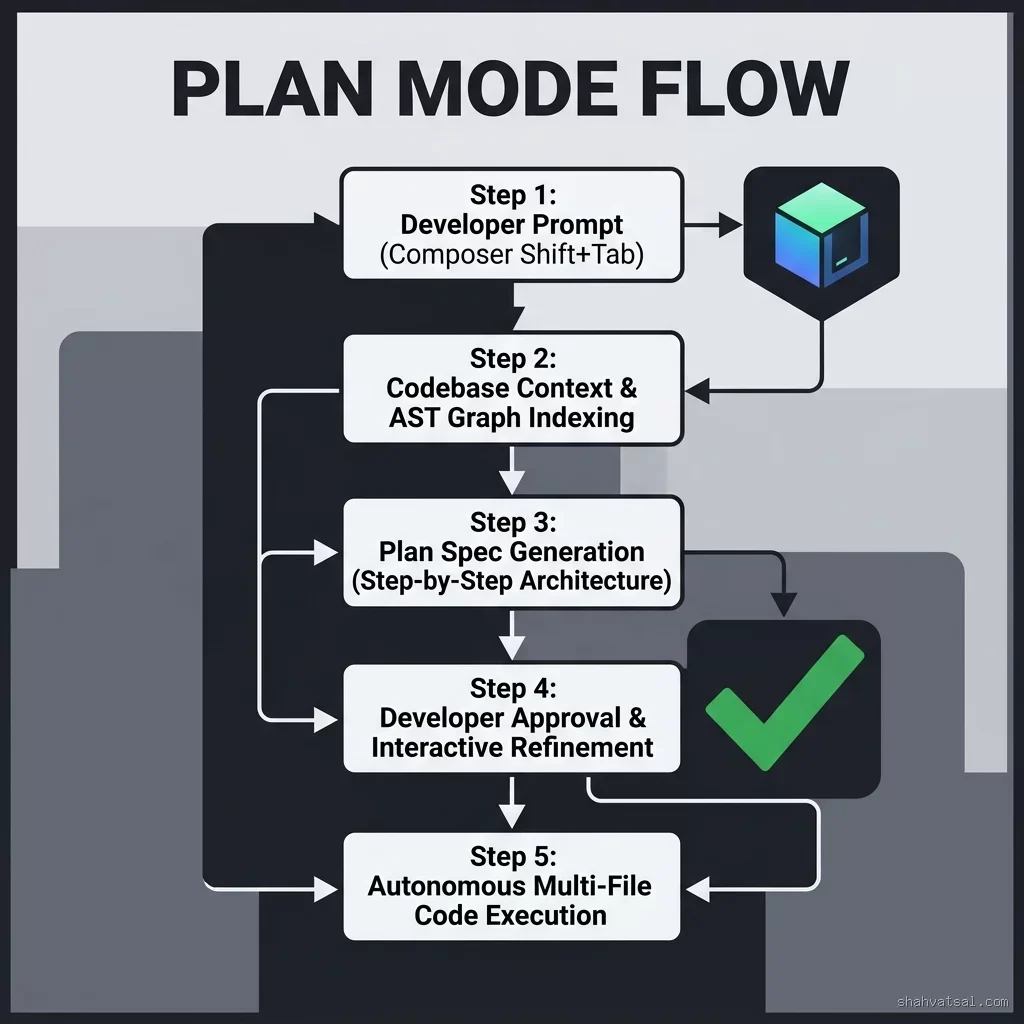
Introduced in Cursor v3, Plan Mode (triggered via Shift+Tab inside the Composer window) changes how the agent approaches multi-file modifications.
Instead of jumping straight into editing code, Plan Mode enters a read-only analysis state:
- AST Context Traversal: Cursor scans your project's Abstract Syntax Tree (AST), indexing imports, interface contracts, and caller relationships across target modules.
- Plan Specification Generation: It outputs a structured
.cursor/plans/markdown document outlining:
- Interactive Approval Gate: The developer can edit the plan directly in the UI, toggle specific file touchpoints on/off, or prompt: "Plan looks good, but use Redis for caching instead of in-memory maps."
BugBot Setup & Configuration on GitHub
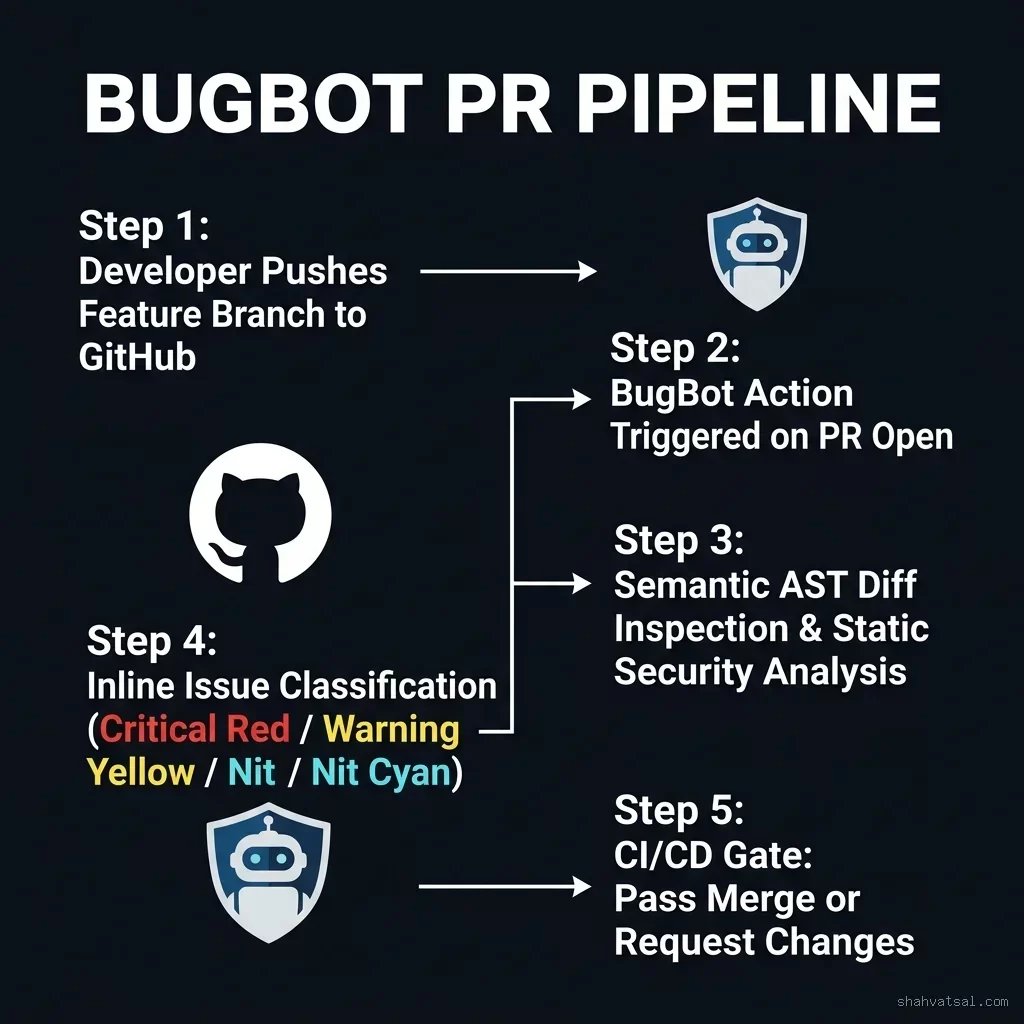
While Plan Mode catches bad design before code is written, BugBot acts as the automated post-flight auditor on your GitHub repository.
BugBot connects to GitHub Actions or GitHub Apps, inspecting every incoming Pull Request diff with specialized AST bug-hunting heuristics.
Step-by-Step BugBot Configuration
To enable BugBot on your repository, add .github/workflows/bugbot.yml:
name: BugBot Automated PR Gatekeeper
on:
  pull_request:
    types: [opened, synchronize, reopened]

jobs:
  bugbot-audit:
    runs-on: ubuntu-latest
    permissions:
      contents: read
      pull-requests: write
      checks: write
    steps:
      - name: Checkout Code
        uses: actions/checkout@v4
        with:
          fetch-depth: 0

      - name: Run BugBot AST Reviewer
        uses: cursor-analytics/bugbot-action@v2
        with:
          github_token: ${{ secrets.GITHUB_TOKEN }}
          severity_threshold: "warning" # critical | warning | nit
          fail_on_critical: true
          rules_file: ".github/bugbot-rules.json"
BugBot Rules File (.github/bugbot-rules.json)
{
  "strict_mode": true,
  "enforce_null_safety": true,
  "flag_unhandled_promises": true,
  "check_sql_injection": true,
  "max_diff_lines_per_pr": 1200,
  "ignore_paths": [
    "docs/**",
    "public/assets/**"
  ]
}
When a developer opens a PR, BugBot analyzes the diff and posts inline comments categorized by severity:
- Critical (Red): Memory leaks, unhandled exceptions, SQL injection, security bypasses. Blocks PR merge automatically.
- Warning (Yellow): Unused imports, missing index tags, sub-optimal algorithmic complexity ($O(n^2)$ inside render loop).
- Nit (Cyan): Naming convention deviations, missing docstrings.
The Unified Zero-Regression Workflow
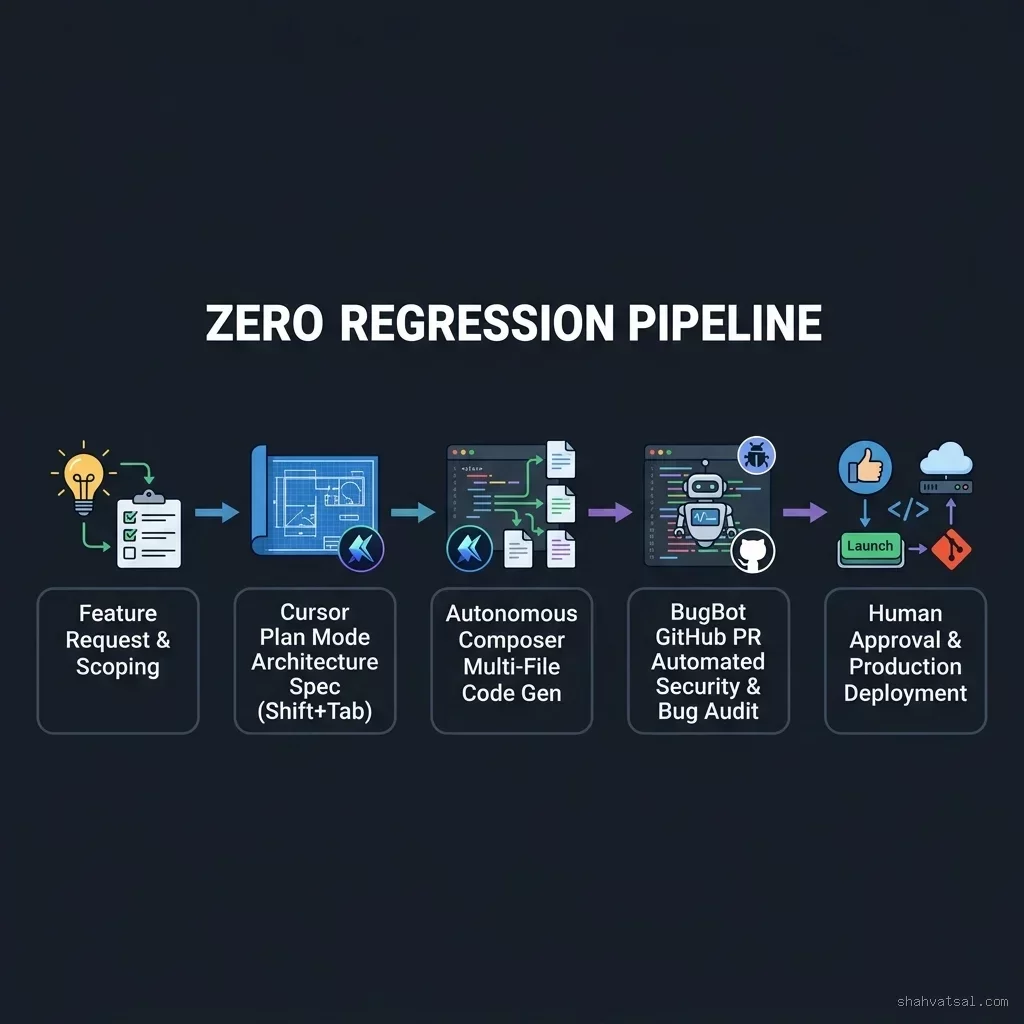
Here is the exact step-by-step workflow for shipping multi-file refactors with zero regressions:
- Step 1: Open Composer & Trigger Plan Mode (
Shift+Tab)
/plan Refactor database connection pool to use connection multiplexing.
- Step 2: Review & Approve the Plan Specification
- Step 3: Execute Code Generation
npm test).
- Step 4: Push Branch & Open GitHub Pull Request
- Step 5: Address BugBot Inline Comments & Merge
Multi-File Refactoring Safety
Refactoring complex codebases across 10+ files is where single-turn AI agents usually break things. Without Plan Mode, agents frequently make partial edits — updating the method definition in UserService.ts while forgetting to update invocation signatures in UserController.ts or AuthMiddleware.ts.
How Plan Mode Guarantees Refactor Safety
Plan Mode constructs a Dependency Call Graph before writing any code:
[Target Change: UserService.updateUser()]
         │
         ├── Caller Check: UserController.ts (Line 42) -> Updated
         ├── Caller Check: AuthMiddleware.ts (Line 88) -> Updated
         ├── Caller Check: UserTest.ts (Line 15)       -> Updated
         └── Schema Check: DatabaseMigration.sql      -> Verified Immutable
By presenting this dependency call graph to the developer before execution, Plan Mode eliminates signature mismatches across dependent modules.
BugBot vs. AI Code Review vs. Human Review
Not all code review tools serve the same purpose. Understanding the distinction between general LLM code reviewers, BugBot, and human senior reviewers is essential for engineering leads:
| Review Vector | Generic LLM PR Summarizer | BugBot AST Gatekeeper | Human Senior Lead |
|---|---|---|---|
| Primary Focus | Writing prose summaries of PR diffs | Finding AST bugs, null flaws, security risks | Business alignment & long-term architecture |
| False Positive Rate | High (Hallucinates non-existent issues) | Very Low (Grounded in AST static graph) | Low |
| Execution Time | 15 – 30 seconds | 30 – 60 seconds (CI/CD Action) | 15 – 60 minutes (Human schedule) |
| Merge Blocking Ability | No (Informational only) | Yes (Automated GitHub Check Failure) | Yes (Manual PR Approval) |
Cost-Benefit & Overhead Matrix
A common question from engineering managers: "Does forcing Plan Mode add unnecessary overhead to quick tasks?"
The rule of thumb depends on File Touchpoint Scope:
- 1 File Change (Typo / Constant Update): Skip Plan Mode (
Ctrl+I/ standard inline edit). Plan Mode overhead is unnecessary. - 2–4 Files Change (Simple Feature / Test Addition): Optional Plan Mode. Good if modifying shared utility functions.
- 5+ Files Change (Refactor / Schema Update / Architectural Shift): Mandatory Plan Mode. The 20 seconds spent reviewing the plan saves 45 minutes of rollback and debugging time.
Anti-Patterns That Defeat Both Tools
- Anti-Pattern 1: Blindly Clicking "Approve Plan": If a developer clicks "Approve Plan" in Plan Mode without reading the file touchpoints, Plan Mode's architectural guard is lost. Treat plan review with the same rigor as code review.
- Anti-Pattern 2: Suppressing BugBot Alerts via Overrides: Adding
// bugbot-ignorecomments without investigating the root cause bypasses the post-flight gate and allows regressions to reach production. - Anti-Pattern 3: Writing Vague Tasks in Plan Mode: Prompting
/plan make the API fastergenerates a generic plan. Always specify target modules:/plan Optimize SQL queries in app/Repositories/UserRepository.php using eager loading.
Deep Analysis: Review Triad Matrix
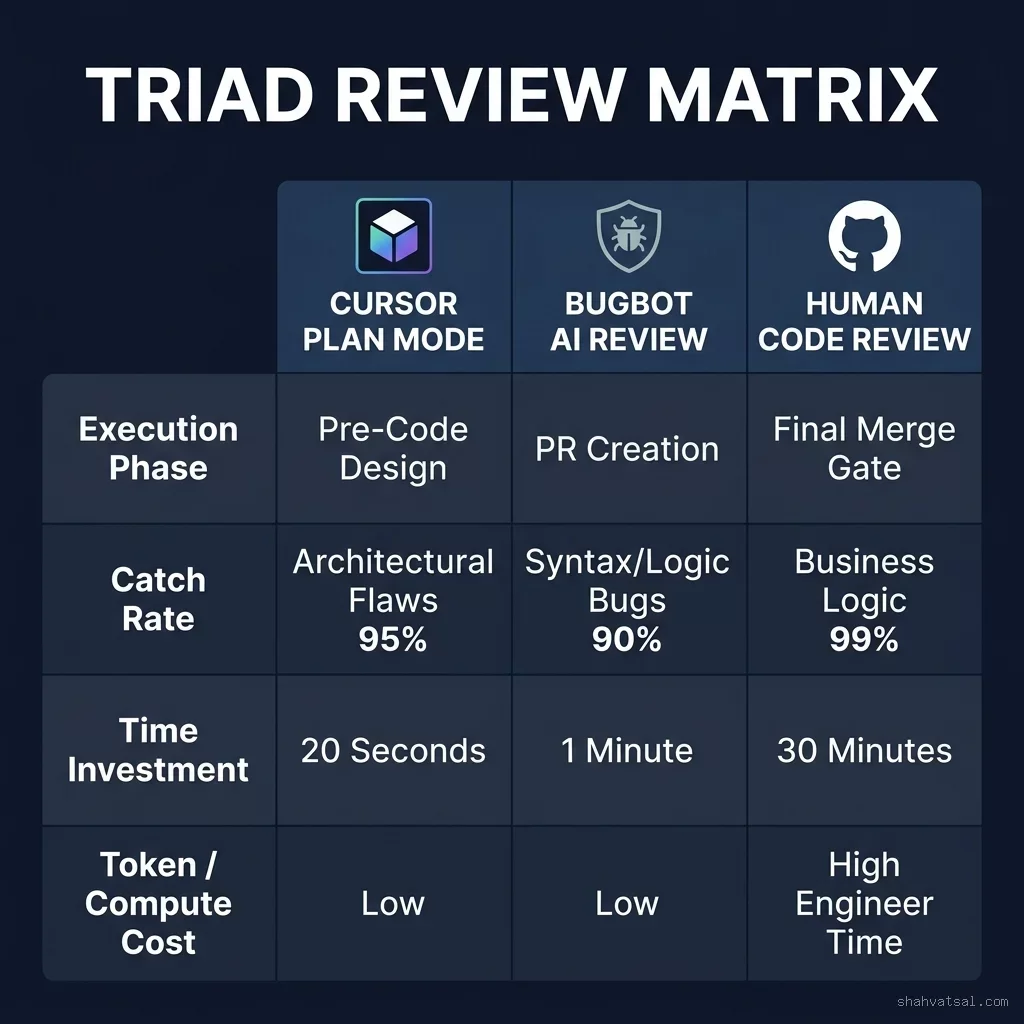
| Phase | Primary Tool | Target Defects | Developer Effort | Regression Prevention Rate |
|---|---|---|---|---|
| Pre-Code Design | Cursor Plan Mode (Shift+Tab) |
Architectural drift, wrong design pattern, invalid file scope | 20 Seconds (Plan Review) | 95% (Architectural) |
| PR Creation Gate | BugBot GitHub Action | Null pointers, memory leaks, unhandled exceptions, SQL injection | 0 Seconds (Automated) | 90% (Syntax & Logic) |
| Merge Signoff | Senior Human Tech Lead | Domain logic, business requirements, compliance policies | 5 Minutes (High-level check) | 99% (Final Overall) |
2027–2030 Roadmap: The Future of Zero-Regression Engineering
The combination of Plan Mode and BugBot marks the beginning of autonomous quality engineering:
- 2027: Self-Healing Plan Execution: When BugBot flags a PR issue, it will automatically generate a counter-plan specification and pass it back to Cursor Composer for automated fix commits without human re-prompting.
- 2028: Multi-Repo Dependency Planning: Plan Mode will operate across microservice ecosystems, indexing AST graphs in Repo A and generating coordinated migration plans for Repo B and Repo C.
- 2029: Real-Time Production Telemetry Feedback: BugBot will ingest Datadog and Sentry error logs from production, automatically adding regression test rules to GitHub PR checks based on real user incidents.
- 2030: Zero-Bug Software Delivery: Software engineering will achieve deterministic regression prevention, where human leads exclusively approve intent specifications while AI agents write, test, audit, and deploy code with mathematical correctness proofs.
Key Takeaways
- Sandwich AI Code: Never run raw AI code generation without pre-code plan validation and post-code PR auditing.
- Use
Shift+Tabfor Plan Mode: Force Cursor Composer to inspect codebase AST graphs and output explicit.cursor/plans/blueprints before editing files. - Deploy BugBot on GitHub: Configure
.github/workflows/bugbot.ymlwith strict severity rules to block PR merges containing logic or security defects. - Mandatory for 5+ File Changes: Apply Plan Mode strictly to multi-file refactors, schema migrations, and cross-module updates.
- Combine with Human Oversight: Let Plan Mode and BugBot eliminate 95% of syntax, null, and architectural errors so human leads can focus exclusively on business domain logic.
FAQ
About the Author
Vatsal Shah is an AI engineering strategist, technology architect, and DevSecOps advisor. He helps enterprise development organizations adopt modern agentic IDE workflows, automated code review pipelines, and zero-regression release trains. Read more technical guides at shahvatsal.com.
Conclusion & Strategic Call to Action
Stop letting unvalidated AI code generation introduce subtle architectural regressions into your codebase. By pairing Cursor Plan Mode before code is written with BugBot before code is merged, your team can achieve high-velocity AI development with absolute quality control.
Ready to eliminate regressions and upgrade your team's AI coding workflow? Schedule an Engineering Strategy Review →