STRATEGIC OVERVIEW Cursor Composer Mastery: Orchestrating Multi-File Code Generation with Multi-Agent Layouts in 2026 By Vatsal Shah | July 8, 2026 | 18 min rea…
Most engineers using Cursor are stuck at the shallow end. They open a file, ask Chat to fix a function, close the tab, move on. That's not Composer. That's a very expensive autocomplete.
What actually makes Cursor powerful - genuinely, absurdly powerful - is Composer mode. The ability to say: "Here is my schema, here is my route map, here is my component directory. Build the full feature stack across all of them simultaneously." And watch it happen.
I've shipped production features at enterprise scale using Composer sessions. I've seen a senior engineer replace a two-day sprint task with a 40-minute Composer session. I've also seen Composer sessions go completely off the rails because the developer didn't understand context boundaries, prompt anatomy, or how to set up multi-agent layouts.
This guide covers all of it. If you already know basic Cursor, start at Section 3. If you're new, start here.
What Is Cursor Composer?
Cursor Composer is the orchestration layer of the Cursor AI IDE. It was introduced as an experimental mode and by 2025 had become the primary way serious engineers use Cursor. By 2026, multi-agent Composer layouts - where you run multiple coordinated Composer instances on separate parts of your codebase simultaneously - are the standard pattern for teams operating at speed.
The core mechanic: you write a prompt that describes what to build, you attach context (files, docs, URLs), and Composer generates diffs across all relevant files. You review each change, accept or reject, and iterate.
Simple in description. Profound in execution - if you know how to drive it.
Cursor Chat vs. Composer: Why the Difference Matters
Here's the honest assessment most tutorials skip.
Cursor Chat is reactive. You paste a function, ask a question, get an answer. It's a conversation about a specific code block. Scope: one file, one context, one turn.
Cursor Composer is proactive. You describe an outcome, attach your codebase context, and Composer works autonomously across your file tree. Scope: entire project, structured context, multi-turn iteration.
The confusion arises because both use the same underlying models. The difference is the execution envelope. Composer has persistent project context, multi-file diff awareness, and the ability to plan changes before executing them.
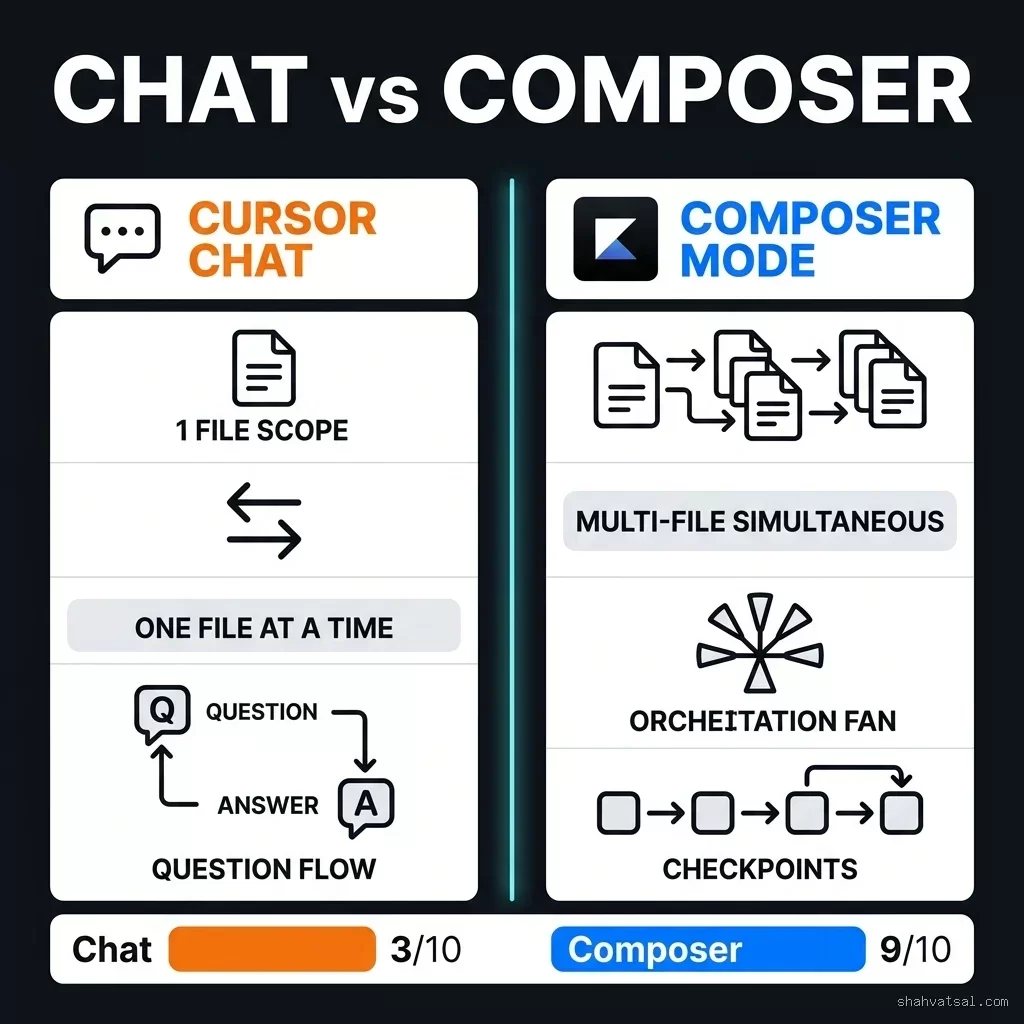
The practical consequence: for any feature that touches more than one file, Composer will always be faster and more consistent than Chat. The break-even point is roughly two files. Above that, Chat is actually slower.
The Composer Session Workflow
Every successful Composer session follows a five-phase discipline. Teams that skip phases 1 or 2 spend the time they "saved" doing cleanup in phase 4.
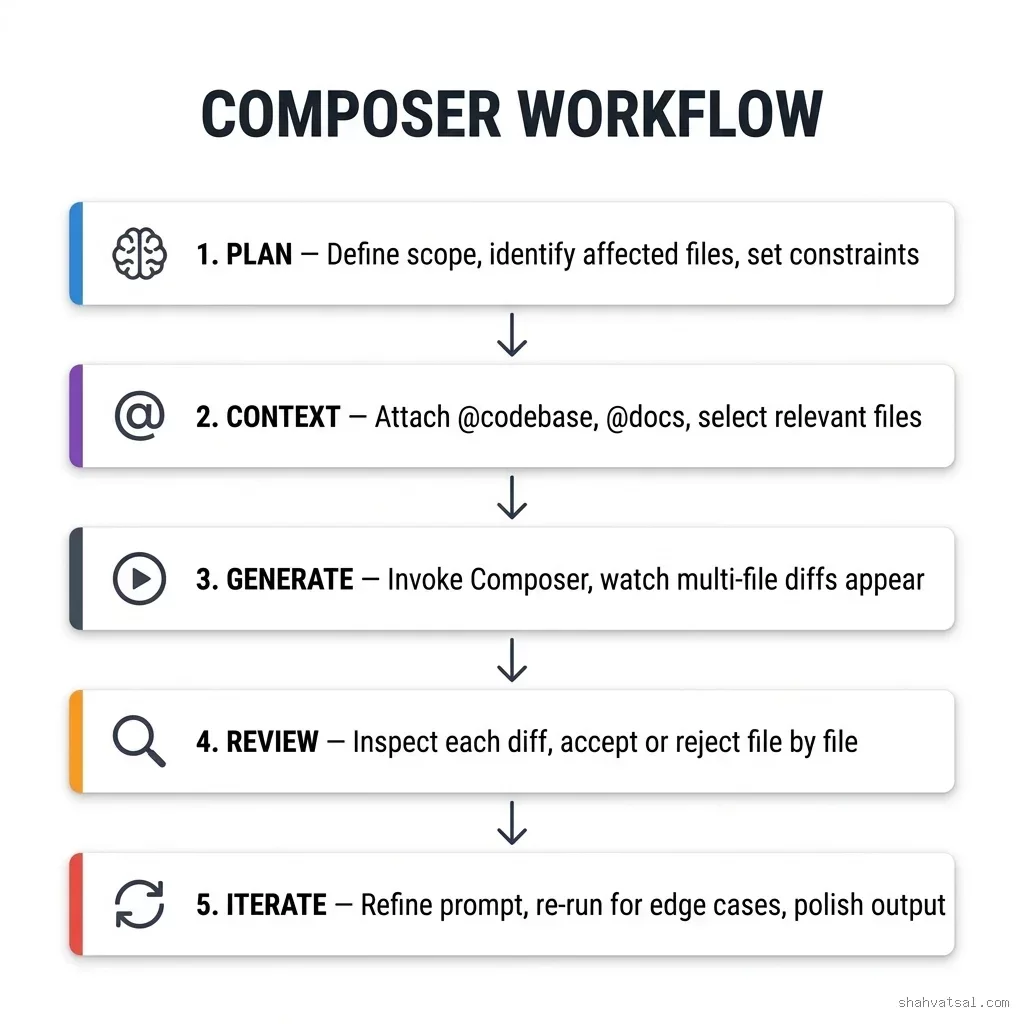
Phase 1 - Plan
Before touching Cursor, write a short specification. Not code. English. Three questions to answer:
- What files will this change touch? (Name them explicitly.)
- What is the single invariant that must hold after the change?
- What must this change NOT modify?
Phase 2 - Context Attachment
Open Composer (⌘K or Ctrl+K) and attach your context deliberately:
@codebase- gives Composer access to your full indexed project. Use for feature-level tasks.@{filename}- specific file references. Use to anchor Composer to an exact schema, controller, or type definition.@docs- external documentation. Critical for working with library-specific patterns.@web- live web lookup. Use sparingly; introduces latency and non-determinism.
Phase 3 - Generate
Send the prompt. What happens next: Composer reads all attached context, builds a mental model of your project, then generates a change plan - a sequence of file-level diffs, in dependency order (types first, then implementations, then views).
You'll see files appearing one by one. Don't interrupt. Don't accept yet. Let it finish the full generation pass.
Phase 4 - Review
Review each diff file by file. This is not optional and it's not rubber-stamping. Things to check:
- Import paths (hallucinated module names are the most common error)
- Type correctness (Composer sometimes generates valid-looking but wrong generics)
- Business logic invariants (the logic should match your spec from Phase 1)
- Naming conventions (did it follow your existing codebase patterns?)
Phase 5 - Iterate
Run your type checker and unit tests immediately. Fix any remaining issues with targeted follow-up prompts. The instinct to start a new Composer session is usually wrong - you'll lose context. Iterate within the same session.
Context Window Mastery
Context management is where most teams stall. The Composer context window isn't infinite. Overloading it is the second most common failure mode (after missing the Plan phase).
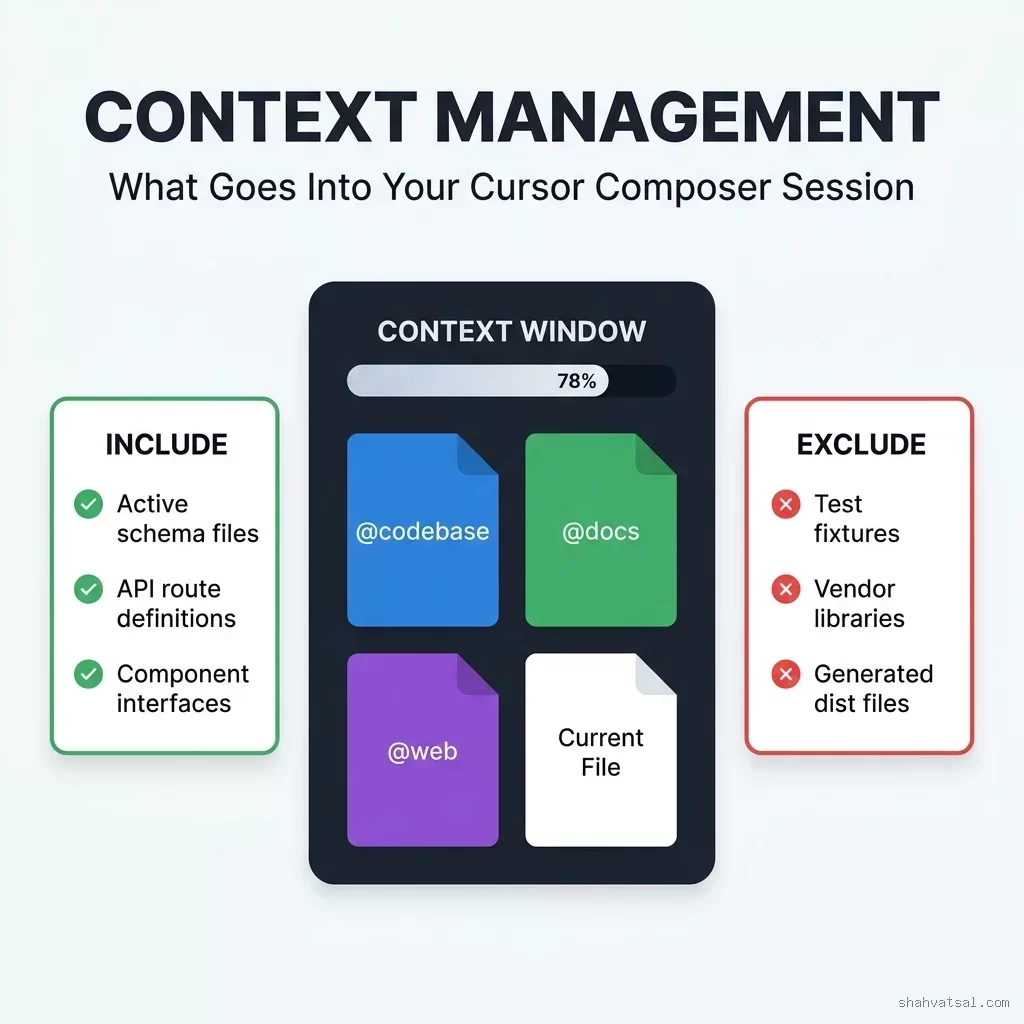
What belongs in context
High signal:
- Database schema files (your schema.sql or Prisma schema)
- Type definition files (shared interfaces, DTOs)
- The controller or route file you're extending (not the whole routes directory)
- One representative example of the pattern you're following
- Test fixtures - they add volume without semantic value for generation
- Compiled output / dist directories - Composer doesn't need the output to generate the input
- Third-party vendor libraries - Cursor's index already knows standard libraries
- Unrelated domain files - files from a different feature area add noise
The 60% Rule
My rule of thumb: keep your explicit context attachments below 60% of the available window. This leaves headroom for Composer's internal reasoning about the changes, its dependency resolution, and the diff preview buffering.
When context saturation is causing problems, you'll see symptoms like:
- Import statements using non-existent module paths
- Functions defined in file A being called with the wrong signature in file B
- Naming conventions from early in the session abandoned mid-generation
Crafting Elite Composer Prompts
The prompt is the interface. Bad prompt, bad output - regardless of how good the model is.
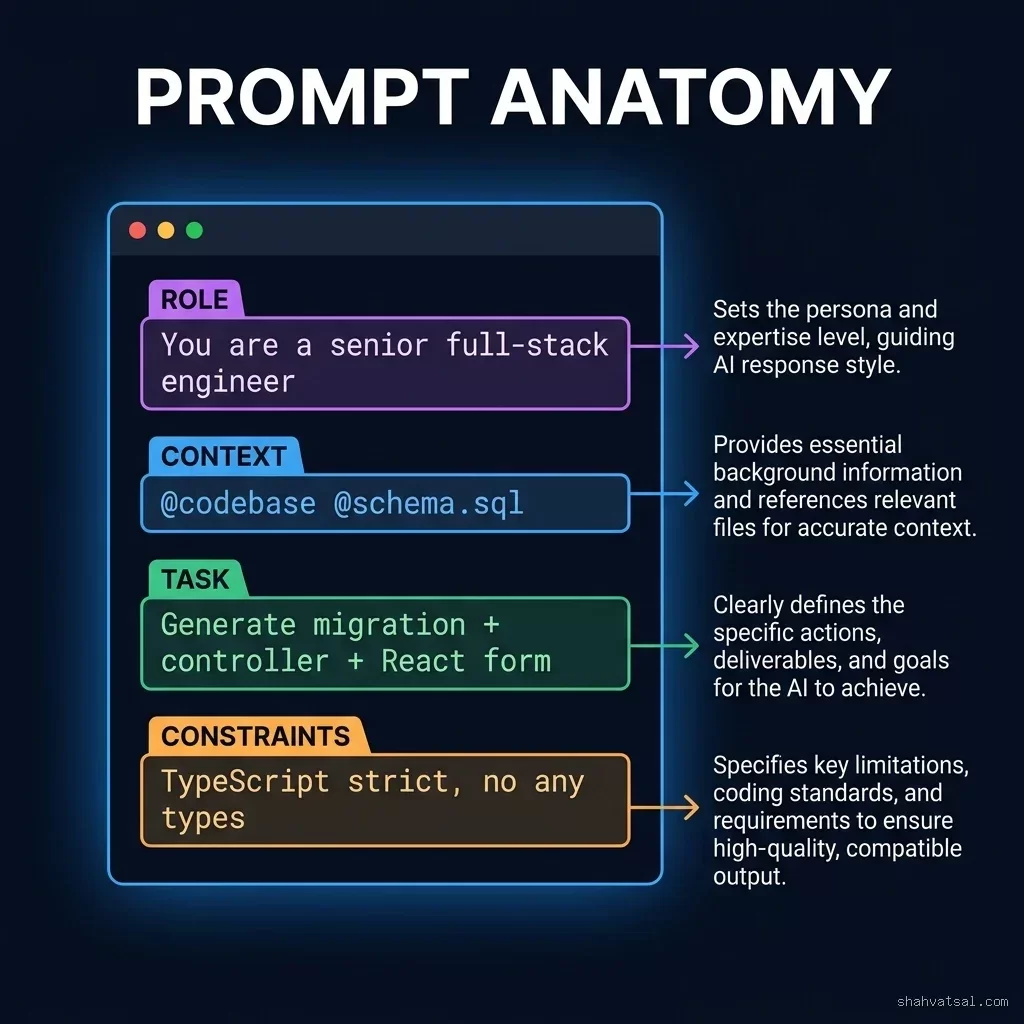
The Four-Block Structure
Block 1 - ROLE: Specify the expertise persona.
You are a senior TypeScript full-stack engineer working on a production SaaS product. You follow strict TypeScript conventions with no implicit any types.Block 2 - CONTEXT: Reference your actual files.
@schema.sql contains the database schema.
@app/types/user.ts contains shared User interfaces.
The existing controller pattern is at @app/controllers/product.controller.ts  -  follow it exactly.
Block 3 - TASK: State the deliverable precisely.
Create a complete "Notification Preferences" feature:
1. PostgreSQL migration: notifications_preferences table with user_id FK, email_enabled, sms_enabled, push_enabled booleans
2. TypeScript types: NotificationPreferences interface in app/types/notifications.ts
3. Repository: NotificationPreferencesRepository class in app/repositories/
4. Controller: GET /users/:id/notifications and PUT /users/:id/notifications in app/controllers/
5. React component: NotificationPreferencesForm with save/cancel in app/components/settings/
Block 4 - CONSTRAINTS: Specify what must hold.
Constraints:
- TypeScript strict mode: no `any`, no non-null assertions without justification
- All database queries must use parameterized statements (no string interpolation)
- Use existing error handling pattern from product.controller.ts
- Do NOT modify package.json, tsconfig.json, or any existing migration files
- Component must use the existing Button and FormField primitives from app/components/ui/
That fourth block is doing more work than the others. Most Composer failures I've debugged trace back to an absent CONSTRAINTS block letting the model make assumption calls it shouldn't make.
The "Do Not Modify" Discipline
Always include a list of files Composer must not touch. This isn't just defensive - it focuses Composer's attention on only generating new or extending existing files, which improves generation quality. An open scope is a distracted model.
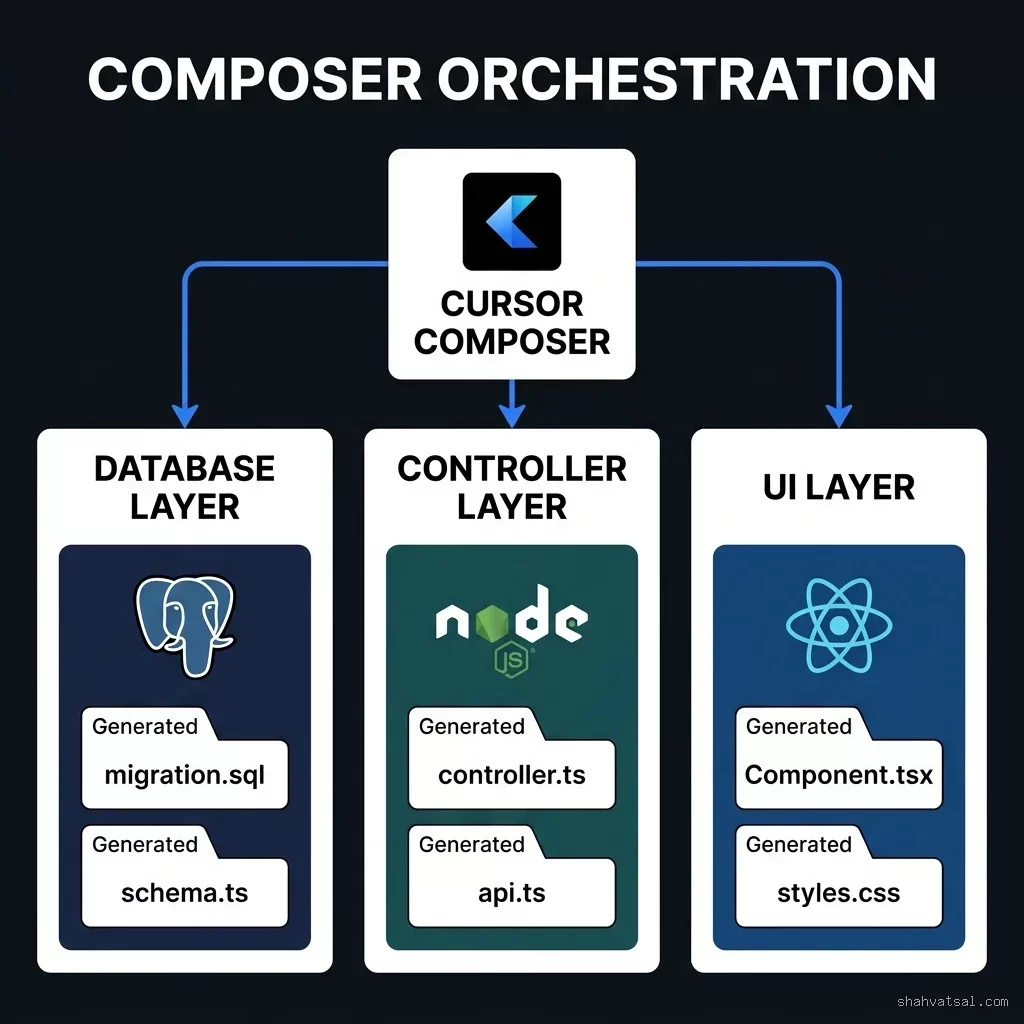
Multi-File Orchestration: Database → Controller → UI
This is the pattern that converts Composer from a tool into a force multiplier. The Database → Controller → UI chain is the most common production feature scaffold. Let's walk through a real implementation.
Scenario: Adding a team invitation system to a B2B SaaS product.
Files that will change:
migrations/20260708_create_team_invitations.sql- new tableapp/types/invitations.ts- new typesapp/repositories/InvitationRepository.ts- data accessapp/services/InvitationService.ts- business logicapp/controllers/invitation.controller.ts- HTTP handlersapp/components/team/InviteTeamMemberForm.tsx- UI formapp/components/team/PendingInvitations.tsx- display list
// TypeScript context hint for Cursor  -  do not generate
// Schema reference: @migrations/schema.sql
// Type patterns: @app/types/user.ts @app/types/team.ts
// Controller pattern: @app/controllers/team.controller.ts (follow exactly)
// Component pattern: @app/components/team/TeamMemberList.tsx (follow exactly)
You are a TypeScript architect. Generate the complete team invitation system.
REQUIRED FILES (generate all):
1. migrations/20260708_create_team_invitations.sql
- team_invitations: id (UUID), team_id FK, invited_email TEXT, invited_by_user_id FK,
status ENUM('pending','accepted','declined','expired'), token UUID UNIQUE,
expires_at TIMESTAMP, created_at TIMESTAMP
2. app/types/invitations.ts
- InvitationStatus enum
- TeamInvitation interface (all columns)
- CreateInvitationDto, AcceptInvitationDto
3. app/repositories/InvitationRepository.ts
- findByToken(token: string): Promise<TeamInvitation | null>
- findByTeam(teamId: string): Promise<TeamInvitation[]>
- create(data: CreateInvitationDto): Promise<TeamInvitation>
- updateStatus(id: string, status: InvitationStatus): Promise<void>
4. app/services/InvitationService.ts
- sendInvitation(teamId, email, invitedBy): validates, creates record, sends email
- acceptInvitation(token): validates expiry, adds user to team, updates status
- revokeInvitation(id, requestingUserId): authorization check + soft delete
5. app/controllers/invitation.controller.ts
- POST /teams/:teamId/invitations
- GET /teams/:teamId/invitations
- POST /invitations/:token/accept
- DELETE /invitations/:id
6. app/components/team/InviteTeamMemberForm.tsx
- Email input, role selector, send button
- Inline validation, loading state, success toast
7. app/components/team/PendingInvitations.tsx
- Table of pending invitations with status badges
- Revoke action per row
CONSTRAINTS:
- No any types
- All DB queries parameterized via pg Pool
- Follow existing error pattern from team.controller.ts
- Do NOT touch: package.json, tsconfig.json, existing controllers, existing migrations
- Use ui/Button and ui/Input primitives for React componentsWhat happens: Composer generates all 7 files in sequence, respecting the dependency ordering (types before implementations, service before controller, before UI). Total generation time: approximately 4 minutes. Total review time: approximately 20 minutes. Total implementation time that a human-only workflow would take: 2-3 days.
This is the actual productivity delta. Not 10%. Not 30%. For greenfield feature scaffolding: 600-800% time compression.
Multi-Agent Layouts in Cursor
The frontier of Cursor usage in 2026 is multi-agent layouts - running two or more Composer sessions simultaneously, each working on a different non-overlapping portion of the codebase.
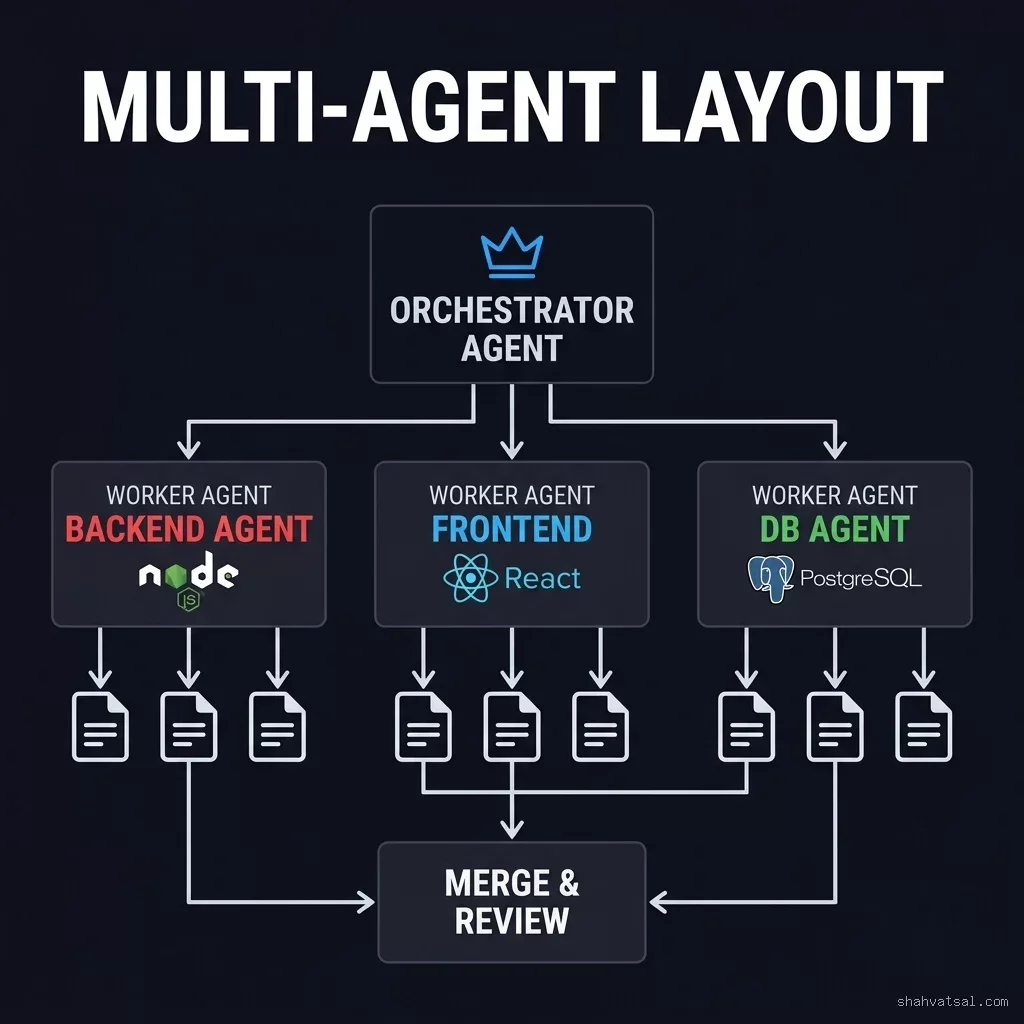
The Non-Overlapping Zone Principle
The critical rule: no two agents should touch the same file. This seems obvious but requires deliberate setup. The way to enforce it:
- Run the Orchestrator Composer session first. Its sole job: establish the shared type contracts. Output:
app/types/{domain}.ts. - Once types are generated and reviewed, run worker sessions in parallel, each with those type files as pinned context.
- Each worker session has an explicit "you own these files, nothing else" constraint.
Setting Up Parallel Sessions
In Cursor, open a new window (not a tab) for each worker agent. Each window can run its own Composer session against the same codebase directory. They don't conflict because they're generating different files.
Worker 1 - DB Agent session (in Cursor Window 1):
@app/types/invitations.ts (types are fixed  -  do not modify)
Generate: InvitationRepository.ts and migration SQL only.
Scope: app/repositories/ and migrations/ only. Touch nothing else.
Worker 2 - Backend Agent session (in Cursor Window 2):
@app/types/invitations.ts (types are fixed  -  do not modify)
@app/repositories/InvitationRepository.ts (interface only, implementation may not exist yet)
Generate: InvitationService.ts and invitation.controller.ts only.
Scope: app/services/ and app/controllers/ only. Touch nothing else.
Worker 3 - Frontend Agent session (in Cursor Window 3):
@app/types/invitations.ts (types are fixed  -  do not modify)
Generate: InviteTeamMemberForm.tsx and PendingInvitations.tsx only.
Use existing ui/Button and ui/Input. Do NOT generate new UI primitives.
Scope: app/components/team/ only. Touch nothing else.
All three sessions run concurrently. Review happens sequentially: DB → Backend → Frontend, so that type dependencies are validated before the dependent code is reviewed.
Real-World Examples with Metrics
Example 1: Fintech Ledger Reconciliation Feature
Context: B2B fintech startup, 8-engineer team, TypeScript/Next.js stack with PostgreSQL.
Task: Build a ledger reconciliation dashboard - showing transaction discrepancies between internal records and bank statements.
Scope:
- 2 DB migrations (transactions_reconciliation, reconciliation_runs)
- 3 repository classes
- 2 service classes
- 4 API routes
- 3 React components
With Composer multi-agent layout:
- Orchestrator session (types): 35 minutes
- DB Agent session: 45 minutes concurrent
- Backend Agent session: 50 minutes concurrent
- Frontend Agent session: 40 minutes concurrent
- Cross-agent review + reconciliation: 1.5 hours
Time compression: 78% reduction in time-to-working-draft.
Example 2: SaaS Multi-Tenant Data Isolation Refactor
Task: Retrofit tenant isolation across 12 existing controllers - adding tenant_id filtering to all DB queries.
Without Composer: 2 days of careful, repetitive modification.
With Composer (single session, 12 files attached as context):
- Single Composer prompt: "Add tenant_id guard to all DB queries in the attached controllers. Pattern: read tenant_id from req.user.tenantId, inject into every query's WHERE clause."
- Generation time: 8 minutes
- Review time: 45 minutes (reading each controller's changes)
- Bug fixes: 3 edge cases required manual correction
Deep Analysis: Cursor Composer vs. GitHub Copilot Workspace vs. Windsurf
My verdict: Cursor Composer leads on multi-agent layout support and context granularity - the two factors that matter most for complex feature scaffolding. Copilot Workspace has tighter GitHub integration but lacks the multi-window parallel session capability. Windsurf Cascade is a strong alternative for teams already in a different IDE ecosystem.
Pitfalls and Anti-Patterns
Anti-Pattern 1: Starting Without a Plan
Opening Composer and writing a vague prompt is the most common productivity killer. "Add authentication to my app" is not a Composer-ready prompt. It's a project brief. Composer needs file scope, not feature intent.
Fix: Write a file-level change specification before opening Composer. At minimum: list every file that should change and every file that must not.
Anti-Pattern 2: Context Overload
Attaching @codebase AND manually referencing 15 specific files. You're saturating the context window with redundant information and confusing the model about what to prioritize.
Fix: Choose @codebase OR specific file references. Not both. For features in a known domain, specific file references (schema + one controller pattern + types) consistently outperform @codebase alone.
Anti-Pattern 3: Accepting Diffs Without Reading Them
This one has caused actual production incidents. Composer is good. It's not infallible. The generated code will occasionally:
- Reference a module that doesn't exist at that path
- Use a slightly wrong method signature for a third-party library
- Miss a unique edge case in your business logic
Anti-Pattern 4: One Giant Session for a 10-File Feature
Putting all 10 files into one Composer session causes context saturation and cascading error propagation. If the model makes a wrong assumption about file 3, that assumption infects files 4 through 10.
Fix: Split into two sessions at the type boundary. Session 1: establish types and DB layer. Session 2: implement application and UI layer with pinned type files as immutable context.
Anti-Pattern 5: Abandoning the Session on First Error
First-draft errors are normal. That's not a session failure - that's Phase 5 starting. The fix is a targeted follow-up prompt, not a new session. Abandoning preserves nothing from the session's context.
Futuristic Horizon: 2027-2030 Roadmap
2026 (now): Multi-window parallel Composer sessions are the state of the art. Engineers manually orchestrate the Orchestrator → Worker pattern.
2027: Persistent agent state. Composer sessions that survive IDE restarts, maintaining awareness of long-running multi-day feature branches. AI agents that can "continue from where I left off" without full context re-attachment.
2028: Automated multi-agent layout setup. IDE-level detection of non-overlapping file zones. Cursor automatically suggests which files should go to which agent based on dependency graph analysis.
2029: Cross-repository context. Agents that understand not just your current repo but your team's microservice ecosystem - generating changes to service A that are consistent with the interfaces expected by service B.
2030: Human-in-the-loop at the architectural level only. Engineers define system invariants, business rules, and quality gates. AI agents handle implementation, testing, and iterative refinement within those constraints. The engineer's role becomes system architect and quality gate owner rather than code author.
The transition is already underway. Teams using Composer multi-agent layouts today are building the muscle for this shift. The discipline is portable even as the tools evolve.
Key Takeaways
- Composer ≠Chat: Composer operates at project scope, generating multi-file diffs in dependency order. Chat is a single-file assistant. For any feature touching more than 2 files, use Composer.
- Prompt anatomy is structural: ROLE → CONTEXT → TASK → CONSTRAINTS is not a style suggestion. Each block is loadbearing. The CONSTRAINTS block is the most commonly skipped and most consequential.
- Context window is finite: Target 60-75% utilization. Use
@codebaseOR specific file references - not both simultaneously. - Multi-agent layouts unlock parallelism: Establish type contracts first (Orchestrator session), then run DB, Backend, and Frontend agents in parallel Cursor windows. Non-overlapping file zones are the key constraint.
- Review every diff: Composer generates high-quality code. It's not perfect code. Treat every diff like a PR from a smart but junior engineer.
- Iterate, don't restart: Follow-up prompts within the same session preserve context. Starting a new session costs you 10-15 minutes of context re-establishment.
- Time compression is real: Engineering teams report 40-80% time reduction on feature scaffolding. The floor is teams with poor discipline; the ceiling is teams with mature Composer workflows.
FAQ
About the Author
Vatsal Shah is an AI engineer, enterprise architect, and technical advisor with 10+ years of experience building production systems across fintech, logistics, and B2B SaaS. He has led AI-native development initiatives at multiple organizations, including deployments of agentic workflows, MCP integrations, and AI-assisted engineering tooling at enterprise scale.
Vatsal writes for senior engineers who want practical, battle-tested intelligence - not vendor marketing. He is a recognized practitioner on AI developer tools, agentic systems, and engineering productivity.
📠shahvatsal.com · LinkedIn · Advisory Inquiries
Conclusion
Cursor Composer isn't magic. It's a structured execution model for AI-assisted engineering - one that rewards discipline with genuine productivity gains and punishes sloppy usage with frustrating hallucinations and context drift.
The engineers getting the most out of Composer are the ones who treat it like an engineering system, not an autocomplete. They plan before prompting. They manage context deliberately. They review every diff critically. They split large sessions into scoped multi-agent layouts.
The pattern is learnable. The ceiling - 600-800% time compression on feature scaffolding - is real and achievable with practice.
If you're leading an engineering team and want to assess how multi-agent AI workflows could integrate with your current development process, let's talk.