What Are Cursor Rules? The .cursorrules File vs .cursor/rules/*.mdc: Rules Hierarchy Why This Matters in 2026: The Agentic IDE Shift Core Concepts: How Cursor R…
- Step-by-Step: Crafting Your First .cursorrules File
- Advanced: Building an MDC Rules System
- Enforcing Security Policies with Cursor Rules
- Enforcing Directory Architecture
- Real-World Examples: Production Rule Systems
- Deep Analysis: .cursorrules vs MDC Comparison Table
- Pitfalls and Anti-Patterns
- 2027–2030 Agentic IDE Roadmap
- Key Takeaways
- FAQ
- About the Author
- Conclusion
Introduction
Here's something that happens in every engineering team that adopts Cursor IDE: the first two weeks are magic. The AI writes boilerplate instantly, refactors cleanly, and suggests patterns you'd have taken 30 minutes to recall yourself. Then week three arrives. The AI starts generating code that works but violates your team's conventions. It uses axios when your stack uses fetch. It writes raw SQL when you mandated repository patterns. It creates files in the wrong directories. And nobody told it not to.
This isn't a bug in Cursor. It's a configuration problem. Cursor's AI — whether Claude, GPT-4o, or Gemini — doesn't know your organization's unwritten rules unless you write them down. That's exactly what .cursorrules and .cursor/rules/*.mdc files are for.
I've deployed rule systems at scale for teams of 5 to 50 engineers. Done right, Cursor Rules transform an AI coding assistant from a helpful-but-unpredictable junior developer into a disciplined agent that follows your architecture as if it had read every ADR, attended every sprint planning session, and memorized your security policy. Here's exactly how to do it.
What Are Cursor Rules?
Cursor Rules are instruction files that inject persistent context into every AI interaction within your codebase. Think of them as a standing system prompt that's always present — before any user message, before any code completion, before any refactor suggestion.
Without rules, Cursor's AI operates on its training data plus whatever context fits in its active context window: the files you've opened, the conversation history, the code around your cursor. That's useful, but it's generic. With rules, you're adding a layer of institutional knowledge that makes the AI specific to your project.
Concretely, a rule file might contain:
- "All API routes MUST use the
apiResponse()helper fromsrc/utils/api-response.ts. Never return rawResponseobjects." - "Do not use
console.log()in production code. Use theLoggerservice fromsrc/services/logger.ts." - "All database access MUST go through repository classes. No raw SQL or direct Prisma calls in controllers."
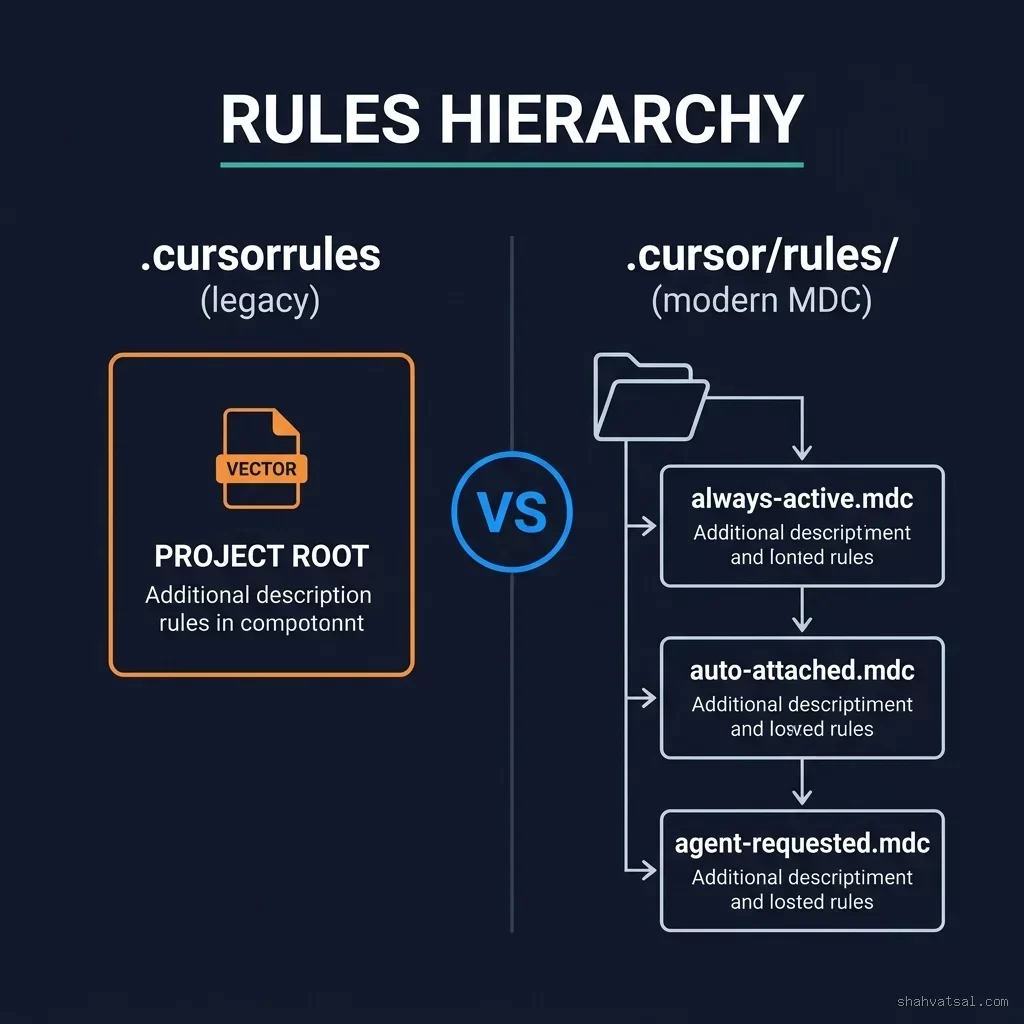
The .cursorrules File vs .cursor/rules/*.mdc: Rules Hierarchy
There are two mechanisms for defining rules in Cursor. Understanding the difference is non-negotiable if you want a robust system.
The .cursorrules File (Legacy)
The .cursorrules file lives at the project root. It's a plain text file — no special format, no frontmatter. Cursor reads it and injects its contents as system-level instructions for every AI interaction in the project.
# .cursorrules (project root)
You are an expert TypeScript engineer working on a Next.js 15 application.

## Architecture Rules
- Use App Router (app/) exclusively. Never suggest Pages Router.
- All server components must use async/await for data fetching.
- Client components must be explicitly marked with "use client".

## Code Style
- Use named exports only. No default exports except page.tsx files.
- Prefer const over let. Never use var.
- All functions must have explicit return types.
Simple, effective, and widely supported. The limitation: it's binary. Either the rules are on (always) or off (if file is deleted). There's no way to have different rules for your API files versus your test files versus your UI components.
The .cursor/rules/*.mdc System (Modern — Recommended)
Cursor introduced MDC (Markdown with Context) rule files to solve exactly that problem. These files live in .cursor/rules/ and support three activation modes — giving you surgical control over when each rule applies.
The folder structure looks like this:
.cursor/
  rules/
    base-conventions.mdc      # Always active
    security-policy.mdc       # Always active
    api-route-patterns.mdc    # Auto-attached to src/api/**
    react-component-rules.mdc # Auto-attached to src/components/**
    test-patterns.mdc         # Auto-attached to **/*.test.ts
    database-rules.mdc        # Agent-requested (manually invoked)
  settings.json
Each .mdc file starts with frontmatter that declares its activation behavior:
description: "API route patterns and response formatting standards"
globs: ["src/api/**/*.ts", "src/app/api/**/*.ts"]
alwaysApply: false


# API Route Standards

All API routes MUST use the centralized `apiResponse()` helper:

```typescript
// ✅ Correct
return apiResponse({ data: user, status: 200 });

// ❌ Banned
return new Response(JSON.stringify(user), { status: 200 });
Every route handler must include error boundary handling via withErrorHandler().
The activation modes:
| Mode | Frontmatter | When Active |
|------|-------------|-------------|
| **Always** | `alwaysApply: true` | Every AI request in the project |
| **Auto-Attached** | `globs: ["src/api/**"]` | When matched files are in context |
| **Agent-Requested** | Neither | Only when AI explicitly requests it |
:::note
**The MDC Activation Decision:** Use `alwaysApply: true` only for truly universal rules (code style, never-do-this bans). Glob-matched rules keep context windows lean — the API rules don't need to load when you're editing a React component. This distinction isn't cosmetic; with large rule files, keeping `alwaysApply` minimal directly reduces token waste and keeps responses faster.
:::
## Why This Matters in 2026: The Agentic IDE Shift {#why-matters-2026}
Cursor isn't a code autocomplete tool anymore. With Background Agent, multi-file Composer, and multi-agent orchestration, it's becoming an autonomous coding system that can execute multi-step tasks — create directories, write files, run tests, commit changes — without your direct input on each step.
That changes the stakes for rule systems dramatically.
When you're reviewing each AI suggestion before accepting it, a bad suggestion is just a wasted suggestion. When an agent is running autonomously and making 50 file changes across your codebase, a missing rule means 50 violations that compound into a massive cleanup session.
The teams that are winning with agentic IDEs in 2026 share a pattern: they've invested in rules infrastructure before giving the agent autonomy. The rule system is their safety net. Every constraint they encode in `.mdc` files is a failure mode they've pre-empted.
## Core Concepts: How Cursor Rules Work {#core-concepts}
### Rule Types and Activation Modes {#rule-types}
The three activation modes map directly to three classes of rules you'll encounter in practice:
**Always-Active Rules** are your non-negotiables — the rules that should apply to every single line of code the AI writes or modifies. These include: language version constraints, package preferences, banned functions, naming conventions, and company-wide security restrictions.
**Auto-Attached Rules** are context-specific. They load when files matching their glob patterns appear in the active context window. This is where your domain-specific rules live: API patterns, React component conventions, test structure requirements, database access patterns.
**Agent-Requested Rules** are documentation that the AI can pull in when it determines it's relevant. These work well for optional style guides, platform-specific notes (mobile vs desktop), or architectural decision records that only matter for certain tasks.
### MDC Glob Pattern Matching {#mdc-glob-patterns}

<figcaption>Glob patterns determine when auto-attached MDC rules load into context — essential for keeping token usage efficient in large projects.</figcaption>
MDC files support standard glob patterns for file matching. Understanding these patterns is the difference between rules that trigger exactly when needed and rules that either fire too broadly or miss their target.
The key patterns you'll use:*/.ts → All TypeScript files anywhere in the project src/api/** → Everything in the API directory (all subdirs) src/*/.test.ts → Test files specifically (not all .ts files) app/api/**/route.ts → Only route.ts files in Next.js API routes !node_modules/** → Explicit exclusion (rarely needed, Cursor handles this) components/*/.tsx → All TSX files in components (and subdirs)
Multiple glob patterns can be combined in the array:

```markdown

globs: ["src/api/**/*.ts", "src/app/api/**/*.ts", "pages/api/**/*.ts"]
Rule Inheritance and Priority
When multiple rules apply to the same context, Cursor merges them. There's no "winner takes all" — the AI sees all active rules simultaneously. This means you need to avoid contradictions between rule files.
Practical recommendation: organize rules into clear scope layers:
- Global layer (always-active): Universal bans, company standards, security non-negotiables
- Domain layer (auto-attached): API rules, UI rules, database rules, test rules
- Feature layer (agent-requested): Optional guides, platform-specific notes
Step-by-Step: Crafting Your First .cursorrules File
Let's build a complete .cursorrules setup for a TypeScript/Next.js project. This is the baseline — you'll extend it with MDC files.
Step 1: Create the file
touch .cursorrulesStep 2: Define the project context
Start with a 2–3 sentence summary of what your project is and what technology stack it uses. The AI uses this to orient itself:
You are an expert TypeScript and Next.js 15 engineer working on [ProjectName],
a SaaS platform for [domain]. The codebase uses TypeScript strict mode,
Next.js App Router, Prisma ORM, tRPC v11, and Tailwind CSS v4.
Step 3: Add architecture constraints
## Architecture Mandates
- App Router only. No Pages Router code.
- Server components by default. Use "use client" only when required.
- Data fetching in server components via direct service/repository calls.
- No client-side data fetching for initial page load. Use React Query for
  client-side mutations and refetches only.
- All business logic in service layer (src/services/). Controllers are thin.
Step 4: Define the tech stack explicitly
This is where most teams miss out. Don't just say "use our preferred libraries" — name them:
## Approved Tech Stack (Deviations Require Team Approval)
- HTTP client: Fetch API (native). NEVER use axios or node-fetch.
- State management: Zustand for global, React useState for local.
- Forms: React Hook Form + Zod. Never use Formik or uncontrolled inputs.
- ORM: Prisma only. Raw SQL strictly prohibited.
- Styling: Tailwind CSS v4 utility classes. No CSS-in-JS, no styled-components.
- Icons: Lucide React. No other icon libraries.
- Date handling: date-fns. Never use moment.js or dayjs.
Step 5: Add security bans
## Security — Non-Negotiable Bans
- NEVER hardcode API keys, secrets, or credentials. Use environment variables.
- NEVER use eval(), Function(), or any dynamic code execution.
- NEVER use dangerouslySetInnerHTML unless explicitly reviewed and marked
  with a /* SECURITY_REVIEWED */ comment.
- ALL user inputs MUST be validated with Zod schemas before processing.
- ALL database queries go through repository classes. No direct Prisma
  calls in route handlers or components.
Advanced: Building an MDC Rules System
For teams beyond a single developer, the .cursorrules monolith doesn't scale. You end up with 300 lines of rules that all fire for every request, bloating context unnecessarily. MDC files are the answer.
Here's a production-grade MDC setup:
always-active-globals.mdc — Loads for everything:
description: "Universal coding standards and security mandates"
alwaysApply: true


## Code Style (Universal)
- TypeScript strict mode. Explicit return types on all functions.
- Named exports only. Default exports only for Next.js page files.
- Prefer const. No var. let only when reassignment is required.

## Security (Universal — Non-Negotiable)
- No hardcoded secrets. All sensitive values via process.env.
- No eval() or dynamic code execution.
- Validate all user inputs with Zod before use.
api-route-patterns.mdc — Loads for API files:
description: "API route response formatting and error handling standards"
globs: ["src/api/**/*.ts", "app/api/**/*.ts"]
alwaysApply: false


## API Response Format
All routes MUST return responses via the `apiResponse()` utility:
```typescript
import { apiResponse } from "@/utils/api-response";

export async function GET(req: Request) {
  const data = await userService.getUser(id);
  return apiResponse({ data, status: 200 });
}
Never construct raw Response objects. Never use res.json() (Pages Router pattern).
Error Handling
Wrap all route handlers withwithErrorHandler():
export const GET = withErrorHandler(async (req: Request) => {
  // your logic
});
**`react-component-standards.mdc`** — Loads for component files:
```markdown
description: "React component architecture and accessibility standards"
globs: ["src/components/**/*.tsx", "app/**/page.tsx", "app/**/layout.tsx"]
alwaysApply: false
## Component Structure
Every component must follow this pattern:
1. Type definitions (props interface)
2. Component function (named, not arrow function at top level)
3. Helper functions below component
4. Styles: Tailwind only, cn() for conditional classes
## Accessibility
- All interactive elements need aria-labels when text is absent.
- Images must have descriptive alt text (no "image" or "photo").
- Form inputs must have associated labels (not placeholders only).Enforcing Security Policies with Cursor Rules
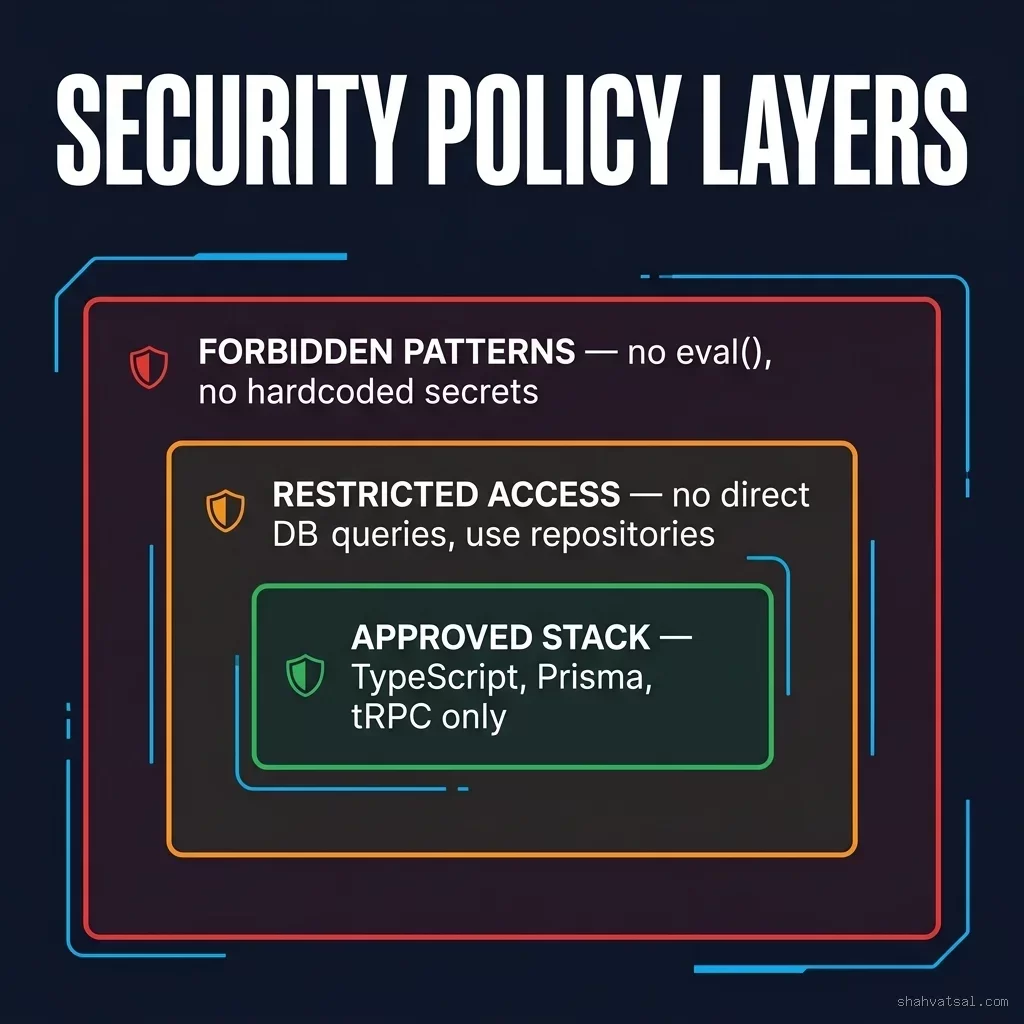
Security rules deserve their own file and alwaysApply: true. Here's a production security policy:
description: "Security policy — always enforced, no exceptions"
alwaysApply: true


# Security Policy — Engineering Grade

## CRITICAL BANS (Zero Tolerance)
These patterns are banned without exception. If a task requires them, escalate to security review:

1. **No eval() or new Function()** — dynamic code execution is prohibited
2. **No hardcoded credentials** — API keys, passwords, tokens, or secrets must use process.env
3. **No dangerouslySetInnerHTML** — without an explicit SECURITY_REVIEWED comment
4. **No SQL string concatenation** — use parameterized queries or ORM only
5. **No HTTP in production** — all outbound calls must use HTTPS

## INPUT VALIDATION MANDATE
Every function that accepts external input (API routes, form handlers, webhooks)
MUST validate inputs using Zod schemas before any processing:

```typescript
import { z } from "zod";

const CreateUserSchema = z.object({
  email: z.string().email(),
  name: z.string().min(2).max(100),
  role: z.enum(["admin", "user"]),
});

// In route handler:
const parsed = CreateUserSchema.safeParse(body);
if (!parsed.success) {
  return apiResponse({ error: parsed.error, status: 400 });
}
SECRETS MANAGEMENT
Environment variables follow the patternNEXT_PUBLIC_ for client-safe values only.
Server secrets NEVER use the NEXT_PUBLIC_ prefix. If you see a secret without the
right prefix, flag it immediately.
This isn't theoretical. I've seen teams catch 12–15 security anti-patterns per sprint cycle after implementing rules like these. The AI doesn't try to work around them — it simply generates compliant code from the first attempt.
## Enforcing Directory Architecture {#directory-architecture}

<figcaption>A well-organized .cursor/rules/ directory — each MDC file corresponds to a bounded domain, making rules maintainable as the team grows.</figcaption>
One of the most valuable applications of Cursor Rules is enforcing where files go. Without this, AI agents will happily create utility functions inside component files, put business logic in route handlers, and scatter configuration across random directories.
Here's a directory architecture rule:
```markdown
description: "Project directory architecture and file placement rules"
alwaysApply: true
# Directory Architecture — Mandatory Structure
## Source Tree (src/)src/ app/ → Next.js App Router pages, layouts, API routes components/ → Reusable UI components (presentational only) features/ → Feature-specific modules (co-located logic) services/ → Business logic layer (database operations, external APIs) repositories/ → Database access layer (Prisma queries only) hooks/ → Custom React hooks utils/ → Pure utility functions (no side effects) types/ → TypeScript type definitions and interfaces config/ → Static configuration (no secrets)
## File Placement Rules
- Business logic → MUST go in src/services/, not in route handlers
- Database queries → MUST go in src/repositories/, not in services
- Shared types → MUST go in src/types/, not inline in component files
- Constants → MUST go in src/config/, not scattered in component files
- Helper functions used in 2+ places → MUST go in src/utils/

## Naming Conventions
- Components: PascalCase.tsx (UserProfile.tsx)
- Services: camelCase.service.ts (userService.ts)
- Repositories: camelCase.repository.ts (userRepository.ts)
- Hooks: camelCase starting with "use" (useUserProfile.ts)
- Utils: camelCase.util.ts or descriptive (formatDate.ts)
- Types: PascalCase.types.ts or inline in closest consumer
When the AI knows this structure, it will automatically create files in the correct location and ask clarifying questions when a task is ambiguous about placement.
Real-World Examples: Production Rule Systems
Example 1: Enterprise SaaS Platform (50-person team)
Situation: A fintech company had 8 Cursor users generating code inconsistently. API responses were formatted differently across 12 routes. Error handling was ad-hoc. Database access was leaking from service classes into controllers.
Rule system implemented:
- 1 always-active global rule file (security + style)
- 4 domain-specific MDC files (API, React, database, testing)
- 1 agent-requested architecture guide
- PR review cycles for AI-generated code dropped from 3.2 days average to 1.1 days
- Security policy violations in AI code: from 8.4 per sprint to 0.3 per sprint
- "Wrong directory" file placements: eliminated
Example 2: Agency with Multi-Project Context
Situation: A development agency with 12 clients, each with different conventions. The AI kept mixing conventions between projects.
Solution: Each client project got its own .cursor/rules/ directory with client-specific MDC files. Shared rules lived in a separate base/ module referenced in each project.
Key insight: When rules are explicit and scoped, even junior developers generate code that meets senior-level architectural standards on first attempt.
Deep Analysis: .cursorrules vs MDC Comparison
| Dimension | .cursorrules | .cursor/rules/*.mdc | Verdict |
|---|---|---|---|
| Activation control | Always on (binary) | 3 modes: always, glob, agent-requested | ✅ MDC wins |
| Scalability | Single file, grows unwieldy | Modular, unlimited files | ✅ MDC wins |
| Token efficiency | All rules always loaded | Only relevant rules loaded | ✅ MDC wins |
| Setup complexity | One file, minimal setup | Requires folder + frontmatter | ✅ .cursorrules (simpler) |
| Version control | Single file, easy to diff | Multiple files, better separation | 🔸 Tie |
| Team adoption | Any team member can edit one file | Requires understanding of MDC structure | ✅ .cursorrules (easier) |
| Context precision | No targeting — all or nothing | File-pattern targeting | ✅ MDC wins |
| Long-term maintenance | High — one file becomes a mess | Modular files stay clean | ✅ MDC wins |
Verdict: Start with .cursorrules for solo projects or quick prototypes. Migrate to MDC when your team exceeds 3 developers or when your rule file exceeds 100 lines. The investment pays back in the first sprint.
The Rule Enforcement Pipeline
Understanding how rules flow into AI responses helps you write them more effectively.
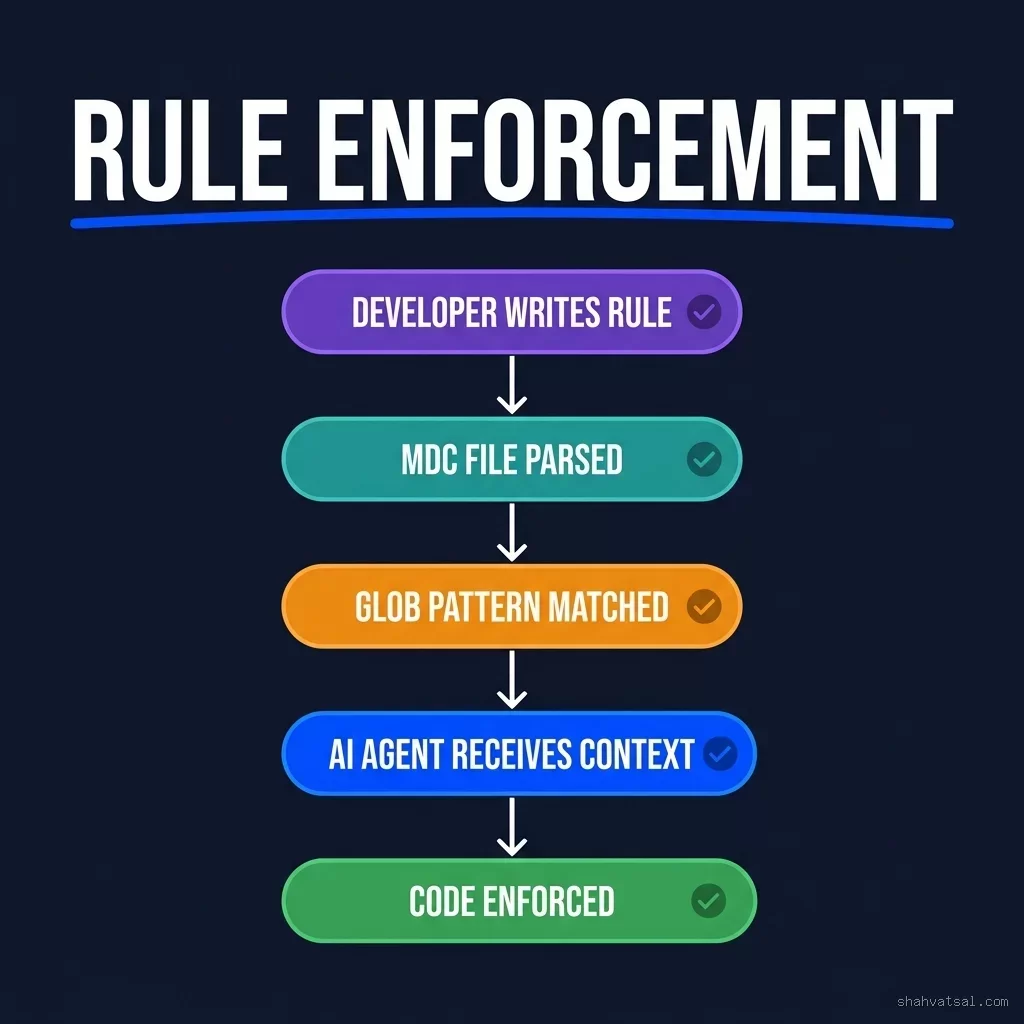
The pipeline works like this:
- Developer writes rule in
.cursorrulesor an MDC file with frontmatter - Cursor's MDC parser reads the frontmatter to determine activation mode and glob patterns
- Glob pattern matching occurs when files open — if current context includes a file matching the pattern, the rule is activated
- AI agent receives context — matched rules are prepended to the system prompt alongside the user's request
- Code is enforced — the AI generates responses that comply with the active rules
Pitfalls and Anti-Patterns
Anti-Pattern 1: Rules That Contradict Each Other
If your base-conventions.mdc says "no default exports" and your component-patterns.mdc says "export default your components for lazy loading," the AI will behave inconsistently. Audit your rules for conflicts when you add new files.
Anti-Pattern 2: Overloading alwaysApply: true
Every rule with alwaysApply: true consumes context window space on every request. Five 200-line always-on rules means 1,000 lines of context overhead before you've typed a single character. Reserve alwaysApply for genuinely universal rules.
Anti-Pattern 3: Rules Without Examples
"Write clean code" is not a rule. "Use early returns to avoid nested conditionals — see example below" is a rule. The difference between rules that work and rules that don't is almost always specificity.
Anti-Pattern 4: Not Reviewing AI Output Against Rules
Rules reduce violations — they don't eliminate them. The AI can misapply a rule when a task is ambiguous. Build a lightweight review checklist that maps back to your critical rules and run it on AI-generated PRs for the first few weeks until you've validated that your rules are working as intended.
Anti-Pattern 5: Rules Files as Documentation Archives
Some teams use .cursorrules as a dump for every ADR, meeting note, and design document. A 2,000-line rule file is almost as bad as no file at all. Keep rules concise, current, and focused on actionable constraints.
2027–2030 Agentic IDE Roadmap
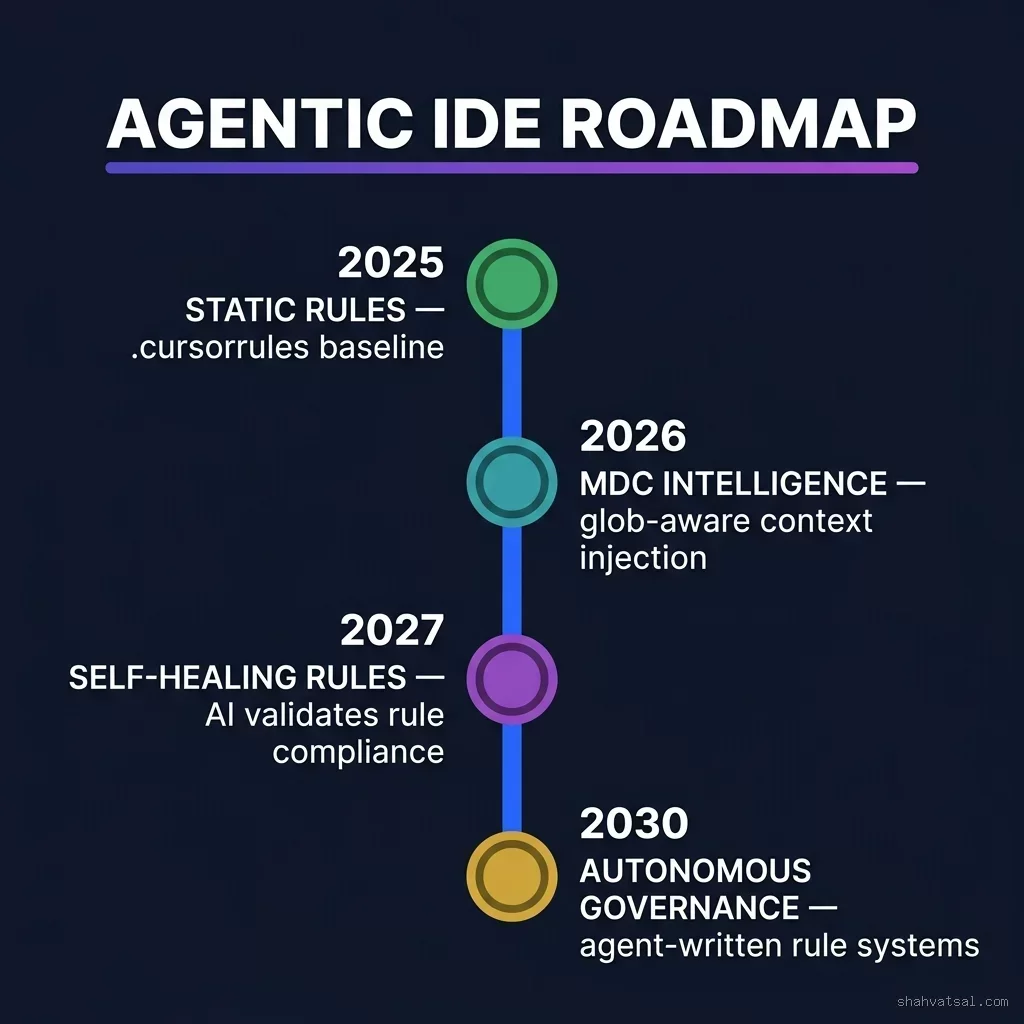
The trajectory is clear and it's accelerating:
2025–2026 (Now): Static rule files. Developers write rules, agents follow them. MDC enables glob-based context targeting. This is where most teams are landing.
2027: Self-healing rule systems. AI agents will actively validate their own output against the rule set, flag violations before submitting, and propose rule amendments when they encounter edge cases the rules didn't anticipate. Expect Cursor and competitive IDEs to ship "Rule Compliance Scores" as a native metric.
2028–2029: Cross-agent rule inheritance. When multi-agent systems coordinate across repositories, shared rule registries will enforce consistency at the organization level rather than the project level. Teams will maintain a "rule monorepo" that feeds all projects.
2030: Autonomous governance. AI agents will write, test, and update their own rule systems based on observed pattern violations. The rule file becomes a living artifact that evolves with the codebase — curated rather than authored by humans.
The practical takeaway: the rule systems you build today are the foundation for the autonomous AI systems you'll be operating in three years. Getting the discipline right now, while the loops still have humans in them, is exactly the right time to invest.
Key Takeaways
.cursorrulesis your starting point — one file, minimal friction, real enforcement.cursor/rules/*.mdcis your scale point — modular, glob-targeted, token-efficient- Always-active rules should be your genuine non-negotiables only; overuse bloats context
- Security rules deserve their own file with
alwaysApply: true— these never get scoped - Directory architecture rules prevent structural drift, especially critical with autonomous agents
- Rule quality = specificity + examples + rationale; vague rules produce vague compliance
- Teams with rule systems report 40–60% fewer AI-generated code review cycles
FAQ
What's the difference between .cursorrules and .cursorignore?
.cursorrules provides instructions to the AI on how to write code. .cursorignore tells Cursor which files to exclude from indexing and codebase context (similar to .gitignore). You use both: .cursorignore to keep sensitive files out of context, .cursorrules to inject architectural standards into AI responses.
Can Cursor Rules be shared across multiple projects?
Not natively via Cursor's built-in system, but there are two practical approaches. First, maintain a "base rules" file in a shared repository and symlink it into each project. Second, create an npm package that installs your rule files into .cursor/rules/ as part of your project setup script. Some teams use the second approach to enforce org-wide standards across dozens of projects.
Do Cursor Rules work with all AI models in Cursor?
Yes. Cursor Rules inject into the system prompt layer before the model processes your request — the same mechanism works regardless of whether you're using Claude 4, GPT-4o, Gemini 2.5 Pro, or any other model available in Cursor. The rules are model-agnostic by design.
How long should a .cursorrules file be?
Practically speaking, keep it under 200 lines. Beyond that, you're better served by the MDC system where rules can be modularized and activated selectively. A 200-line .cursorrules file consumes a meaningful chunk of context on every request. The tradeoff becomes obvious when you measure response latency and quality degradation with overstuffed rule files.
Will the AI always follow my Cursor Rules exactly?
No — and this expectation mismatch is the most common source of frustration. Rules significantly increase compliance rates, but the AI can still produce rule violations when instructions are ambiguous, when a task creates genuine tension between two rules, or in complex multi-step tasks where rule adherence competes with task completion. Review AI output against critical rules for the first few weeks until you've calibrated your expectations and refined your rule language accordingly.
Should I commit .cursorrules and .cursor/rules/ to git?
Yes, absolutely. These files are team infrastructure. Treating them as personal IDE settings is a mistake — they encode your architectural decisions and should be versioned, reviewed, and updated through the same PR process as your code. Some teams create a dedicated rules/ directory in their repo root and symlink it to .cursor/rules/ to make the governance artifact even more prominent.
About the Author
AI Systems Architect & Enterprise Technology Advisor
Vatsal Shah is a hands-on AI practitioner and technology architect with over a decade of experience designing production AI systems, agentic frameworks, and developer tooling for enterprise teams. He has advised teams across fintech, healthcare, and SaaS on adopting AI-native development workflows. His writing is grounded in the production deployments he runs — not the demos that tend to fall apart in week three.
Conclusion
Cursor Rules aren't a nice-to-have. They're the difference between an AI coding assistant that helps your team and one that slowly erodes your codebase's architectural coherence.
Start with .cursorrules. Get specific about your tech stack, your security bans, and your directory structure. Iterate with your team's first week of feedback. Then migrate the domain-specific rules to MDC files as your confidence in the pattern grows.
The teams I've seen get the most value from Cursor aren't the ones who lean hardest on the AI's autonomy. They're the ones who invest earliest in encoding their standards — and then trust the AI to execute within those standards at speed.
Your architecture is too important to leave to defaults.
→ Read next: Cursor Composer Mastery: Orchestrating Multi-File Code Generation with Multi-Agent Layouts in 2026
→ Work with Vatsal: Request an architecture review or advisory session