Autonomous AI agents are transforming GitHub Actions from simple rule-based runners into cognitive CI/CD pipelines that review code, fix bugs, and deploy securely.
1. Introduction: The Evolution to Cognitive CI/CD
Software delivery has reached an inflection point. For the past decade, Continuous Integration and Continuous Deployment (CI/CD) pipelines have operated on deterministic, rule-based execution models. We wrote configuration files—like GitHub Actions workflow YAMLs—to orchestrate serial tasks: spin up an virtual environment, pull the repository, run a linter, execute a test suite, compile the binary, and push the artifact to a server. When a test failed, the pipeline broke, and a human engineer had to read the log, diagnose the error, commit a fix, and push it back up to restart the sequence. This was automation, but it was not intelligent. It could detect failure, but it could not resolve it.
In 2026, the proliferation of code-generation tools has fundamentally shifted the bottleneck of software engineering. As discussed in our analysis of redefining productivity project metrics for teams where AI writes 70% of code, the speed of writing code has increased exponentially. However, the speed of code validation, testing, code review, and safe deployment remains bound by human cognitive throughput. When an engineering team attempts to push fifty pull requests a day—mostly generated by agentic code companions—the review pipeline collapses. The manual steps of inspecting code patterns, identifying security flaws, and fixing broken unit tests become critical bottlenecks.
This mismatch is driving the migration from traditional automated runners to cognitive CI/CD pipelines. An agentic CI/CD pipeline does not simply execute tasks; it actively reasons over execution failures, reviews code for architectural compliance, repairs broken unit tests, and validates deployment health. In this new paradigm, GitHub Actions serves as the execution grid, while autonomous AI agents serve as the runtime actors. The pipeline transitions from a static checklist to a dynamic, self-healing loop.
+---------------------------------------------------------+
|                  Traditional CI/CD                      |
|  [Code Push] -> [Lint] -> [Test] -> [Fail] -> [Alert]   |
+---------------------------------------------------------+
                             |
                             v
+---------------------------------------------------------+
|                   Cognitive CI/CD                       |
|  [Code Push] -> [Review Agent] -> [Test] -> [Fail]      |
|                       ^                         |       |
|                       |                         v       |
|                  [Self-Heal] <----------- [Fixer Agent] |
+---------------------------------------------------------+
This evolution is not without risk. Introducing autonomous execution loops that can modify the source repository, run code, and deploy to production introduces serious compliance and security challenges. If an agent is granted write access to a repository, how do we guarantee it does not commit malicious dependencies or bypass branch protection rules? If an agent has access to credentials, how do we prevent credential exfiltration? Enforcing security boundaries, establishing cryptographic trust chains, and tracking compute costs are foundational prerequisites for building a production-ready autonomous pipeline.
2. Separation of Duties: Role-Based Agent Orchestration in CI
A common failure mode when teams first integrate AI agents into CI/CD pipelines is deploying a single, highly privileged "developer agent" with full permissions across the entire workspace. This creates a massive security vulnerability and a lack of auditability. Instead, enterprise-grade architectures enforce the principle of Separation of Duties (SoD) by splitting agent responsibilities into distinct, low-privilege roles executing in isolated environments.
By decoupling the pipeline into isolated tasks, we ensure that an exploit in one agent container cannot compromise the entire workflow. Each agent operates with the minimum set of permissions necessary to perform its specific task, communicating with other agents exclusively via standard git artifacts or structured API payloads.
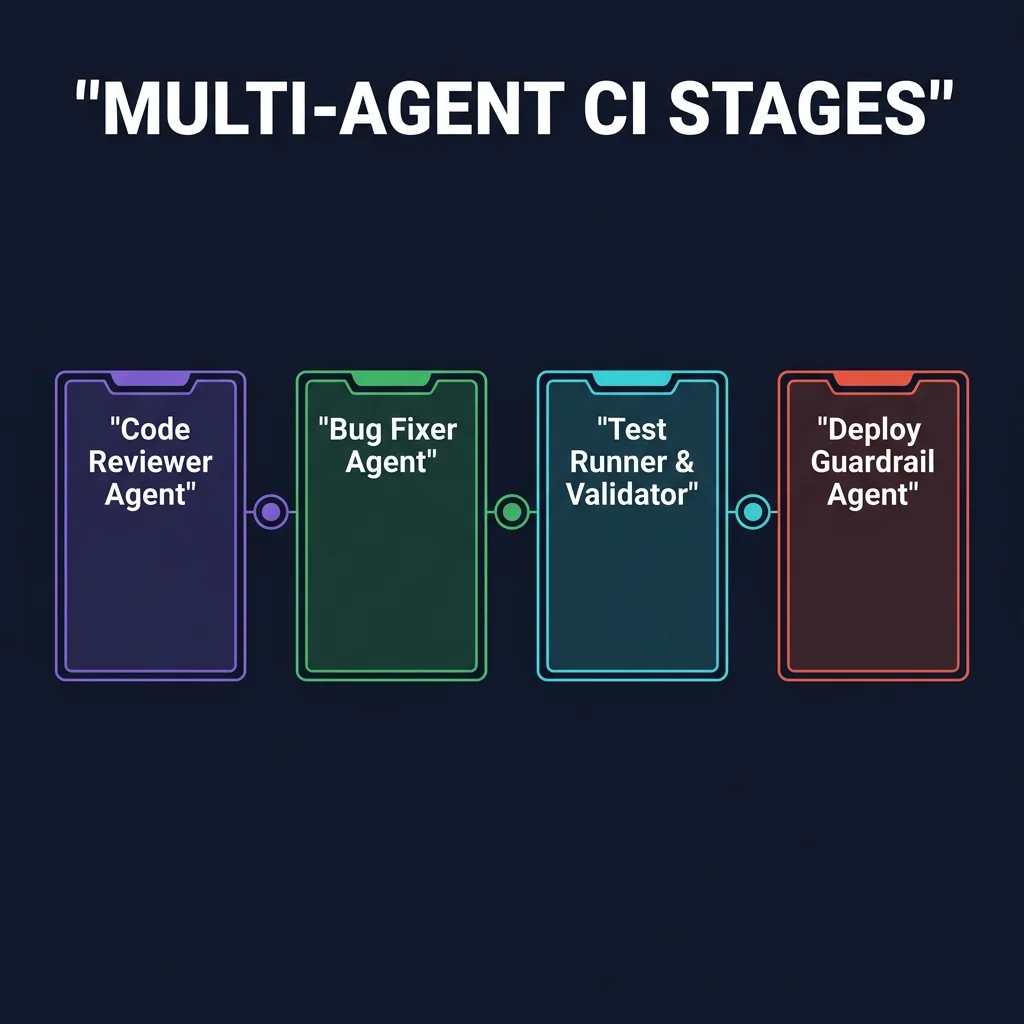
Code Reviewer Agent
The Code Reviewer Agent acts as the first gate in the pull request pipeline. It is triggered immediately when a PR is opened or updated. Operating in a read-only container environment, it inspects the diff files, evaluates formatting consistency, and scans for structural logic errors.Unlike traditional static code analyzers, the Code Reviewer Agent reads and understands the developer's intent. It compares the implementation against the repository’s style guidelines, identifying issues like redundant database queries, unhandled API rejections, or missing validation checks. It leaves precise, inline code comments directly on the pull request, suggesting refactoring options without having the authority to merge the branch.
Bug Fixer Agent
When a unit test or integration test fails during the CI run, the Bug Fixer Agent is summoned. It receives the compilation logs, runtime stack traces, and the failing code files as input. The agent constructs a localized dependency graph of the affected methods to pinpoint the failure.It reasons over the logic error, drafts a code repair, and executes the test suite locally in an isolated sandbox. Once the tests pass successfully, the Bug Fixer Agent commits the minimal necessary changes directly to the feature branch. It then pushes the commit back to GitHub, triggering a new validation run.
Test Runner & Validator
The Test Runner & Validator agent coordinates execution across the target regression suites. Because running every test on every commit is expensive, this agent dynamically calculates the blast radius of the modified files. It determines which integration tests, end-to-end user journeys, and database performance suites are actually affected by the changes.By pruning the active test matrix, it keeps execution loops fast and cost-effective. If a critical regression is detected, it logs a structured payload mapping the failure vector, which is consumed by the Bug Fixer Agent.
Deploy Guardrail Agent
The Deploy Guardrail Agent enforces security and governance policies before any code reaches staging or production. It runs code scans to ensure no hardcoded API keys are committed, verifies compliance with licenses, and checks the branch against access rules (like Cedar policies).It validates the signature of the commits and checks that the deployment bundle is signed by verified build runners. This agent holds the keys to the deployment trigger: it verifies that all human reviews are complete and that the security metrics are 100% satisfied before generating the deployment event.
3. Trust Chains: Implementing OIDC for Passwordless Agent Security
In any CI/CD pipeline, the security of authentication credentials is the primary target for attackers. In traditional configurations, teams configured a static token—such as a GitHub Personal Access Token (PAT) or a long-lived cloud service account key—as a repository secret. The runner loaded these secrets into memory during execution, exposing them to the code being executed.
If an AI agent is compromised, or if a third-party dependency contains a malicious script, these long-lived secrets can be exfiltrated. Once an attacker obtains a static key, they gain access to the cloud resources indefinitely, bypassing security logs. As documented in our deep dive on surviving shadow ai architecting enterprise governance, the rise of autonomous systems requires a complete elimination of static, long-lived credentials.
To solve this, modern pipelines implement OpenID Connect (OIDC) to establish a dynamic, passwordless trust chain between GitHub Actions and cloud providers. Under an OIDC trust chain, the GitHub Actions runner never stores or handles static secrets. Instead, when the runner needs to access a cloud provider, it requests a temporary, short-lived JSON Web Token (JWT) from GitHub's OIDC Provider. The runner presents this JWT to the cloud provider's Identity and Access Management (IAM) service.
The cloud provider validates the signature of the JWT, checks that the metadata claims (such as repository name, workflow file, and run ID) match the pre-configured trust policy, and issues temporary, scoped credentials that expire automatically after a short period (typically 15 to 60 minutes).
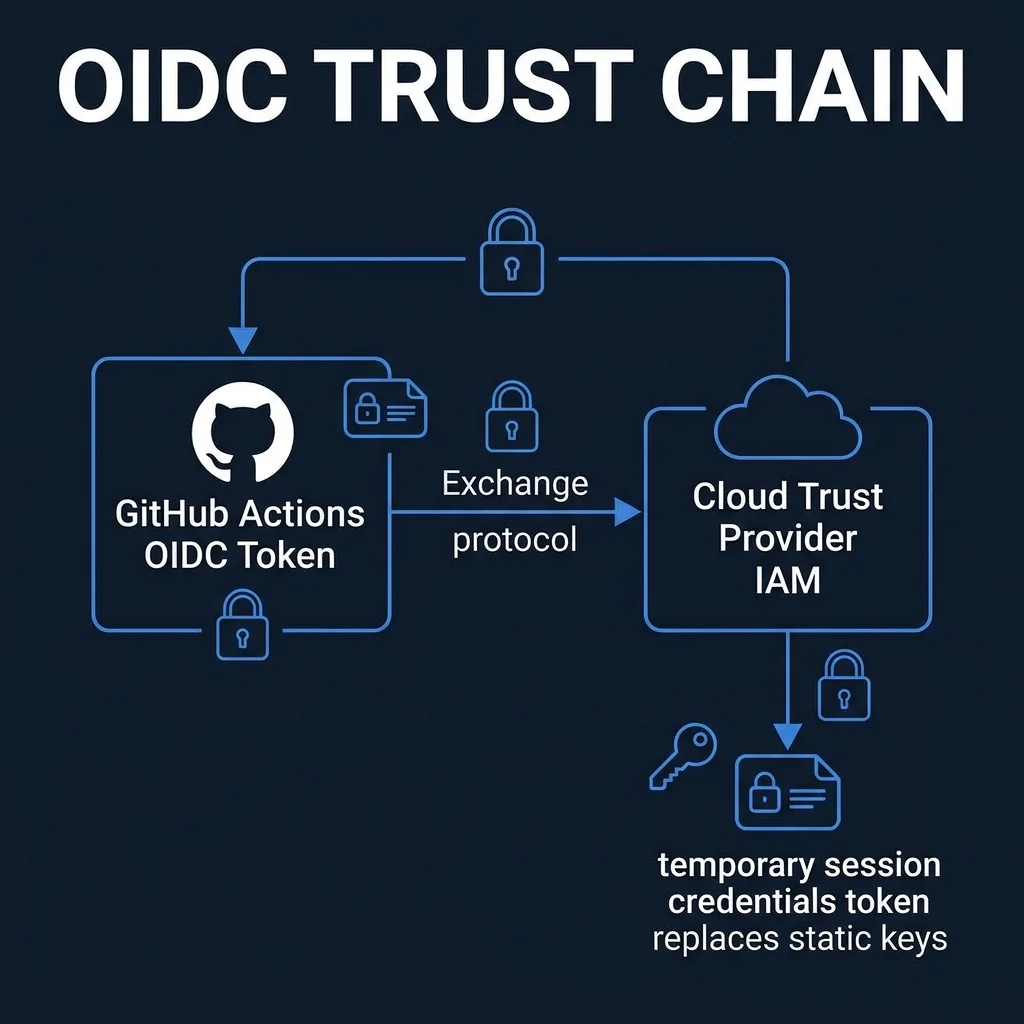
Here is the reference GitHub Actions workflow configuration for setting up OIDC with AWS. This configuration limits the agent's permissions by defining strict OIDC claims, ensuring that only workflows running on the specified repository can assume the target IAM role:
name: Secure Autonomous Deployment
on:
  push:
    branches:
      - main

permissions:
  id-token: write # Required for requesting the OIDC JWT token
  contents: read  # Required for checkout of repository code

jobs:
  validate-and-deploy:
    runs-on: ubuntu-latest
    steps:
      - name: Checkout Codebase
        uses: actions/checkout@v4

      - name: Configure AWS Credentials via OIDC
        uses: aws-actions/configure-aws-credentials@v4
        with:
          role-to-assume: arn:aws:iam::123456789012:role/github-actions-ai-deploy-role
          role-session-name: GitHubActionsAgenticDeploy
          aws-region: us-east-1
          audience: https://github.com/vatsalshah

      - name: Verify Security and Deploy via Agent
        run: |
          aws sts get-caller-identity
          # Executing deployment scripts using short-lived credentials
The cloud provider’s trust relationship policy configuration must enforce strict boundaries. The trust policy ensures that the cloud role can only be assumed if the OIDC claim originates from the correct repository and branch. The trust policy JSON configuration below restricts access to the main branch of a specific repository, blocking unauthorized access:
{
  "Version": "2012-10-17",
  "Statement": [
    {
      "Effect": "Allow",
      "Principal": {
        "Federated": "arn:aws:iam::123456789012:oidc-provider/token.actions.githubusercontent.com"
      },
      "Action": "sts:AssumeRoleWithWebIdentity",
      "Condition": {
        "StringEquals": {
          "token.actions.githubusercontent.com:aud": "https://github.com/vatsalshah",
          "token.actions.githubusercontent.com:sub": "repo:vatsaltechnosoft/vatsalshah:ref:refs/heads/main"
        }
      }
    }
  ]
}
4. Guardrails & Approval Gates: The Human-in-the-Loop State Machine
While AI agents can refactor code and resolve linting errors, they must operate within strict governance boundaries. An autonomous agent should never have the authorization to merge its own code changes directly into the main branch or trigger a production deployment without human validation.
To maintain security, pipelines implement a state machine that enforces a Human-in-the-Loop (HITL) approval gate. This architecture models the lifecycle of code modifications through explicit, verifiable states:
+---------------+      Test Fail      +---------------+      Fix Pass      +-----------------+
|  Agent Draft  | ------------------> |  Self-Healing | -----------------> | Waiting Review  |
+---------------+                     +---------------+                    +-----------------+
                                                                                    |
                                                                                    | Trigger Webhook
                                                                                    v
+---------------+      Approve        +---------------+                    +-----------------+
| Deploy Success| <------------------ |   Human Gate  | <----------------- |   Slack/Teams   |
+---------------+                     +---------------+                    +-----------------+
When an agent successfully fixes a bug or updates a dependency, it opens a pull request. The state machine transitions the status of the request to waiting_review. Instead of expecting developers to constantly monitor GitHub, the pipeline triggers an interactive webhook to a communication channel, such as Slack or Microsoft Teams.
The webhook payload displays the details of the changes, the test logs, the security verification metrics, and provides interactive "Approve" and "Reject" buttons.
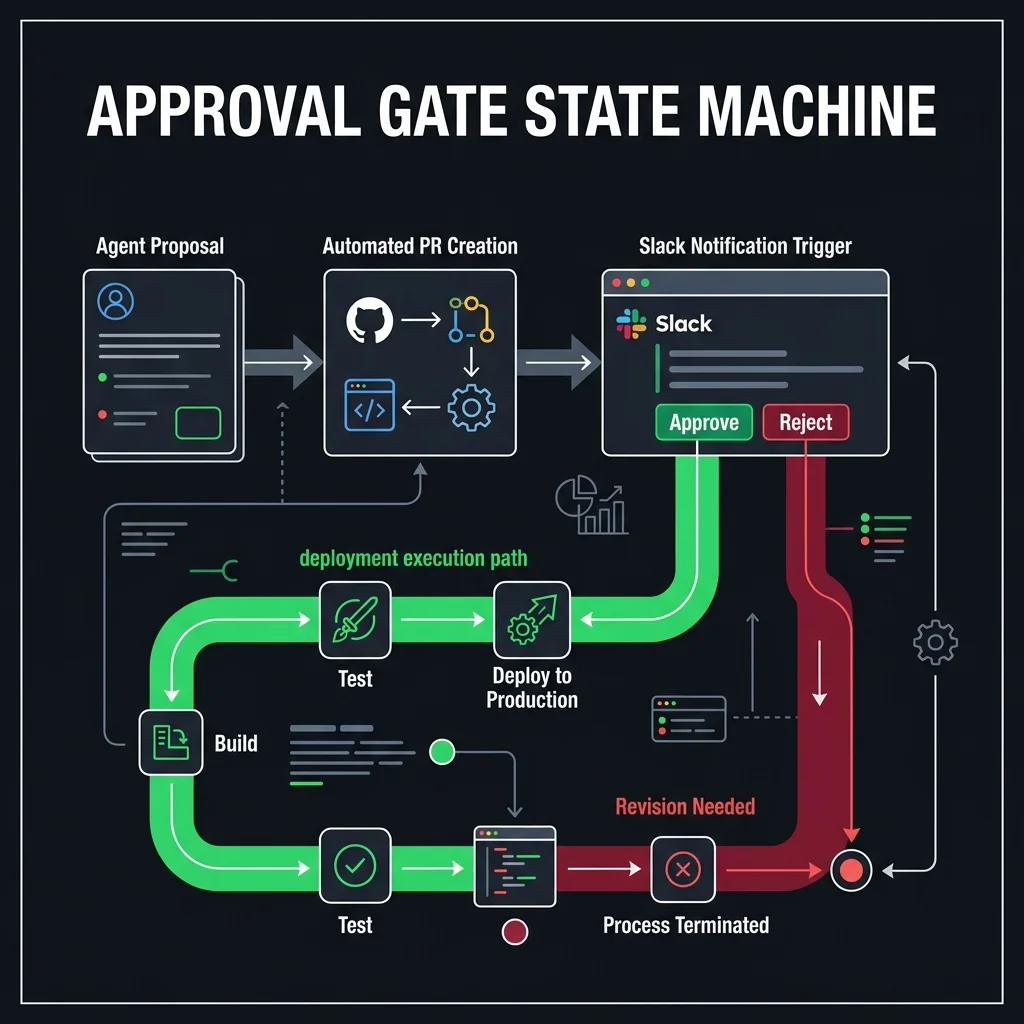
Once a reviewer clicks "Approve", the Slack webhook controller processes the request, validates the user’s role, signs the approval event, and sends a secure request to GitHub to trigger the merge. If the reviewer clicks "Reject", the state machine transitions to updates_needed, and a notification is sent back to the agent to adjust the implementation.
This setup provides speed while maintaining human oversight.
5. FinOps & Cost Governance: Monitoring Token Budgets and Minutes
Running autonomous agents in CI/CD pipelines introduces a new cost vector: LLM API token consumption. In traditional pipelines, compute costs were linear and predictable, consisting of runner minutes (cents per hour). With agentic steps, a single execution loop that makes recursive calls to a reasoning model (like Claude 3.5 Sonnet or GPT-4o) can quickly consume hundreds of thousands of input/output tokens.
Without cost controls, a failing test loop could trigger an infinite self-healing loop, consuming hundreds of dollars in a single run. As explored in our GitHub Copilot AI credits and agentic IDE economics analysis and the wider FinOps transformation roadmap, tracking the total cost of ownership (TCO) of developer tools is essential for maintaining profitability.
To manage costs, organizations enforce strict token budgets per execution step, implement cache strategies, and run monitoring scripts.
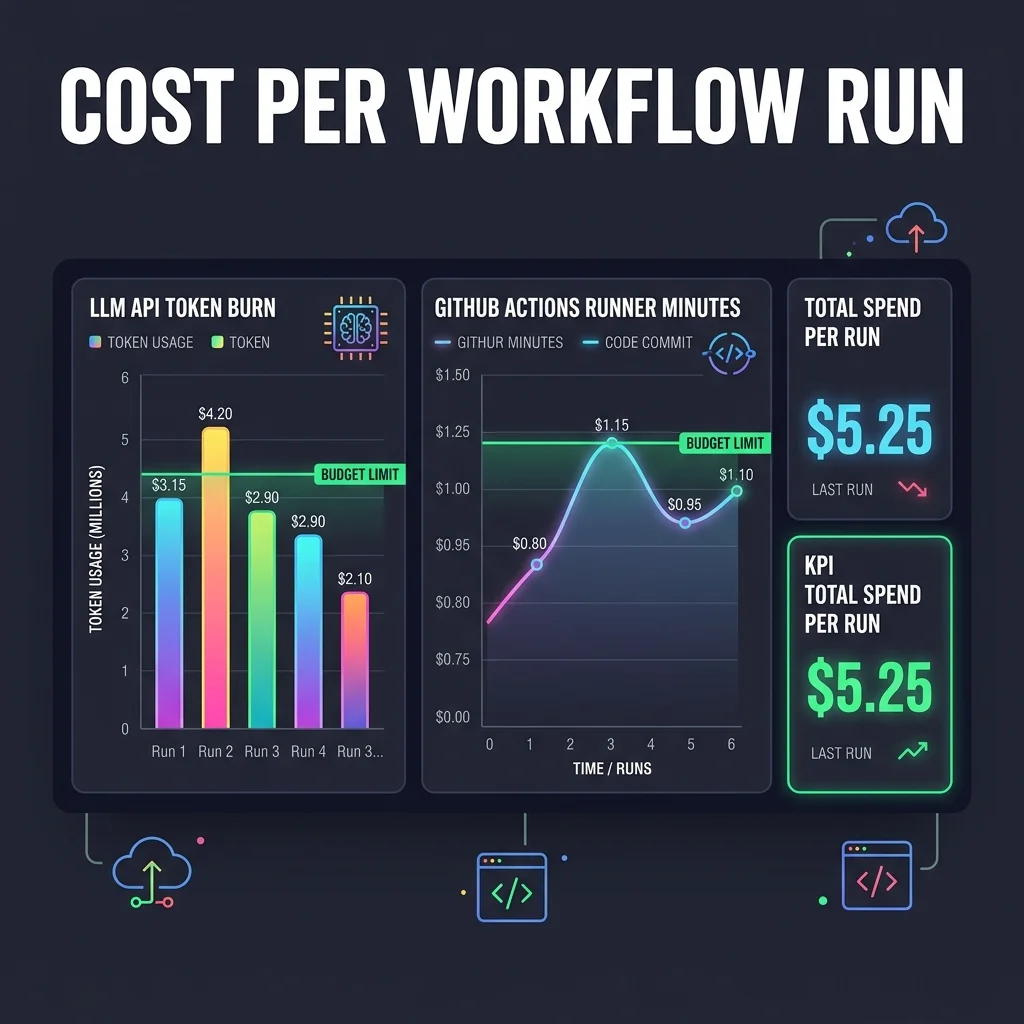
Here is a Python script used in GitHub Actions to extract token usage, calculate real-time run costs, and trigger alerts if the budget threshold is exceeded:
#!/usr/bin/env python3
import os
import sys
import json
import requests

def calculate_workflow_cost(log_file_path, budget_limit_usd):
    # Costs per 1M tokens (Claude 3.5 Sonnet 2026 reference rates)
    INPUT_TOKEN_COST_PER_M = 3.00
    OUTPUT_TOKEN_COST_PER_M = 15.00

    total_input_tokens = 0
    total_output_tokens = 0

    if not os.path.exists(log_file_path):
        print(f"Error: Log file not found at {log_file_path}")
        sys.exit(1)

    with open(log_file_path, 'r') as f:
        for line in f:
            if "LLM_TOKEN_USAGE:" in line:
                try:
                    # Expected format: LLM_TOKEN_USAGE: {"input": 1500, "output": 450}
                    data_str = line.split("LLM_TOKEN_USAGE:")[1].strip()
                    usage = json.loads(data_str)
                    total_input_tokens += usage.get("input", 0)
                    total_output_tokens += usage.get("output", 0)
                except json.JSONDecodeError:
                    continue

    input_cost = (total_input_tokens / 1000000.0) * INPUT_TOKEN_COST_PER_M
    output_cost = (total_output_tokens / 1000000.0) * OUTPUT_TOKEN_COST_PER_M
    total_cost = input_cost + output_cost

    print(f"--- FinOps Execution Audit ---")
    print(f"Input Tokens Consumed:  {total_input_tokens}")
    print(f"Output Tokens Consumed: {total_output_tokens}")
    print(f"Calculated Run Cost:    ${total_cost:.4f} USD")
    print(f"Workflow Budget Limit:  ${budget_limit_usd:.4f} USD")

    if total_cost > budget_limit_usd:
        print(f"🚨 BUDGET EXCEEDED! Terminating next steps.")
        # Trigger Slack alert payload
        slack_webhook = os.getenv("FINOPS_SLACK_WEBHOOK")
        if slack_webhook:
            payload = {
                "text": f"🚨 *CI Cost Alert:* Workflow run exceeded budget. Cost: ${total_cost:.2f} (Limit: ${budget_limit_usd:.2f})."
            }
            requests.post(slack_webhook, json=payload)
        sys.exit(1)
    else:
        print("✅ Run cost within budget boundaries.")

if __name__ == "__main__":
    calculate_workflow_cost(
        log_file_path="storage/logs/agent_token_log.txt",
        budget_limit_usd=1.50
    )
To optimize these metrics, teams should structure their codebases to keep context windows clean. For example, instead of feeding an agent an entire file history, they should use tools that isolate dependencies, ensuring only the relevant blocks are sent. Caching common libraries and schemas in the virtual environment avoids having to re-fetch and re-parse them on every run.
6. Analytical Comparison: Automated Bots vs. Cognitive Agents
Many engineering leaders confuse traditional automated bots (like Dependabot, Renovate, or basic code-formatting linters) with autonomous AI agents. While both run inside CI pipelines, their architectures, reasoning capabilities, and scopes of action are fundamentally different.
Traditional bots are static and rule-based. They check structured dependencies (like package lockfiles) against lists of vulnerabilities or updates. When they detect a match, they execute a templated string replacement to increment the version number, open a pull request, and exit. If the new version introduces a breaking API change or breaks a unit test, the bot cannot resolve the issue. The broken PR remains open until a human developer steps in.
In contrast, cognitive agents operate with an execution loop that includes reasoning and code modification. When a package update breaks a test, the agent does not quit. It reviews the breaking changes, maps the modified API signature, modifies the code calls in the codebase, verifies the fix, and updates the PR.
The table below contrasts these two approaches across core operational dimensions:
| Dimension | Automated Bots (Dependabot/Renovate) | Cognitive AI Agents (Copilot/Codex/Custom) |
|---|---|---|
| Execution Loop | Linear & deterministic. Trigger -> update version -> exit. | Stateful loop. Reason -> execute -> validate -> iterate. |
| Context Scope | Locked to specific metadata configuration files (e.g. package.json). | Entire codebase index, commit history, and runtime environments. |
| Handling Failures | Leaves PR in a broken state for human intervention. | Analyzes compiler output and code paths to fix the breaking change. |
| Access Scope | Read-only checkout; writes only to lockfiles and version properties. | Scoped IAM roles, CLI tool access, and sandboxed test runtimes. |
| Cost Metrics | Extremely low. Standard CPU runtime execution minutes. | Variable. CPU minutes + LLM input/output token consumption. |
7. Automated Production Rollbacks: Self-Healing Workflows
Even with robust testing, some failure conditions only trigger in production under live user traffic. When a bad deployment slips through and triggers a spike in HTTP 5xx errors or latency metrics, every second counts. Traditional disaster recovery workflows require manual intervention: an on-call engineer must receive an alert, log in, locate the stable release version, and execute a deployment rollback.
In an agentic pipeline, this sequence is automated. The monitoring agents check the post-deployment health metrics. If the error rate or latency exceeds pre-configured thresholds within the first 10 minutes of release, the monitoring agent triggers a rollback event. It automatically generates a git revert pull request, merges it, and runs the rollback deployment.
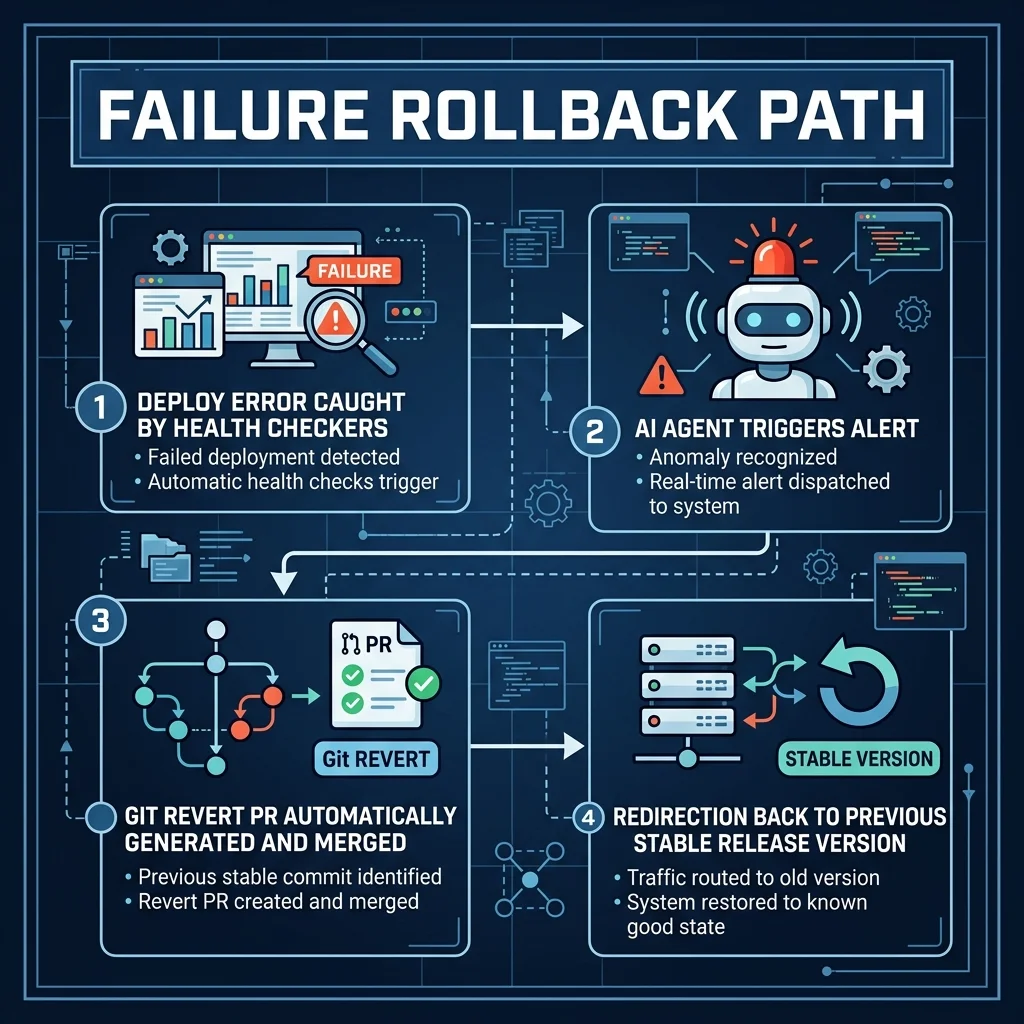
Here is a bash script that runs as a post-deployment step in GitHub Actions. It monitors live health metrics, checks the response codes, and automatically executes a git revert to previous stable release version if the error threshold is breached:
#!/usr/bin/env bash
set -euo pipefail

# Configuration
MONITOR_URL="https://shahvatsal.com/health"
MAX_RETRIES=5
CHECK_INTERVAL_SECONDS=10
ERROR_THRESHOLD_PERCENT=5.0
STABLE_COMMIT_HASH="${GITHUB_SHA_BEFORE:-}"

echo "Starting Post-Deploy Health Monitoring..."

for ((i=1; i<=MAX_RETRIES; i++)); do
    echo "Health Check Run $i of $MAX_RETRIES..."

    # Fetch live health status payload
    response=$(curl -s -w "\n%{http_code}" "$MONITOR_URL" || echo "FAILED 500")
    http_code=$(echo "$response" | tail -n1)
    body=$(echo "$response" | head -n -1)

    if [ "$http_code" -ne 200 ]; then
        echo "🚨 HTTP Code is $http_code. Triggering automated rollback!"
        trigger_git_revert
        exit 1
    fi

    # Optional: Parse custom JSON metrics to calculate error rate
    # error_rate=$(echo "$body" | jq '.metrics.error_rate_percent')

    sleep "$CHECK_INTERVAL_SECONDS"
done

echo "✅ Post-Deploy health checks passed successfully. Release is stable."
exit 0

trigger_git_revert() {
    echo "Initiating Git Revert Pipeline..."

    # Configure git attributes for agent
    git config --global user.name "AI Agent Deployer"
    git config --global user.email "[email protected]"

    if [ -z "$STABLE_COMMIT_HASH" ]; then
        echo "Error: No stable commit hash available. Manual rollback required."
        exit 1
    fi

    echo "Reverting current deployment to stable commit: $STABLE_COMMIT_HASH"

    # Generate revert branch and commit
    git checkout -b "rollback-$STABLE_COMMIT_HASH"
    git revert --no-edit "$GITHUB_SHA"
    git push origin "rollback-$STABLE_COMMIT_HASH"

    # Open rollback pull request using GitHub CLI
    gh pr create \
      --title "🚨 Rollback: Revert broken deploy back to stable commit $STABLE_COMMIT_HASH" \
      --body "Automated rollback triggered by post-deploy health monitor failure." \
      --base "main" \
      --head "rollback-$STABLE_COMMIT_HASH"

    # Auto-merge the rollback pull request
    gh pr merge --admin --rebase --yes
    echo "Rollback PR merged successfully. Deploying stable revision."
}
This automated rollback loop keeps production issues brief. Rather than waiting for a developer to wake up and locate the bug, the system heals itself automatically within minutes, protecting the user experience.
8. Monday Morning Implementation Roadmap
Transitioning to autonomous CI/CD pipelines requires a phased approach. Rather than refactoring your entire deployment infrastructure overnight, start by securing your authentication boundaries and testing agentic loops on safe branches.
Here is the three-step roadmap to implement this week:
Step 1: Configure OpenID Connect (OIDC)
Replace all static GitHub secrets and PATs with dynamic, passwordless OIDC trust relationships. Register your GitHub repository with your cloud provider’s IAM, create scoped roles, and update your workflow files to use theaws-actions/configure-aws-credentials action.
Step 2: Establish the Human-in-the-Loop Webhook Gate
Implement a Slack or Microsoft Teams webhook gate for your pull request reviews. Configure GitHub Actions to trigger a payload containing change summaries, test logs, and interactive approval buttons. Block merging to themain branch until the webhook controller receives a signed human approval payload.