Why This Comparison Matters Now Evaluation Criteria: What Production Actually Demands LangGraph: Graph State, Checkpoints, Production Patterns CrewAI: Role-Base…
Introduction
Every engineering team I talk to in 2026 is having the same conversation. They've built a proof-of-concept AI agent — it works in demos, falls apart in production. The question isn't whether to use multi-agent orchestration anymore. It's which framework to stake your architecture on.
LangGraph, CrewAI, and AutoGen have collectively accumulated over 180,000 GitHub stars. They each have evangelists who swear by them and engineers who've ripped them out after painful production incidents. The marketing around all three is thick with "autonomous," "collaborative," and "production-ready" language that tells you nothing about what actually breaks at 3am on a Tuesday.
This is not a framework fan post. I've shipped production systems on all three. Here's the honest comparison.
Why This Comparison Matters Now
The multi-agent landscape in 2026 is consolidating. Twelve months ago, teams were experimenting with AutoGPT clones and bare LangChain chains. Today the realistic production contenders are three:
- LangGraph (by LangChain Inc.) — graph-based state machines with checkpointing
- CrewAI — role-based agent crews with sequential and hierarchical task flows
- AutoGen / Microsoft Agent Framework — conversation-driven multi-agent coordination with deep Azure integration
Three data points that frame why this choice matters more than people realize:
- Teams that pick the wrong framework for their use case spend an average of 6–8 weeks migrating once they hit the wall (based on conversations with 12 engineering teams across 2025–2026)
- LangGraph's GitHub repository crossed 50,000 stars in March 2026, overtaking CrewAI's 48,000 — a signal of ecosystem momentum
- Microsoft's AutoGen 0.4 rewrite (released January 2026) broke backward compatibility with 0.2 and 0.3, stranding teams who'd built on the earlier API
Evaluation Criteria: What Production Actually Demands
Before comparing frameworks, agree on what matters. Most blog comparisons score frameworks on features that shine in demos but crumble under real production load. Here's the production-first criteria:
1. State Persistence and Durability Can an agent workflow survive a process crash, a network blip, or a Kubernetes pod restart mid-execution? Can you resume from the exact step where it failed?
2. Human-in-the-Loop (HITL) Mechanics Can you pause a workflow, route it to a human for review or approval, and resume with the human's input injected? This is non-negotiable for compliance-sensitive workflows (finance, legal, healthcare).
3. Observability and Debuggability When something goes wrong at step 14 of a 20-step agent workflow, can you see exactly what happened at each step? Can you replay from a specific checkpoint? Does your existing observability stack (Datadog, Grafana, Azure Monitor) integrate without custom middleware?
4. Vendor Lock-in Surface How deeply does the framework tie you to a specific LLM provider, cloud platform, or proprietary service? This matters for cost flexibility, model switching, and regulatory requirements.
5. Failure Mode Clarity When an agent fails — LLM timeout, tool error, invalid output format — does the framework fail loudly with structured errors, or silently with corrupted state? Silent failures in multi-agent systems are production killers.
6. Horizontal Scalability Can you run 1,000 concurrent agent workflows without hitting framework-level bottlenecks? Does state management scale beyond a single process?
LangGraph: Graph State, Checkpoints, Production Patterns
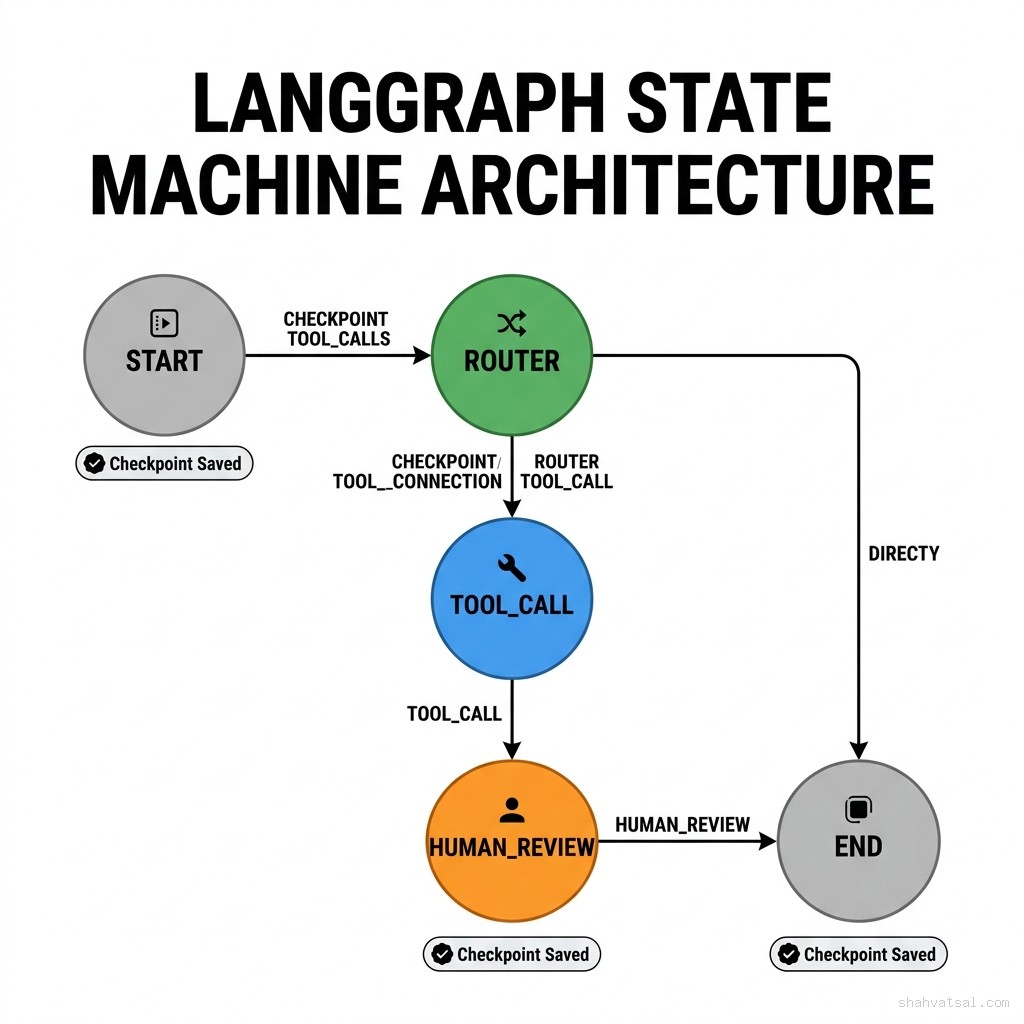
LangGraph is the most architecturally serious of the three frameworks. It models agent workflows as directed graphs where nodes are Python functions (tools, LLM calls, routers) and edges define control flow. State is typed, explicit, and persisted at every node transition.
What Makes LangGraph Different
The core concept is typed state that flows through the graph. Every node reads from and writes to a shared state object. The framework tracks state transitions, making debugging a matter of inspecting snapshots rather than log archaeology.
# LangGraph — typed state + conditional routing
from langgraph.graph import StateGraph, END
from typing import TypedDict, Literal

class AgentState(TypedDict):
    messages: list[dict]
    tool_calls: list[dict]
    human_approved: bool
    final_answer: str | None

def router(state: AgentState) -> Literal["tool_call", "human_review", "end"]:
    last_msg = state["messages"][-1]
    if last_msg.get("requires_approval"):
        return "human_review"
    if last_msg.get("tool_calls"):
        return "tool_call"
    return "end"

def tool_call_node(state: AgentState) -> AgentState:
    # Execute tool calls, update state
    results = execute_tools(state["tool_calls"])
    return {"messages": state["messages"] + results}

def human_review_node(state: AgentState) -> AgentState:
    # Workflow pauses here — resumes when human injects approval
    # Implemented via LangGraph's interrupt() mechanism
    from langgraph.types import interrupt
    approval = interrupt({"message": "Please review and approve", "state": state})
    return {"human_approved": approval["approved"]}

# Build the graph
workflow = StateGraph(AgentState)
workflow.add_node("tool_call", tool_call_node)
workflow.add_node("human_review", human_review_node)
workflow.add_conditional_edges("router", router)
workflow.set_entry_point("router")

# Compile with checkpointing (PostgreSQL backend)
from langgraph.checkpoint.postgres import PostgresSaver
checkpointer = PostgresSaver.from_conn_string("postgresql://...")
app = workflow.compile(checkpointer=checkpointer)
LangGraph Production Strengths
Checkpointing is first-class. Out of the box, LangGraph supports PostgreSQL, SQLite, and Redis as checkpoint backends. A workflow that crashes at step 8 of 15 resumes from step 8 — not from the beginning. For long-running agentic workflows (document review pipelines, multi-step research tasks, approval chains), this is not a nice-to-have. It's the difference between a reliable system and an expensive one.
Human-in-the-loop via interrupt(). The interrupt() primitive pauses execution, serializes state, and waits for external input. The workflow resumes with the injected data. This is production-grade HITL without polling loops or message queues.
LangSmith native observability. Every graph execution produces a structured trace: node entry/exit, state at each transition, LLM token counts, tool call latency. LangSmith (LangChain's observability platform) visualizes these traces as interactive graphs. You can replay a failed run step by step.
LangGraph Production Weaknesses
Learning curve is real. Teams coming from imperative Python code find the graph mental model non-obvious. State typing discipline requires upfront design work. I've seen teams spend 2 weeks on their first LangGraph workflow that would have taken 3 days in CrewAI.
LangSmith costs money at scale. The native observability story is LangSmith, which is a paid product. Open-source alternatives (OpenTelemetry + Langfuse) work but require more integration effort.
Graph complexity explodes with branching. A workflow with 8+ conditional branches becomes hard to reason about visually. LangGraph provides a draw_mermaid() helper but for complex production graphs, the diagrams become unreadable.
CrewAI: Role-Based Teams, When It Shines and When It Breaks
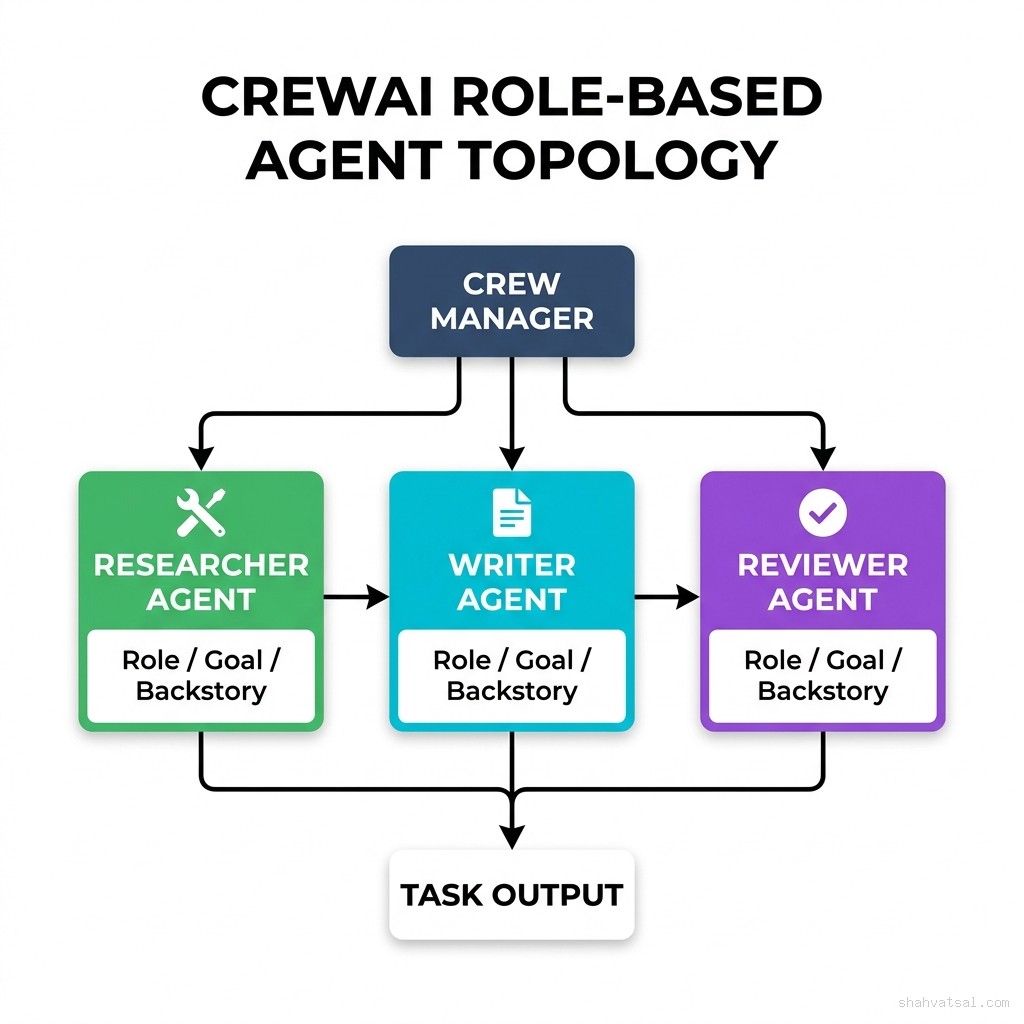
CrewAI takes a completely different mental model. Instead of graphs and state machines, it thinks in terms of teams of agents with defined roles, goals, and backstories — like assigning tasks to human colleagues.
The CrewAI Mental Model
CrewAI's abstraction is intuitive: you define agents as role-players, assign them tasks, and the framework handles coordination. For teams that think in terms of "who does what" rather than "what state flows where," it clicks immediately.
# CrewAI — role-based team setup
from crewai import Agent, Task, Crew, Process
from crewai_tools import SerperDevTool, FileReadTool

# Define agents with roles
researcher = Agent(
    role="Senior AI Research Analyst",
    goal="Find and synthesize the latest production data on multi-agent frameworks",
    backstory="""You're an expert in AI infrastructure with 8 years reading
    technical papers and GitHub issues. You cut through marketing to find
    what actually works in production.""",
    tools=[SerperDevTool()],
    llm="gpt-4o",
    verbose=True,
    max_iter=5,  # critical: cap iterations in production
    memory=True
)

writer = Agent(
    role="Technical Content Strategist",
    goal="Transform research into clear, authoritative technical content",
    backstory="You've written for engineering blogs at Stripe, Vercel, and Anthropic.",
    tools=[FileReadTool()],
    llm="gpt-4o",
    verbose=True
)

# Define tasks
research_task = Task(
    description="Research production adoption patterns for LangGraph, CrewAI, AutoGen in 2026",
    expected_output="A structured report with specific metrics, failure modes, and production use cases",
    agent=researcher,
    output_file="research_output.md"
)

writing_task = Task(
    description="Write a 4,000-word authoritative comparison blog using the research findings",
    expected_output="Publication-ready blog post with code examples and data tables",
    agent=writer,
    context=[research_task]  # receives researcher output as context
)

# Assemble crew
crew = Crew(
    agents=[researcher, writer],
    tasks=[research_task, writing_task],
    process=Process.sequential,
    verbose=True,
    memory=True,
    embedder={"provider": "openai", "config": {"model": "text-embedding-3-small"}}
)

result = crew.kickoff()
CrewAI Production Strengths
Fastest time-to-working-prototype. For teams new to multi-agent systems, CrewAI reduces the cognitive load of orchestration design. Define agents, define tasks, run crew. Most teams have a working prototype in hours, not days.
Hierarchical process with LLM manager. The Process.hierarchical mode uses a manager LLM to dynamically assign tasks to agents based on capability. This is genuinely impressive for workflows where task routing is contextual.
Built-in memory. CrewAI's memory system (short-term, long-term, entity memory via embeddings) is pre-integrated. You don't build it yourself.
Active ecosystem. CrewAI's marketplace of tools and integrations (crewai-tools package) covers the most common production use cases: web search, file I/O, database queries, email, calendar.
CrewAI Production Weaknesses
No native checkpointing. This is the critical production gap. If a CrewAI crew crashes at step 4 of 7, it restarts from step 1. For workflows that involve expensive LLM calls or external API side effects, this is painful. Workarounds exist (AgentOps, custom state persistence) but they're not native.
Agent iteration loops can run forever. Without aggressive max_iter caps, agents in CrewAI can spin in reasoning loops that exhaust your LLM budget. I've seen $80 bills from a single crew.kickoff() call that lost its exit condition. Always set max_iter and max_rpm.
Hierarchical process is non-deterministic. When using Process.hierarchical, the manager LLM chooses which agent gets each task. This works beautifully 80% of the time. The other 20%, it makes baffling routing decisions that are extremely hard to debug because the reasoning is implicit in the LLM's response.
Memory is OpenAI-embedding-dependent in default config. The default embedder for long-term memory is text-embedding-3-small. Swapping to a local embedding model (Ollama, Hugging Face) requires configuration that isn't well-documented.
AutoGen / Microsoft Agent Framework: The Enterprise Angle
AutoGen (now officially branded Microsoft AutoGen with the 0.4 rewrite) takes the most conversational approach. Agents communicate through message-passing patterns that mirror chat interfaces. The mental model is closer to a group chat between specialized bots than a programmatic workflow.
The January 2026 AutoGen 0.4 release was a near-complete rewrite. It introduced the AgentChat and Core layers, made async-first a default, and added the Magentic-One multi-agent system as a reference implementation. It also broke everything built on AutoGen 0.2 and 0.3.
# AutoGen 0.4 — async agent conversation pattern
import asyncio
from autogen_agentchat.agents import AssistantAgent, UserProxyAgent
from autogen_agentchat.teams import RoundRobinGroupChat
from autogen_agentchat.conditions import TextMentionTermination
from autogen_ext.models import AzureOpenAIChatCompletionClient

# Azure-native LLM client
model_client = AzureOpenAIChatCompletionClient(
    model="gpt-4o",
    azure_endpoint="https://your-resource.openai.azure.com",
    azure_deployment="gpt-4o",
    api_version="2024-02-01"
)

# Define specialist agents
planner = AssistantAgent(
    name="Planner",
    model_client=model_client,
    system_message="""You are a planning agent. Break down complex tasks into
    concrete steps. When the plan is complete, say PLAN_COMPLETE."""
)

executor = AssistantAgent(
    name="Executor",
    model_client=model_client,
    system_message="""You execute plans from the Planner. Call tools to complete
    each step. Report results clearly. Say DONE when finished.""",
    tools=[search_tool, code_executor_tool]
)

critic = AssistantAgent(
    name="Critic",
    model_client=model_client,
    system_message="""Review the Executor's output. If correct, say APPROVED.
    If not, describe specific issues for the Executor to fix."""
)

# Group chat with termination condition
termination = TextMentionTermination("APPROVED")
team = RoundRobinGroupChat(
    participants=[planner, executor, critic],
    termination_condition=termination,
    max_turns=15  # always cap
)

async def run_workflow():
    result = await team.run(
        task="Research and summarize the top 3 enterprise use cases for multi-agent AI in finance"
    )
    return result

asyncio.run(run_workflow())
AutoGen Production Strengths
Deep Azure integration. If your stack is Azure — Azure OpenAI, Azure Monitor, Azure Active Directory, Microsoft Fabric — AutoGen is the native choice. It integrates with Azure's enterprise telemetry stack without custom adapters.
Code execution sandbox. AutoGen has the most mature built-in code execution story. The CodeExecutorAgent runs generated Python/shell code in Docker containers with configurable timeouts, whitelisted packages, and output capture. For agentic coding workflows, this is a meaningful advantage.
Async-first architecture. AutoGen 0.4 is fully async. Under concurrent load, this scales better than synchronous frameworks. For high-throughput production deployments (processing thousands of documents per hour), the async architecture matters.
Magentic-One reference implementation. Microsoft's Magentic-One is a fully functional multi-agent system built on AutoGen — web browsing, file handling, code execution, and task planning out of the box. It's the best-documented "complete system" reference in the ecosystem.
AutoGen Production Weaknesses
0.4 migration is brutal for existing users. AutoGen 0.2/0.3 code is not compatible with 0.4. The API surface changed completely. Teams on 0.2 either stay stuck or rewrite. This is a trust problem that goes beyond technical merit.
Conversation-as-orchestration has limits. The message-passing model is elegant for small agent teams but becomes brittle as team size grows. A 6-agent conversation where agents reference each other's outputs from 8 turns ago produces context window pressure that degrades output quality in measurable ways.
Observability is Azure-centric. Integrating AutoGen traces into non-Azure observability platforms (Grafana + Loki, Datadog, Jaeger) requires custom OpenTelemetry exporters that aren't officially supported.
Head-to-Head Feature Matrix
| Dimension | LangGraph | CrewAI | AutoGen 0.4 |
|---|---|---|---|
| Mental Model | Graph state machine | Role-based team | Conversational agents |
| Native Checkpointing | ✅ PostgreSQL / Redis / SQLite | ❌ No native — workarounds only | ⚠️ Partial — state in memory by default |
| Human-in-the-Loop | ✅ interrupt() primitive — native pause/resume | ⚠️ Callback hooks — less ergonomic | ✅ UserProxyAgent — good but conversational only |
| Observability | ✅ LangSmith native (paid); OTel via Langfuse | ⚠️ AgentOps integration; no native tracing | ✅ Azure Monitor native; OTel exportable |
| Vendor Lock-in | Low — LangSmith optional; any LLM | Low — any LLM; OpenAI default | Medium-High — Azure native, Microsoft ecosystem |
| Time to First POC | 2–5 days (graph design overhead) | 2–8 hours (intuitive role model) | 1–3 days (async patterns + 0.4 docs) |
| Horizontal Scalability | ✅ Distributed state via Postgres/Redis | ⚠️ Single-process by default | ✅ Async native — scales well |
| Deterministic Routing | ✅ Explicit conditional edges | ⚠️ Hierarchical = LLM-decided (non-deterministic) | ⚠️ Conversation-driven (partially non-deterministic) |
| Code Execution | ⚠️ Bring-your-own (LangChain tools) | ⚠️ External tools only | ✅ Docker sandbox native |
| Memory / Long-term State | ✅ Typed state + checkpoint backend | ✅ Built-in (short/long-term/entity) | ⚠️ Conversation history (context window limited) |
| Production Stability (2026) | ✅ Stable — 0.2 API stable since 2025 | ✅ Stable — 0.x API consistent | ⚠️ 0.4 is new — 0.2/0.3 teams stranded |
| Best For | Complex stateful workflows, HITL, compliance | Content pipelines, research, fast prototypes | Azure shops, coding assistants, document processing |
Reference Architecture: Router + Specialist Agents
The most durable multi-agent pattern across all three frameworks is the Router + Specialist architecture. A single coordinator agent classifies incoming tasks and routes them to domain-specialized sub-agents. Here's how it maps to each framework.
LangGraph Implementation
# Router + Specialist in LangGraph
from langgraph.graph import StateGraph, END
from typing import TypedDict, Literal

class WorkflowState(TypedDict):
    task: str
    task_type: Literal["research", "code", "analysis", "unknown"]
    specialist_output: str | None
    error: str | None

def router_node(state: WorkflowState) -> WorkflowState:
    """Classify task and route to specialist."""
    classification = llm.invoke(f"""
    Classify this task as one of: research, code, analysis, unknown.
    Task: {state['task']}
    Return only the classification word.
    """).content.strip()
    return {"task_type": classification}

def route_to_specialist(state: WorkflowState) -> str:
    return state["task_type"]  # returns edge name

def research_specialist(state: WorkflowState) -> WorkflowState:
    result = research_agent.invoke(state["task"])
    return {"specialist_output": result}

def code_specialist(state: WorkflowState) -> WorkflowState:
    result = code_agent.invoke(state["task"])
    return {"specialist_output": result}

def analysis_specialist(state: WorkflowState) -> WorkflowState:
    result = analysis_agent.invoke(state["task"])
    return {"specialist_output": result}

# Build graph
graph = StateGraph(WorkflowState)
graph.add_node("router", router_node)
graph.add_node("research", research_specialist)
graph.add_node("code", code_specialist)
graph.add_node("analysis", analysis_specialist)

graph.set_entry_point("router")
graph.add_conditional_edges("router", route_to_specialist, {
    "research": "research",
    "code": "code",
    "analysis": "analysis",
    "unknown": END
})
graph.add_edge("research", END)
graph.add_edge("code", END)
graph.add_edge("analysis", END)

app = graph.compile(checkpointer=checkpointer)
CrewAI Implementation
# Router + Specialist in CrewAI
from crewai import Agent, Task, Crew, Process

router = Agent(
    role="Task Router",
    goal="Classify incoming tasks and route them to the correct specialist",
    backstory="You are an expert at understanding task requirements and matching them to specialists.",
    llm="gpt-4o-mini",  # cheaper model for routing
    allow_delegation=True
)

research_specialist = Agent(
    role="Research Specialist",
    goal="Conduct thorough research on any given topic",
    backstory="PhD-level researcher with access to web search and academic databases.",
    tools=[SerperDevTool()],
    llm="gpt-4o"
)

code_specialist = Agent(
    role="Software Engineer",
    goal="Write, review, and debug code solutions",
    backstory="Senior engineer with 10 years of Python and TypeScript experience.",
    llm="gpt-4o"
)

routing_task = Task(
    description="Analyze this task and route to the best specialist: {task}",
    expected_output="Routed task with specialist assignment and execution plan",
    agent=router
)

crew = Crew(
    agents=[router, research_specialist, code_specialist],
    tasks=[routing_task],
    process=Process.hierarchical,
    manager_llm="gpt-4o"
)
AutoGen Implementation
# Router + Specialist in AutoGen 0.4
from autogen_agentchat.teams import SelectorGroupChat
from autogen_agentchat.conditions import TextMentionTermination

# SelectorGroupChat uses LLM to route to the best next speaker
team = SelectorGroupChat(
    participants=[router_agent, research_agent, code_agent, analysis_agent],
    model_client=model_client,
    selector_prompt="""Select the next agent based on the conversation.
    Route to 'router_agent' for initial classification.
    Route to 'research_agent' for information gathering.
    Route to 'code_agent' for implementation tasks.
    Route to 'analysis_agent' for data interpretation.
    Say DONE when the task is complete.""",
    termination_condition=TextMentionTermination("DONE")
)
Monday Morning: Your First POC in 3 Hours
Don't pick a framework without spiking all three on your actual workflow. Here's a 3-hour protocol.
Hour 1: Define your workflow (30 min) + spike CrewAI (30 min)
Write your workflow as a numbered list of steps. For each step: what input does it need, what does it produce, who executes it? This structure maps directly to CrewAI tasks and agents. Build the CrewAI version first — it'll run fastest.
Hour 2: Spike LangGraph (60 min)
Convert your step list into a graph. Each step is a node. Each condition (retry? escalate? approve?) is an edge. Build the StateGraph, define the state type, wire the nodes. Run it against the same input as your CrewAI version.
Hour 3: Evaluate and decide (60 min)
Run the same 3 test cases against both. Score on:
- Did it complete without errors?
- Can you tell exactly what happened at each step?
- If it failed, could you diagnose why in under 5 minutes?
- If you killed the process mid-run, could you resume?
Migration Paths Between Frameworks
Teams change frameworks. Here's how to do it without a full rewrite.
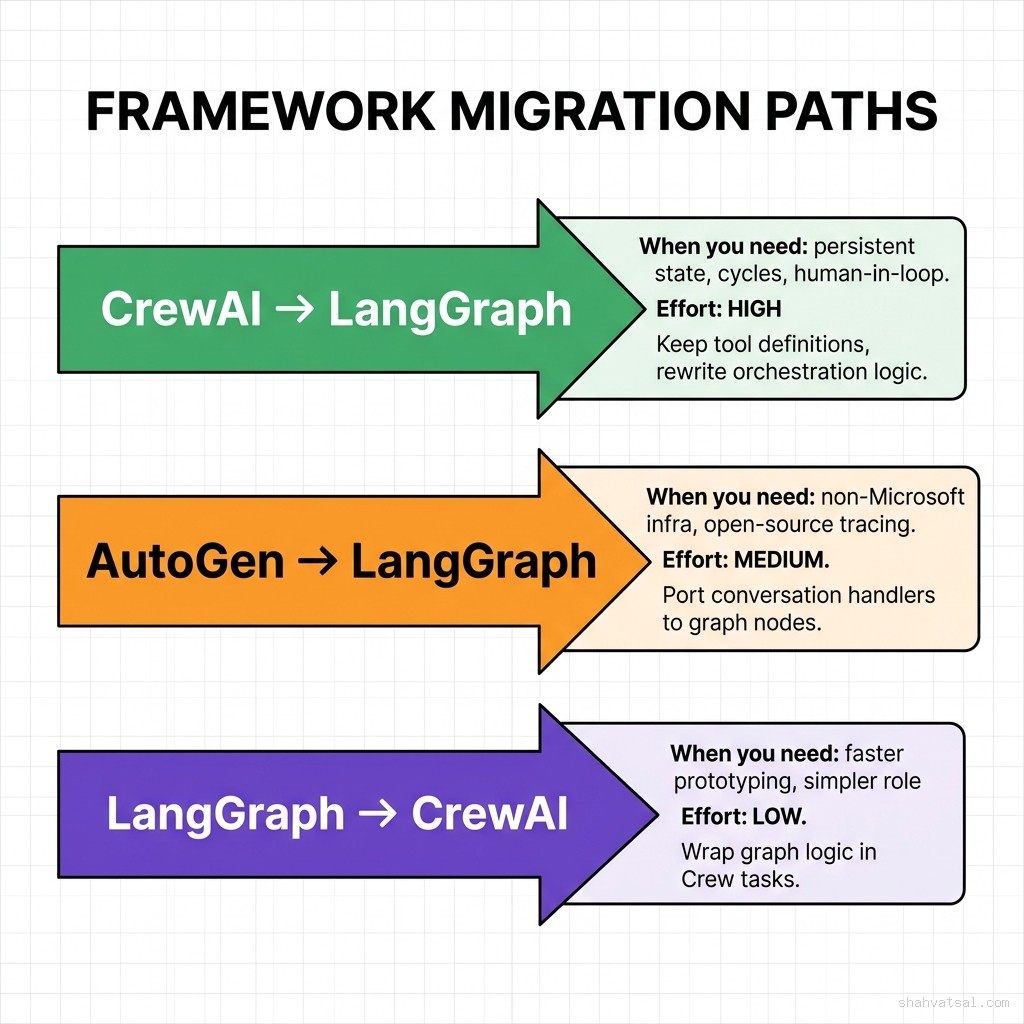
CrewAI → LangGraph (High Effort)
When you need this: Your CrewAI crew works but you're hitting the no-checkpointing wall. A long-running workflow crashes and restarts from scratch, costing time and money.
What transfers: Tool definitions, agent prompts (backstory/goal → system message), task descriptions.
What you rewrite: All orchestration logic. CrewAI's sequential/hierarchical process becomes explicit graph edges. Each agent becomes a node function. State that was implicit in CrewAI's task context chain becomes explicit TypedDict.
Estimated effort: 2–4 weeks for a 5-agent system.
AutoGen 0.3 → AutoGen 0.4 (Medium-High Effort)
When you need this: You're on AutoGen 0.2/0.3 and need features from 0.4 or LangGraph's observability.
What transfers: Agent prompts, some tool definitions.
What you rewrite: All conversation patterns. ConversableAgent → AssistantAgent. GroupChat → RoundRobinGroupChat or SelectorGroupChat. All async wrappers.
Estimated effort: 2–3 weeks for a 4-agent system.
LangGraph → CrewAI (Low Effort)
When you need this: Your LangGraph graph works but you're onboarding non-technical team members who need to understand and modify agent behavior without reading graph code.
What transfers: Tool definitions, LLM configs, most business logic.
What you lose: Checkpointing, deterministic routing, HITL interrupt(). Make sure your use case doesn't need these before migrating.
Estimated effort: 3–5 days for a 5-node graph.
Observability: The Production Differentiator
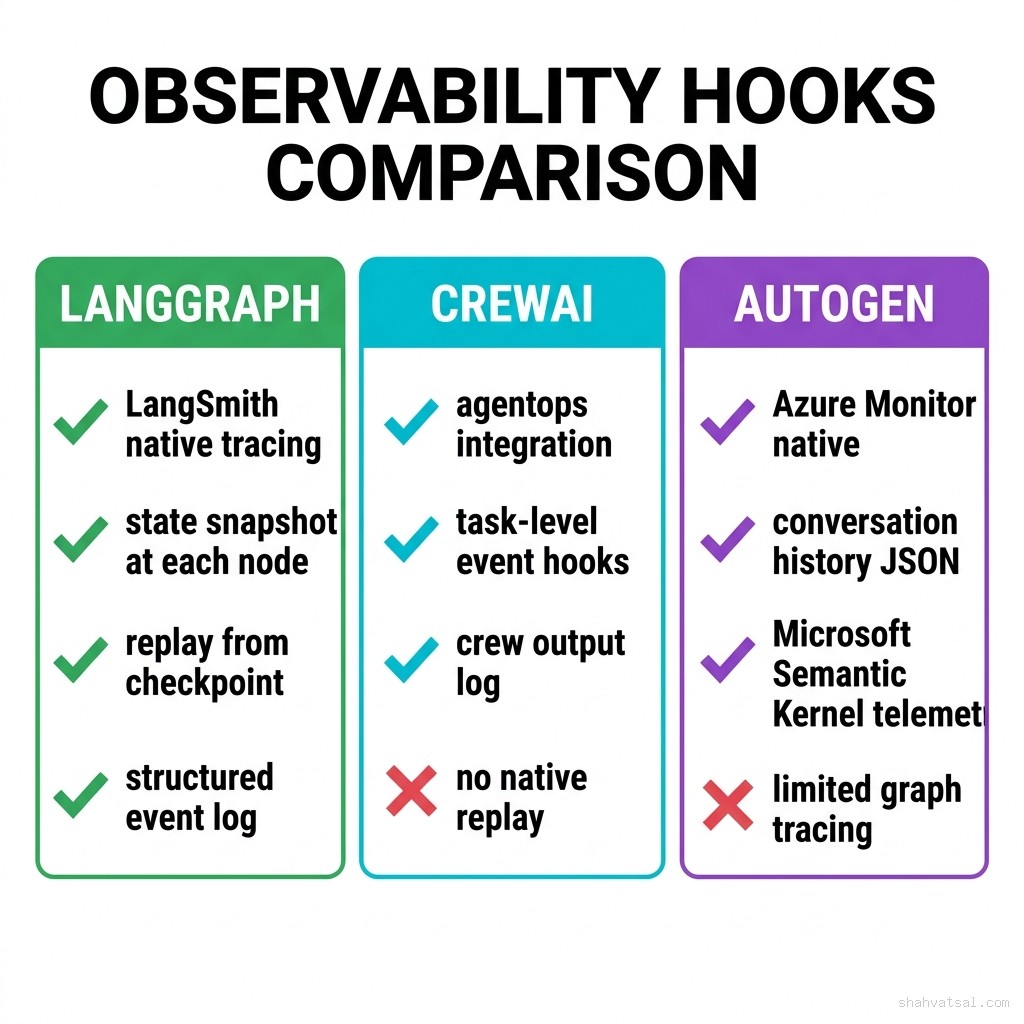
Observability is where production systems live or die. The comparison above shows the native capability gap. If you're building on any framework, instrument it on day one — not after your first production incident.
For non-LangSmith tracing across all three frameworks, Langfuse (open-source) provides the best cross-framework support:
# Langfuse instrumentation — works with LangGraph, CrewAI, AutoGen
from langfuse import Langfuse
from langfuse.openai import openai  # wrapped openai client

langfuse = Langfuse(
    public_key="lf-pk-...",
    secret_key="lf-sk-...",
    host="https://cloud.langfuse.com"
)

# Wrap your LLM client — traces automatically flow to Langfuse
# Works at the OpenAI SDK level, framework-agnostic
Pitfalls and Anti-Patterns
Anti-Pattern 1: No Max Iterations Cap
Every agent in every framework should have an explicit iteration limit. Without it, you're one bad prompt away from an infinite loop that burns your LLM budget. Set max_iter in CrewAI, max_turns in AutoGen, and a node visit counter in LangGraph for any graph that has cycles.
Anti-Pattern 2: Using Hierarchical Process for Deterministic Workflows If you know exactly which agent should execute each step, don't use CrewAI's hierarchical process or AutoGen's SelectorGroupChat — both use LLM routing which adds latency, cost, and non-determinism. Use sequential process in CrewAI or explicit conditional edges in LangGraph.
Anti-Pattern 3: Building on AutoGen 0.2/0.3 Today If you're starting a new project in 2026, start on AutoGen 0.4. The 0.2/0.3 API is not getting new features and the community support is shifting to 0.4. Starting on 0.2 today means a forced migration in 6–12 months.
Anti-Pattern 4: Treating Agent Memory as a Substitute for a Database CrewAI's built-in memory (backed by embeddings in a local vector store) is designed for within-run context, not long-term persistence across workflow executions. Production systems that need agent memory to survive beyond a single run require explicit database backends.
Anti-Pattern 5: Not Versioning Your Agent Prompts System messages and agent backstories are effectively code. They change agent behavior as fundamentally as changing a function. Store them in version control, treat prompt changes as deployments, and A/B test significant changes before pushing to 100% of production traffic.
2027–2030 Roadmap: Where Agent Orchestration Goes Next
2026 (Now): The three frameworks consolidate market share. Model Context Protocol (MCP) adoption grows, giving all frameworks a standardized tool-connection interface. LangGraph's subgraph composition and CrewAI's flow system both move toward supporting MCP-native tool registration.
2027: Stateful agent workflows become a cloud primitive. AWS, Google Cloud, and Azure release managed agent execution environments with built-in checkpointing, tracing, and human-in-the-loop routing. The framework layer becomes thinner — closer to configuration than code.
2028: The framework choice matters less than the agent communication protocol. Standardized agent-to-agent communication (A2A protocols, building on MCP) allows agents built in LangGraph to call agents built in CrewAI as first-class operations. The ecosystem becomes interoperable.
2029–2030: Long-running agents (days-to-weeks lifecycle) become production normal. Frameworks that survive this transition are the ones that solved checkpointing and state durability in 2025–2026. Teams that chose LangGraph for its checkpointing story in 2026 will find themselves better positioned for the long-running agent paradigm.
The implication for 2026 decisions: choose the framework whose weaknesses you can tolerate, not just the one whose strengths impress you in demos.
Key Takeaways
- LangGraph is the production-grade choice for stateful, complex, compliance-sensitive workflows. Pay the learning curve upfront.
- CrewAI is the fastest path to a working prototype and genuinely good for content pipelines, research workflows, and team-based task decomposition. Know the checkpointing gap.
- AutoGen 0.4 is the right choice for Azure-native enterprise shops building coding or document-processing agents. The 0.4 rewrite is the version worth building on.
- No iteration caps = no production. Set
max_iter,max_turns,max_rpmon every agent in every framework. - Spike all three on your actual workflow before committing. The 3-hour protocol above will tell you more than any comparison blog.
- Observability on day one, not after the first incident. Langfuse works across all three for teams not on LangSmith or Azure Monitor.
- The 2028 interoperability wave means your framework choice is not as permanent as it feels — but your state management patterns are. Invest in clean state design regardless of framework.
FAQ
Which framework is best for beginners building their first multi-agent system?
CrewAI. The role-based mental model is the most intuitive for teams new to multi-agent orchestration. You can have a working crew in hours. Use it to understand the patterns, then evaluate whether you need LangGraph's more complex state management for your production use case.
Can I use LangGraph, CrewAI, and AutoGen together in the same system?
Yes, technically. In practice, each framework has its own runtime model and mixing them adds significant operational complexity. A more maintainable pattern: use LangGraph as your top-level orchestrator and call CrewAI crews as sub-tasks from LangGraph nodes. This gives you LangGraph's checkpointing at the workflow level while using CrewAI's intuitive role model for specific tasks.
How does LangGraph compare to Prefect or Airflow for agentic workflows?
Prefect and Airflow are data pipeline orchestrators optimized for scheduled, deterministic batch jobs. LangGraph is designed for dynamic, LLM-driven workflows where the execution path depends on model outputs. They solve different problems. For agentic AI, LangGraph. For data ETL, Prefect or Airflow. Some teams use both: Prefect to schedule LangGraph workflows.
Is AutoGen 0.4 stable enough for production in mid-2026?
It's production-stable for new projects that start on 0.4. The risk is in the documentation gaps — 0.4 launched in January 2026 and some advanced patterns are still thinly documented. Budget extra time for debugging non-obvious async behaviors. The core API is stable; the ecosystem tooling around it is still maturing.
What's the cheapest way to run production multi-agent systems on CrewAI?
Use gpt-4o-mini or claude-haiku-3-5 for agent reasoning and routing (80% of your LLM calls), and gpt-4o or claude-sonnet-3-7 only for final synthesis tasks. Set max_rpm to avoid burst billing. Use gpt-4o-mini as the embedding model for memory. These three changes typically reduce CrewAI LLM costs by 60–75% on production workloads.
How do I handle secrets (API keys, database passwords) inside agent tools?
Never hardcode secrets in agent system messages, tool definitions, or task descriptions — they'll appear in LLM traces and observability logs. Store secrets in environment variables or a secrets manager (AWS Secrets Manager, Azure Key Vault, HashiCorp Vault). Inject them into tool constructors at initialization time, not at execution time through agent prompts.
About the Author
Conclusion
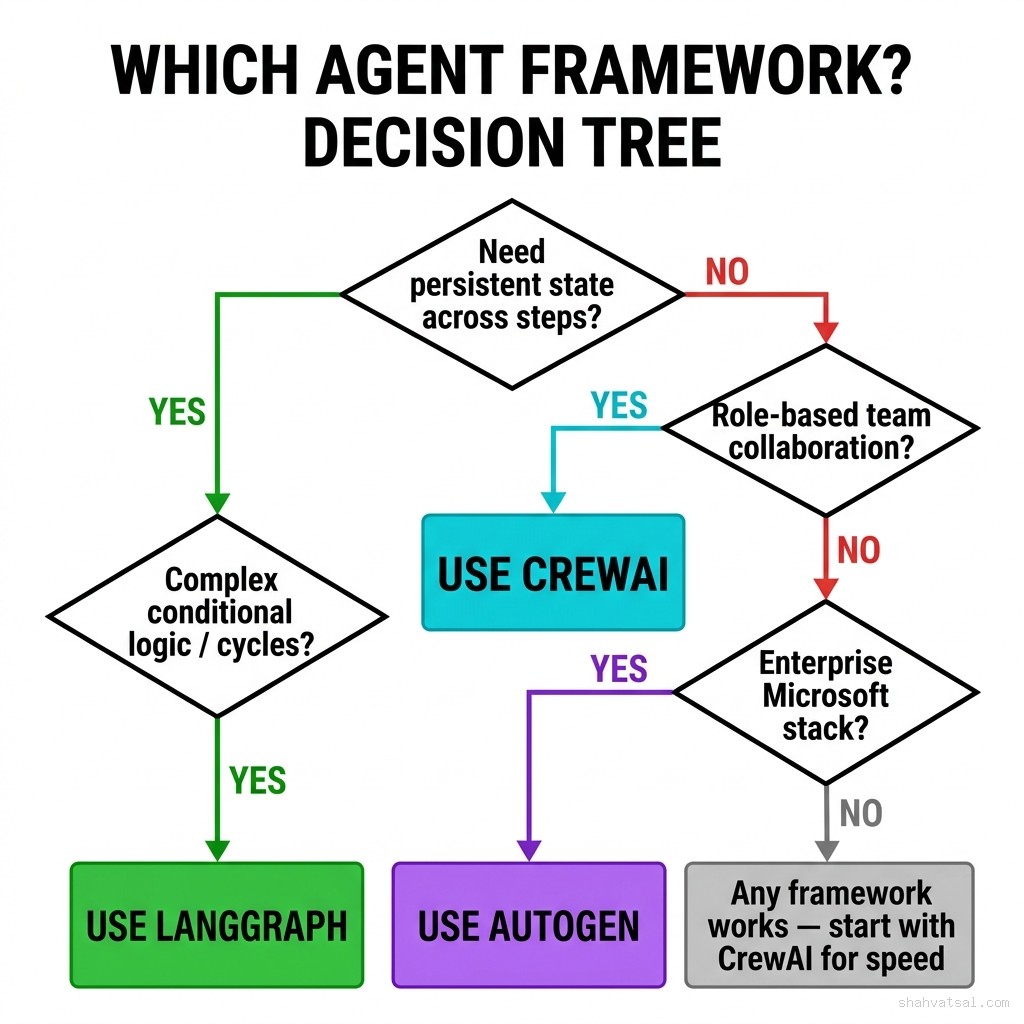
There's no universally correct framework. There's the right framework for your workflow's specific production requirements.
If you need fault-tolerant, checkpointed, auditable agent workflows — LangGraph. Accept the learning curve. It pays back in operational reliability.
If you need a working multi-agent system this week to validate a product idea — CrewAI. Understand the checkpointing gap and design around it.
If your team is Azure-native and building coding or document-processing agents — AutoGen 0.4. Start on 0.4, not the older API.
The worst outcome is spending six weeks building on the wrong framework and discovering its ceiling when you're already in production. The 3-hour spike protocol will cost you an afternoon. A 6-week migration will cost you a quarter.
Related Reading: