In 2024, the software industry was introduced to the concept of "vibe coding." Powered by chat-based coding assistants, engineers could write natural language p…
In 2024, the software industry was introduced to the concept of "vibe coding." Powered by chat-based coding assistants, engineers could write natural language prompts and watch entire applications spring to life. This model worked well for demos, prototypes, and simple MVP layouts. It created a sense of velocity, making it feel as though the barrier to software creation had been permanently removed.
However, as organizations attempted to integrate autonomous AI coding agents into enterprise repositories, they hit a wall. We call this the Vibe Coding Trap.
Vibe coding relies on the model's ability to infer context from local edits and prompt guidelines. While this is fast for simple scripts, it leads to code degradation in complex architectures. Without a structured design spec, the agent writes code that is vulnerable to:
- Structural Entropy: As the agent modifies more files, it lacks a global view of the architecture. It duplicates logic, creates tight coupling between modules, and introduces patterns that conflict with the existing codebase.
- Context Saturation & Attention Leaks: Large language models process text using self-attention mechanisms. As the chat context grows, the model's attention is spread thin. It loses track of early instructions and begins making random edits to unrelated files.
- Probabilistic Drift: Because LLMs are probabilistic engines, they do not guarantee consistency. An agent might run the same prompt ten times and generate different implementations, making it difficult to establish reliable validation gates.
- Prompt Hacking & Instruction Leakage: In chat sessions, agents are vulnerable to instruction leakage or override. An unexpected command or a malformed input file can override the system prompt, causing the agent to delete code or modify configuration schemas.
- Context Footprint Bloat: Long conversational logs fill the model's context window with irrelevant details (e.g., greetings, previous attempts, and chat fluff). This increases API costs and leads to token saturation, reducing the model's reasoning capabilities.
- Regression Cycles: The agent fixes one bug but breaks three others because it lacks a regression boundary or test suite coverage.
- Technical Debt Spikes: The agent writes ad-hoc helper routines instead of reusing existing core utility libraries, increasing maintenance overhead.
- Security Vulnerabilities: Without strict boundaries, the agent can introduce security issues (e.g., bypassing CSRF checks or using insecure library versions).
- Maintenance Overhead: Developers spend more time reviewing, reverting, and repairing agent PRs than writing the features themselves, leading to team friction and pipeline bottlenecks.
Let us compare the architectural transition:
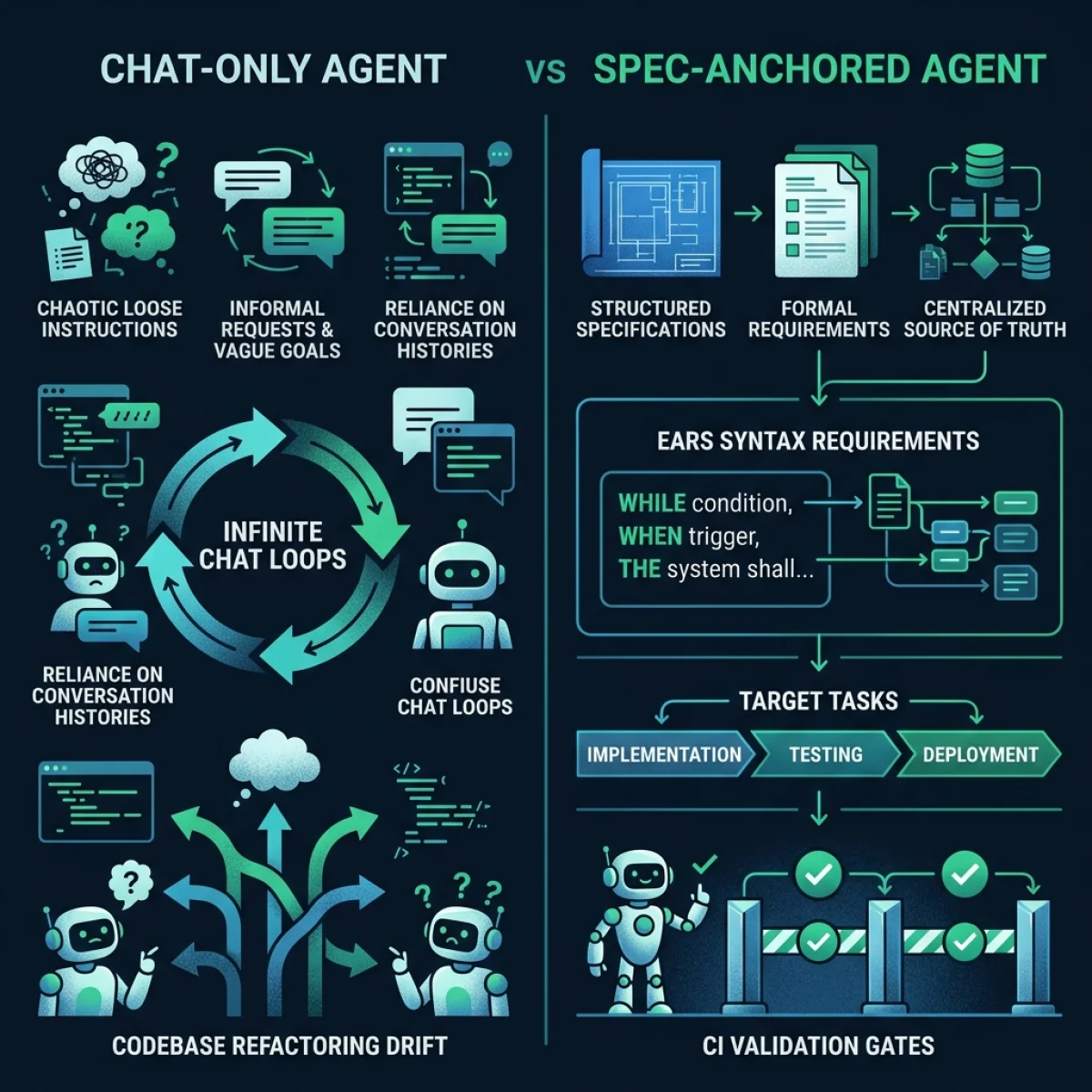
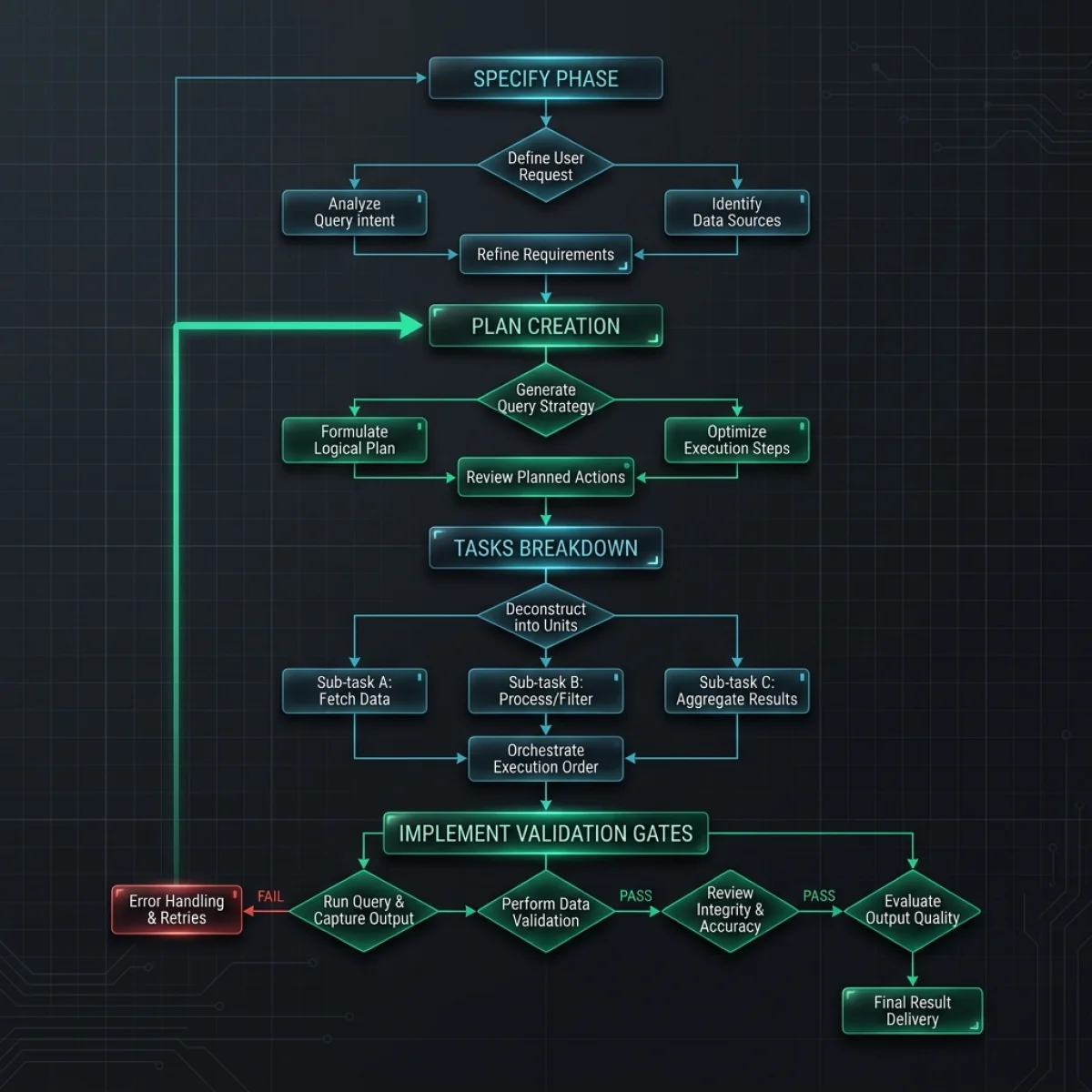
Spec-Driven Development operates on a structured, four-phase loop that mirrors traditional software engineering but is optimized for machine execution. In this closed loop, requirements are translated into plans, plans are broken down into task lists, tasks are implemented, and results are verified by CI checks before code reaches production.
Let us trace the routing flow of this SDD loop:
Phase 1: Specify (Requirements Definition)
In the Specify phase, the developer or product manager writes a requirement document in a structured, machine-readable format. Rather than using vague language like "make it fast," the document defines inputs, validation rules, error handling, and performance boundaries. We write these specifications using the EARS notation standard (Easy Approach to Requirements Syntax).This specification is committed directly to the repository as a .md file (e.g., requirements.md). By keeping the requirements in the code repository, we ensure the agent can read them programmatically and trace modifications using standard Git history.
Phase 2: Plan (Architectural Design Gate)
Before writing code, the agent reads the specification and analyzes the codebase. It generates animplementation_plan.md artifact. This plan identifies the files to modify, the new files to create, potential dependencies, and the verification plan. The plan is presented to the developer for review and approval, serving as a design gate.
- Dependency Mapping: The agent traces class hierarchies and imports to verify that the planned changes do not violate system boundaries or cause regressions.
- Developer Review Gate: The agent pauses execution until the developer explicitly approves the plan. This step ensures that the developer reviews the design before any files are modified.
Phase 3: Tasks (Checklist State Machine)
Once the plan is approved, the agent breaks the implementation plan down into atomic tasks. These tasks are written to atask.md file in the workspace. Each task is represented as a checklist item:
- [ ] Implement database connection pooling handler
- [ ] Add unit tests for pool limits
- [ ] Verify latency on local dev environment
This task file acts as the agent's active memory on disk. As it completes each task, it updates the file. If the session is interrupted or the context resets, the agent reads task.md to resume exactly where it left off.
This state machine approach ensures that the agent's work remains structured and traceable:
[ ]Uncompleted: The task is waiting to be processed.[/]In Progress: The agent has started work on the task.[x]Completed: The agent has implemented the logic and verified the code.
Phase 4: Implement & Verify (CI Gate Enforcement)
The agent executes the tasks listed intask.md. After completing the implementation, the harness runs automated test suites and validation scripts. The code is only pushed if all CI gates pass, ensuring that the agent does not ship broken changes.
If a test fails, the validation script returns the exact error logs to the implementor agent, prompting it to refactor and try again. This feedback loop prevents unstable code from reaching the main branch.
To prevent interpretation errors by LLM agents, we write specifications using EARS (Easy Approach to Requirements Syntax). Developed originally to reduce ambiguity in safety-critical aerospace systems, EARS uses a structured templates system that reduces ambiguity by mapping requirements to clear conditional formats.
When coding agents read unstructured text (e.g., "please make sure user sessions are secure and timeout when they are idle"), they must infer variables, timeout limits, and failure states. Under load, this leads to drift. EARS forces requirements into a semi-formal grammar that maps directly to boolean logic gates.
Let us analyze the five core EARS requirement patterns:
1. Ubiquitous Requirements
Requirements that apply continuously to the entire system, without conditional states:- EARS Template: The [System Name] shall [Response].
- Example: The database adapter shall encrypt all user password tokens using bcrypt with a work factor of 12.
- Logical Mapping:
2. Event-Driven Requirements
Requirements triggered by a specific event or action:- EARS Template: When [Trigger], the [System Name] shall [Response].
- Example: When a user clicks delete account, the user service shall set account status to archived and dispatch an account-deleted webhook event.
- Logical Mapping:
3. State-Driven Requirements
Requirements that apply only when the system is in a specific state:- EARS Template: While [State], the [System Name] shall [Response].
- Example: While the system is in maintenance mode, the API gateway shall reject incoming write requests with a 503 status code.
- Logical Mapping:
4. Unwanted Behavior Requirements
Requirements defining how the system must handle errors, exceptions, or failures:- EARS Template: If [Unwanted Condition], then the [System Name] shall [Response].
- Example: If the primary database connection times out, then the handler shall retry the connection up to three times before throwing a ConnectionFailedException.
- Logical Mapping:
5. Option-Driven Requirements
Requirements that apply only under specific configuration choices or optional capabilities:- EARS Template: Where [Option], the [System Name] shall [Response].
- Example: Where the deployment environment is AWS, the file storage module shall route writes to S3 bucket volumes.
- Logical Mapping:
Grammars as Executable Contracts
By structuring specifications using these five patterns, we make the requirements compile-friendly. Custom AST parsers can scanrequirements.md, extract EARS triggers, and verify that the corresponding tests exist in the test suite. If an agent adds an event-driven requirement but fails to implement a matching test, the CI validation gate blocks the pull request.
Let us inspect a functional parser pattern written in JavaScript to see how the system compiles EARS requirements:
/**
 * EARSRequirementCompiler
 * Compiles natural language requirements into structured logical JSON representations.
 */
class EARSRequirementCompiler {
    static compile(markdownText) {
        const lines = markdownText.split("\n");
        const parsedSpecs = [];

        // RegEx patterns for EARS templates
        const patterns = {
            ubiquitous: /^The\s+(.+?)\s+shall\s+(.+)$/i,
            eventDriven: /^When\s+(.+?),\s+the\s+(.+?)\s+shall\s+(.+)$/i,
            stateDriven: /^While\s+(.+?),\s+the\s+(.+?)\s+shall\s+(.+)$/i,
            unwanted: /^If\s+(.+?),\s+then\s+the\s+(.+?)\s+shall\s+(.+)$/i,
            optionDriven: /^Where\s+(.+?),\s+the\s+(.+?)\s+shall\s+(.+)$/i
        };

        for (const line of lines) {
            const trimmed = line.trim().replace(/^[\*\-\s]+/, "");
            if (!trimmed) continue;

            // 1. Ubiquitous check
            let match = trimmed.match(patterns.ubiquitous);
            if (match) {
                parsedSpecs.push({
                    type: "Ubiquitous",
                    system: match[1].trim(),
                    response: match[2].trim()
                });
                continue;
            }

            // 2. Event-driven check
            match = trimmed.match(patterns.eventDriven);
            if (match) {
                parsedSpecs.push({
                    type: "Event-Driven",
                    trigger: match[1].trim(),
                    system: match[2].trim(),
                    response: match[3].trim()
                });
                continue;
            }

            // 3. State-driven check
            match = trimmed.match(patterns.stateDriven);
            if (match) {
                parsedSpecs.push({
                    type: "State-Driven",
                    state: match[1].trim(),
                    system: match[2].trim(),
                    response: match[3].trim()
                });
                continue;
            }

            // 4. Unwanted behavior check
            match = trimmed.match(patterns.unwanted);
            if (match) {
                parsedSpecs.push({
                    type: "Unwanted Behavior",
                    condition: match[1].trim(),
                    system: match[2].trim(),
                    response: match[3].trim()
                });
                continue;
            }

            // 5. Option-driven check
            match = trimmed.match(patterns.optionDriven);
            if (match) {
                parsedSpecs.push({
                    type: "Option-Driven",
                    option: match[1].trim(),
                    system: match[2].trim(),
                    response: match[3].trim()
                });
                continue;
            }
        }

        return parsedSpecs;
    }
}
This parser compiles EARS Markdown text into structured JSON arrays. The Verifier agent uses this schema to map requirements to test cases, building a coverage matrix. If the test matrix coverage drops below 100%, the Verifier blocks deployment.
The AGENTS.md Operating Contract Standard
While EARS specifies what to build, AGENTS.md defines how the agent must behave within the repository.
Adoption of AGENTS.md has grown significantly, backed by organizations like the Linux Foundation's Autonomous Agent Infrastructure Forum (AAIF), with over 60,000 repositories using this standard to maintain consistent developer platform boundaries.
What is AGENTS.md?
TheAGENTS.md file resides in the root directory or config path of a repository. It serves as an operating contract, defining non-negotiable boundaries, file path access restrictions, validation checklist targets, and runtime limits that the agent must adhere to.
Unlike loose system prompts that can be ignored or bypassed during long chat sessions, the harness reads AGENTS.md at runtime and configures sandbox permissions before executing tools.
Let us compare AGENTS.md with typical agent rules configurations:
| Dimension | Rule Configs (e.g., .cursorrules) | AGENTS.md Operating Contract |
|---|---|---|
| Scope | Editor-specific, focuses on code styling | System-wide, defines operational boundaries |
| Validation | Ad-hoc, rarely checked by CI | Enforced by CI gates during pull request checks |
| Access Control | No path restriction enforcement | Restricts write access to specific folders |
| Workflow State | Omitted (assumes single-turn chat) | Integrated (references task.md checklists) |
| Adoption Standard | Proprietary, editor-locked | Open standard (AAIF), editor-agnostic |
Hard Constraints and Runtime Boundaries
TheAGENTS.md contract defines rules that the agent's execution harness enforces programmatically:
- Sandbox Directory Restrictions: Restricts command execution to designated folders. The harness configures mount boundaries to block access to system paths like
/etc/or user configuration volumes. - Security Control Hardening: Forbids modifications to security rules (such as
.htaccess, OAuth callbacks, or API auth guards). The harness monitors changes to these files and rejects the pull request if modifications are detected. - Subdirectory Compatibility: Ensures that the agent retains base path configurations. This is critical for systems deployed within virtual subdirectory directories (e.g.,
/agiletech), preventing absolute path redirects from breaking the UI. - Separation of Concerns: Differentiates between global rules (universal security policies) and project-scoped rules (coding patterns, linter thresholds). Global rules reside in the host machine's configuration directory, while workspace rules reside in the project root. This structure prevents workspace rules from overriding critical safety controls.
Multi-Agent Orchestration Patterns: Coordinator / Implementor / Verifier
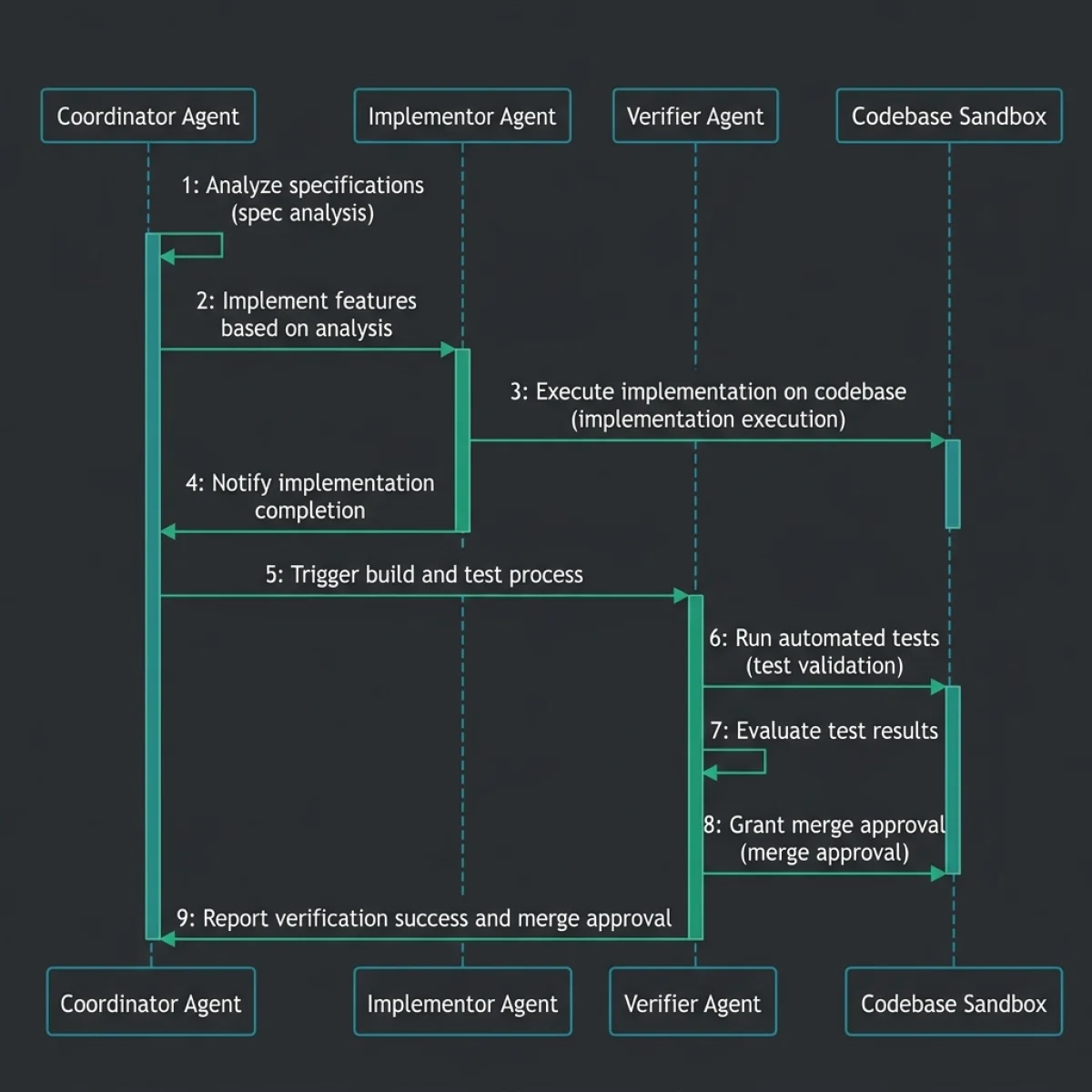
To scale SDD to complex, enterprise-level codebases, we use a multi-agent orchestration pattern. Rather than running a single general-purpose agent that reads prompts, modifies code, and validates tests in a single thread, the work is divided among three specialized agent roles: the Coordinator, the Implementor, and the Verifier.
Let us trace the orchestration flow:
1. The Coordinator Agent (The Project Manager)
The Coordinator acts as the central orchestrator and developer interface. It parses EARS specifications, maps file dependencies, creates the implementation plan, and breaks it down into atomic checklists intask.md.
- System Prompts: Configured with strict rules prioritizing planning, requirements analysis, and code safety. It has no tool access for editing source code.
- Model Selection: Runs on reasoning-optimized, high-parameter models (e.g., Claude 3.5 Sonnet or GPT-4o) capable of mapping abstract specifications to complex architecture designs.
- Responsibility: Manages the task state machine and coordinates inputs/outputs between the developer and the implementation team.
2. The Implementor Agent (The Coder)
The Implementor reads the implementation plan and the current active task fromtask.md. It writes code modifications, creates new files, and handles refactoring.
- System Prompts: Configured with a focus on code syntax, library reuse, and modular styling. It runs in a sandboxed container, with file write permissions restricted exclusively to the paths specified in the coordinator's implementation plan.
- Model Selection: Can run on smaller, fast, instruction-following models (e.g., Gemini 1.5 Flash or GPT-4o-mini) to minimize token latency.
- Responsibility: Implements business logic and runs local refactoring passes.
3. The Verifier Agent (The Quality Gate)
The Verifier runs unit tests, check styles, and validates that changes match the requirements.- System Prompts: Configured with a focus on verification, regression checking, and edge case analysis. It uses tools to run test suites, check linter outputs, and trace code coverage.
- Model Selection: Runs on analysis-focused models capable of mapping code blocks to EARS logical requirements.
- Responsibility: Enforces quality gates. If it detects a compilation error or test failure, it returns the logs to the Implementor, initiating a repair loop. Once all tasks are complete, the Verifier writes a walkthrough document summarizing the changes.
Spec-Driven Multi-Agent Coordinator Code
To demonstrate how to manage spec-driven agent lifecycles, let us review a complete, production-grade Node.js class SpecDrivenOrchestrator. This class parses EARS requirements, tracks implementation plans, manages task checklists, and runs verification gates.
/**
 * SpecDrivenOrchestrator
 * Production-ready coordinator class managing Spec-Driven Development lifecycles.
 * Integrates requirements validation, plan tracking, and automated verification.
 */
class SpecDrivenOrchestrator {
    constructor() {
        this.requirements = [];
        this.implementationPlan = null;
        this.tasks = [];
        this.validationLogs = [];
    }

    /**
     * Registers an EARS-compliant requirement.
     * @param {Object} req - The requirement object containing id, type, condition, response.
     */
    addRequirement(req) {
        const validTypes = ["Ubiquitous", "Event-Driven", "State-Driven", "Unwanted Behavior", "Option-Driven"];
        if (!validTypes.includes(req.type)) {
            throw new Error(`Invalid EARS requirement type: ${req.type}`);
        }
        this.requirements.push(req);
        console.log(`[ORCHESTRATOR][EARS-SPEC] Registered requirement: ${req.id}`);
    }

    /**
     * Registers the implementation plan.
     */
    setImplementationPlan(plan) {
        this.implementationPlan = {
            id: plan.id,
            modifiedFiles: new Set(plan.modifiedFiles),
            newFiles: new Set(plan.newFiles),
            status: "draft"
        };
    }

    /**
     * Registers a task in the task checklist.
     */
    addTask(taskId, description, targetFile) {
        this.tasks.push({
            id: taskId,
            description,
            targetFile,
            status: "pending"
        });
    }

    /**
     * Updates the status of a specific task.
     */
    updateTaskStatus(taskId, status) {
        const task = this.tasks.find(t => t.id === taskId);
        if (!task) {
            throw new Error(`Task ${taskId} not found.`);
        }
        task.status = status;
        console.log(`[ORCHESTRATOR][TASK-UPDATE] Task ${taskId} status set to: ${status}`);
    }

    /**
     * Validates that the implementation respects the plan boundaries and completes all tasks.
     * @param {Array} actualChanges - List of files modified during execution.
     * @returns {Object} Validation outcome report.
     */
    verifyExecutionGate(actualChanges) {
        const report = {
            passed: true,
            pendingTasks: [],
            outOfBoundsChanges: [],
            logs: []
        };

        // 1. Check if all registered tasks are marked completed
        const incompleteTasks = this.tasks.filter(t => t.status !== "completed");
        if (incompleteTasks.length > 0) {
            report.passed = false;
            report.pendingTasks = incompleteTasks.map(t => t.id);
            report.logs.push(`FAILED: ${incompleteTasks.length} tasks remain uncompleted.`);
        } else {
            report.logs.push("SUCCESS: All tasks in task.md marked completed.");
        }

        // 2. Check if modifications stayed within plan boundaries
        const allowedFiles = new Set([
            ...this.implementationPlan.modifiedFiles,
            ...this.implementationPlan.newFiles
        ]);

        for (const file of actualChanges) {
            if (!allowedFiles.has(file)) {
                report.passed = false;
                report.outOfBoundsChanges.push(file);
                report.logs.push(`FAILED: File modified outside plan boundaries: ${file}`);
            }
        }

        if (report.outOfBoundsChanges.length === 0) {
            report.logs.push("SUCCESS: All file edits stayed within implementation plan boundaries.");
        }

        this.validationLogs.push(report);
        return report;
    }
}

// Example usage demonstration
(async () => {
    const orchestrator = new SpecDrivenOrchestrator();

    // 1. Add EARS Specifications
    orchestrator.addRequirement({
        id: "REQ-001",
        type: "Event-Driven",
        condition: "When API received payload limit check request",
        response: "the gateway shall validate Content-Length header limits"
    });

    orchestrator.addRequirement({
        id: "REQ-002",
        type: "Unwanted Behavior",
        condition: "If Content-Length header is missing",
        response: "then the gateway shall reject with 411 Length Required"
    });

    // 2. Define Implementation Plan Boundaries
    orchestrator.setImplementationPlan({
        id: "IP-01",
        modifiedFiles: ["gateway/api.js", "gateway/middleware.js"],
        newFiles: ["gateway/validators.js"]
    });

    // 3. Define Tasks Checklist
    orchestrator.addTask("T-1", "Add length check validator module", "gateway/validators.js");
    orchestrator.addTask("T-2", "Wire validator middleware to routing", "gateway/middleware.js");

    // Simulate Agent execution progress
    console.log("\nStarting agent task execution simulation...");
    orchestrator.updateTaskStatus("T-1", "completed");
    orchestrator.updateTaskStatus("T-2", "completed");

    // 4. Verify Execution Gate
    console.log("\nRunning CI Spec-Drift Verification Gate...");

    // Test Case A: Valid execution (stayed in boundary, all tasks done)
    const mockChangesA = ["gateway/validators.js", "gateway/middleware.js"];
    const runA = orchestrator.verifyExecutionGate(mockChangesA);
    console.log("TEST CASE A RESULT:\n", JSON.stringify(runA, null, 2));

    // Test Case B: Spec violation (modified config/credentials.json without permission)
    console.log("\nTest Case B: File modified outside boundaries...");
    const mockChangesB = ["gateway/validators.js", "gateway/middleware.js", "config/credentials.json"];
    const runB = orchestrator.verifyExecutionGate(mockChangesB);
    console.log("TEST CASE B RESULT:\n", JSON.stringify(runB, null, 2));
})();
Spec-Drift and CI Verification Gates
The main challenge in Spec-Driven Development is preventing Spec-Drift. Spec-drift occurs when code changes diverge from the approved requirements and design documents during implementation. If an agent begins writing custom functions or changing files that were not specified in the implementation plan, it creates technical debt and bypasses the peer review process.
To prevent this drift, we enforce automated checks at the CI/CD pipeline level.
1. The AST Diff Spec Audit
When an agent submits a pull request, the CI environment compares the code diff against the approved implementation plan. The script parses the Git changes, extracting file paths and method signatures.- Syntactic Analysis: Using tools like Esprima or Babel parser, the CI scanner checks if new public functions or variables were added that do not map to the approved design.
- Boundary Checks: If the agent modified files outside the approved list (e.g., editing database routing helpers when the task only specified modifying front-end views), the gate fails, blocking the merge.
2. Task Checklist Validation
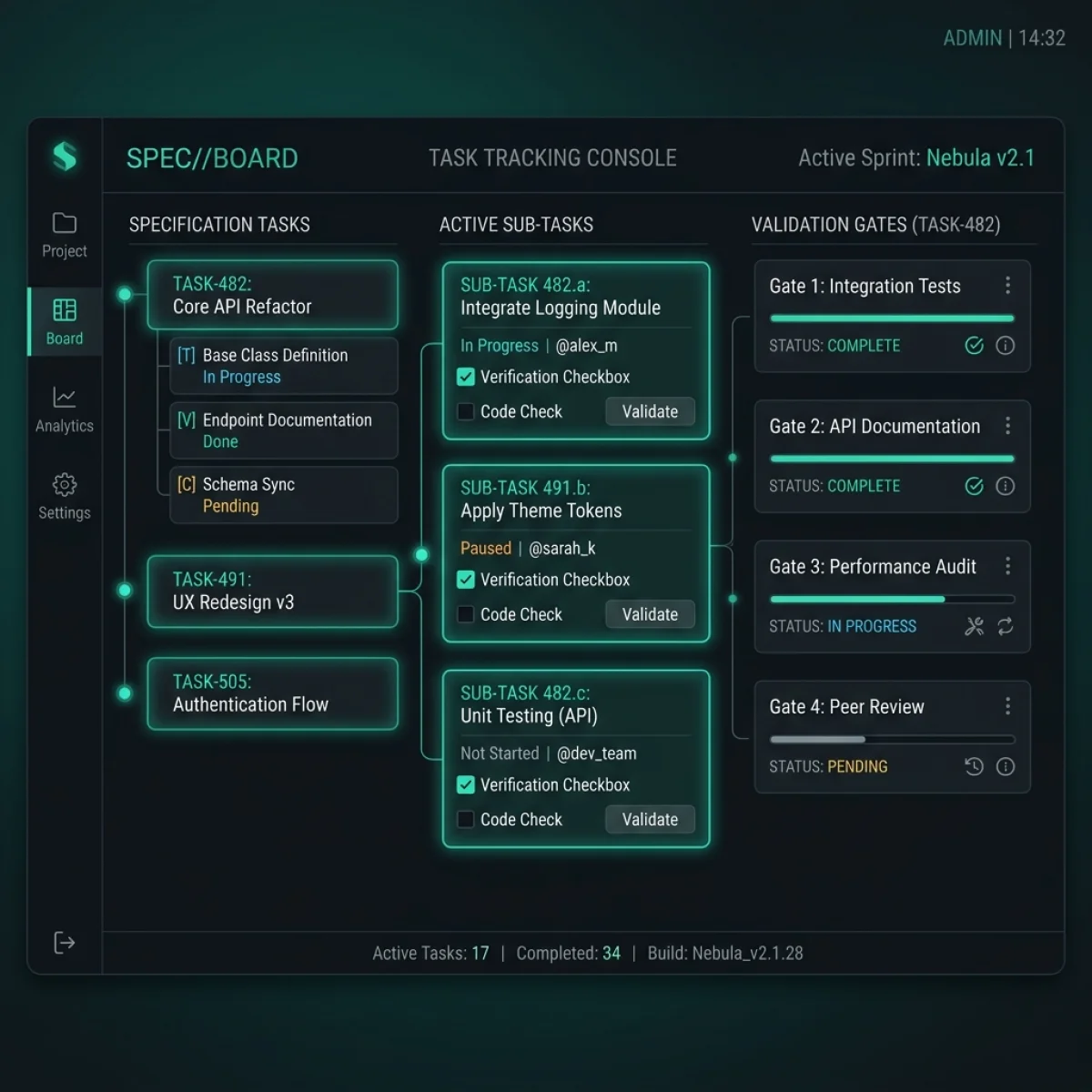
The CI pipeline parses thetask.md file in the branch. It matches the checked-off tasks against the registered items in the task manager.
- Checkbox Parsing: A script scans the file for unchecked markdown list items
[ ]or half-completed items[/]. - Integrity Check: If task items were deleted, reordered, or added without corresponding updates to the requirement specifications, the check fails.
3. Automated Local Rollbacks and Repair Loop
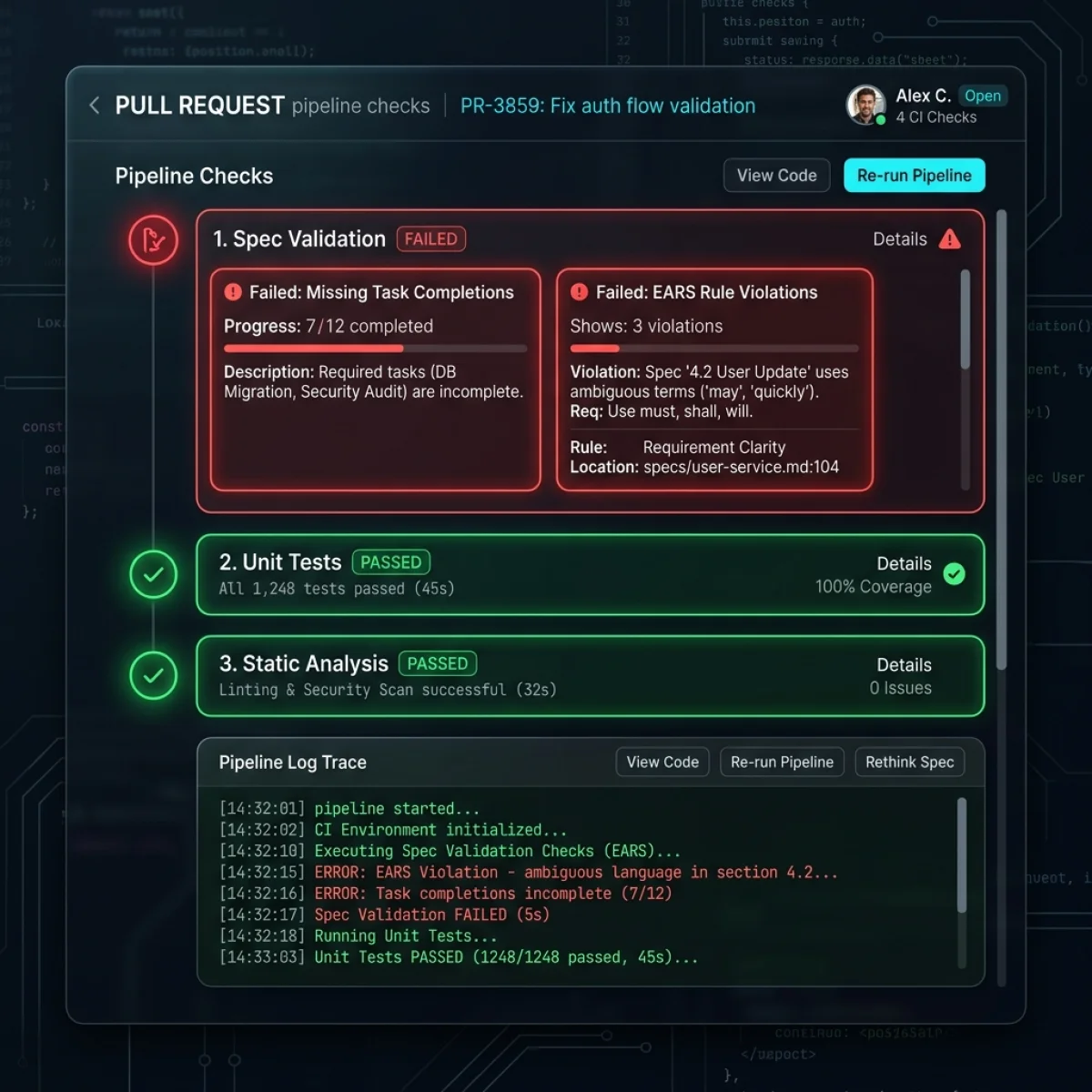
If the Verifier agent or CI pipeline detects a violation, the harness automatically rolls back the changes to the previous clean snapshot state. It feeds the static audit error back to the agent:ERROR: Spec validation gate failed.
File modified outside plan: /config/database.php
Please restore database config and limit edits to /gateway/api.js.This immediate feedback loop lets the agent know its boundaries, encouraging it to correct its path before submitting code for review.
Let us inspect a mockup of the pull request check console:
Let us view the active task tracking board:
The Four Key SDD Artifacts
To maintain alignment between the developer, the agent, and the codebase, SDD relies on four core artifacts:
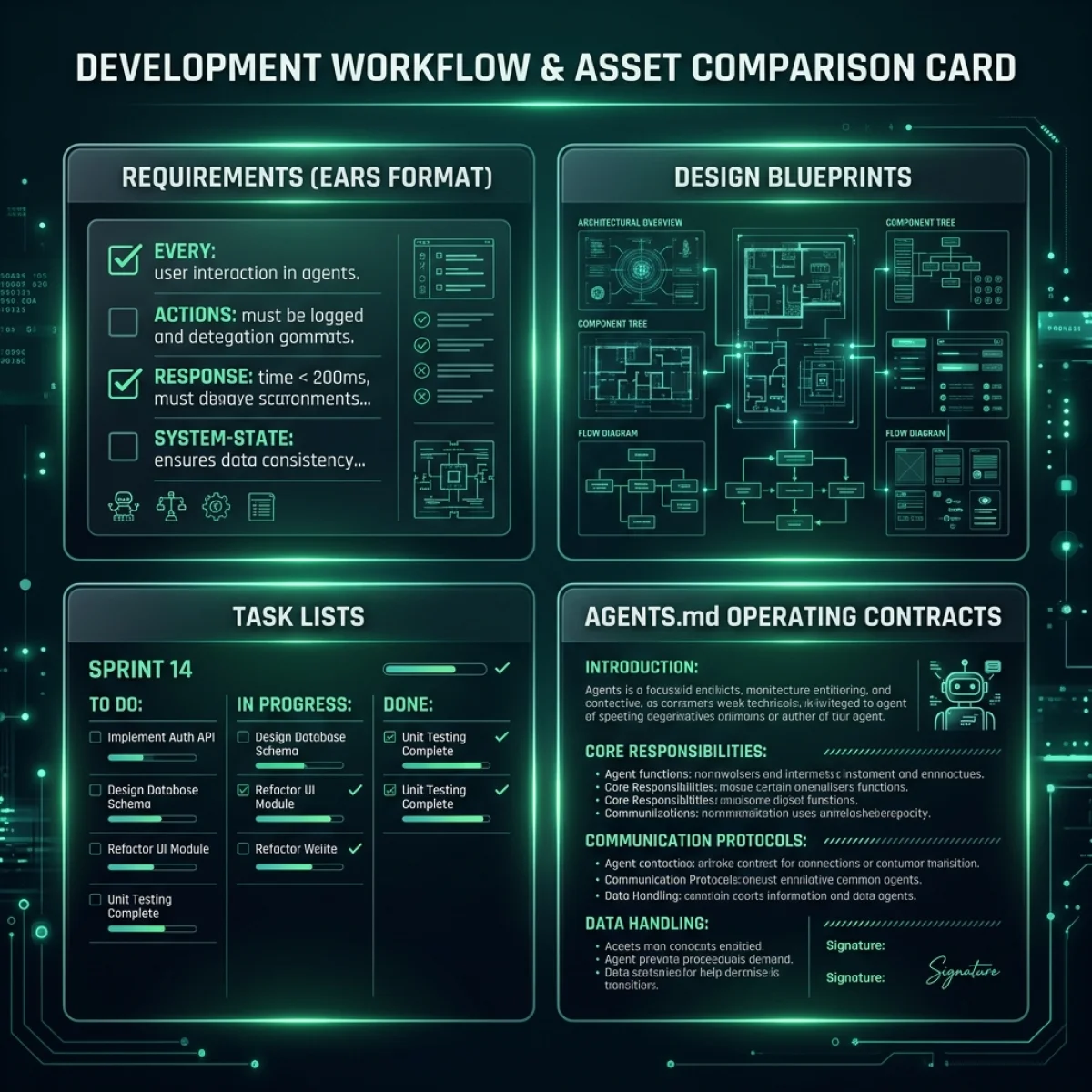
Let us summarize the role of each artifact:
| Artifact | Format | Primary Creator | Operational Role |
|---|---|---|---|
| Requirements Spec | Markdown (EARS format) | Developer / PM | Defines the what: conditional logic, limits, validations. |
| Implementation Plan | Markdown (implementation_plan.md) | Agent (Coordinator) | Defines the how: target files, new modules, test plans. |
| Task Checklist | Markdown (task.md) | Agent (Coordinator) | Manages memory on disk: atomic sub-tasks, completion states. |
| Operating Contract | Markdown (AGENTS.md) | Platform Architect | Defines the rules: path locks, sandbox policies, runtime boundaries. |
Defining the "Definition of Done" (DoD) for Agent PRs
For human developers, the "Definition of Done" (DoD) typically involves writing code, passing unit tests, writing documentation, and getting peer approval. When integrating autonomous agents, the DoD must be made formal and machine-enforced. Because agents lack human judgment, their work must be validated programmatically at each step of the pipeline.
A modern, spec-driven DoD for AI agents includes the following requirements:
- EARS Spec Alignment: Every requirement in the EARS spec must map to at least one test case in the test suite. If the agent adds a requirement without a test case, or vice versa, the PR validation check fails.
- Task Checklist Completeness: The
task.mdfile must be fully completed. The parser verifies that all checklist items are marked[x], and that no pending[ ]or[/]tasks remain. - AST Boundary Verification: The code changes must stay within the files and directories specified in the approved implementation plan. Any change to external files will automatically trigger a rebuild block.
- Linter and Style Synced: Code styling must match the repository standard exactly. The agent must run formatting scripts and fix all linter issues before submission.
- No Regressions on Core Metrics: The codebase must maintain performance baselines. The agent's changes must not degrade page load speeds, resource consumption, or API latency metrics.
Frequently Asked Questions (FAQ)
Q1: Does Spec-Driven Development require more work from developers?
In the short term, yes. Writing structured requirements using EARS notation and reviewing implementation plans takes more initial effort than typing brief chat prompts. However, this upfront investment pays off during implementation. By establishing clear boundaries and design constraints, you eliminate the debugging loops, random file rewrites, and logical regressions common in vibe coding workflows. For enterprise teams, this shift reduces senior developer review load, as PRs are pre-validated against the specification before human review.Q2: What happens if we need to change requirements mid-development?
In SDD, changing requirements is a structured process. Rather than explaining the change in a chat thread, you edit the requirements specification file (e.g.,requirements.md) in the branch. The coordinator agent detects the file change, updates the implementation plan, recalculates file dependencies, and updates the task checklist in task.md. This structured update ensures the agent's context remains consistent, preventing execution drift.
Q3: How does AGENTS.md prevent filesystem compromises?
TheAGENTS.md operating contract defines path locks and write restrictions. When the execution harness initializes the agent session, it parses these constraints and applies them at the container sandbox layer (e.g., using Docker volume read-only mounts or gVisor security profiles). If the agent attempts to modify a locked directory (such as security filters or credentials folders), the sandbox kernel blocks the write operation, independent of the model's instructions.
Q4: Can we use SDD with legacy codebases?
Yes. You do not need to write specifications for the entire legacy codebase. You adopt SDD incrementally by writing EARS specs specifically for the features or modules you are actively modifying. The coordinator agent maps only the dependencies related to those specs, leaving the rest of the legacy codebase untouched and protected from unintended modifications.Q5: How do we handle requirements that are difficult to write in EARS?
For qualitative requirements (like user interface layout, brand design, or motion feel), EARS templates can be supplemented with static visual assets. You can reference wireframe images, design token definitions, or screenshot mocks in the specification. The coordinator agent uses multi-modal vision models to compare its generated output against the visual guidelines, while the computational sensors verify the structural constraints.Q6: Can coordinator and implementor roles run on different models?
Yes, and this is a recommended best practice to optimize API cost and performance. The Coordinator role requires advanced reasoning, system context mapping, and design planning, making it a fit for larger models (like Claude 3.5 Sonnet). The Implementor role focuses on instruction-following and code generation within defined boundaries, allowing you to use faster, more cost-effective models (like Gemini 1.5 Flash) without sacrificing quality.Q7: How does Spec-Driven Development handle large database schema migrations?
In SDD, database schema updates are treated as first-class specification tasks. First, the EARS document specifies the structural change (e.g., "The system shall add column experience_years to settings table"). The Coordinator agent generates a migration plan and creates the corresponding SQL script under thedatabase/patches/ directory. Next, the Verifier executes database/apply_patches.php using the local PHP binary on the sandbox database to check constraints, indexing speeds, and query parsing behaviors. If the patch runs successfully, the Verifier marks the task as completed.
Q8: What role does natural language play if everything is spec-driven?
Natural language remains the primary tool for collaboration, brainstorming, and initial requirement discovery. The developer and the AI coordinate in natural language to refine the implementation plan or discuss edge cases. However, once the planning phase is completed and coding begins, natural language is translated into structured markdown contracts (task.md, AGENTS.md, and EARS specs) to eliminate semantic ambiguity and establish strict boundaries for the Implementor agent.
Q9: Can we use CI spec gates to measure overall developer velocity?
Yes. By tracking the number of tasks completed per implementation run and comparing them with build failures, engineering leaders can measure the efficiency of their coding agents. Analyzing task completion states ([ ] to [x]) and AST diff sizes provides clear metrics on agent productivity, helping teams optimize their context profiles, EARS templates, and model parameters. Over time, these metrics can be aggregated to perform statistical analysis on agent reliability, helping you identify which parts of the codebase trigger the highest rate of spec violations.
Additionally, this data helps teams refine their overall development workflows. By identifying common points of failure—such as specific modules that consistently result in sandbox write violations or schema checks that fail during the database migration phase—engineers can modify the system's global rules in AGENTS.md or provide better design templates, improving the reliability and speed of subsequent agent runs.
References & Industry Standards
- Linux Foundation AAIF: The AGENTS.md Operating Contract Standard for Autonomous Developer Agents. aaif.foundation
- EARS Specification Standards: Easy Approach to Requirements Syntax template specifications. ears-requirements.org
- GitHub Spec Kit Framework: Designing executable specification contracts for AI developer agents. github.com
- ContextOS Specification: Enforcing runtime context boundaries and tracking agentic drift. contextos.dev
Structured Metadata Schema (JSON-LD)
{
  "@context": "https://schema.org",
  "@type": "BlogPosting",
  "mainEntityOfPage": {
    "@type": "WebPage",
    "@id": "https://agiletechguru.com/blog/spec-driven-development-agents-md-constitution"
  },
  "headline": "Spec-Driven Development in 2026 — AGENTS.md, Executable Specs, and Stopping Agentic Drift",
  "description": "Vibe coding fails at scale. Learn how Spec-Driven Development using EARS notation, tasks.md registries, and the AGENTS.md constitution standard stops agentic drift in production.",
  "image": "https://agiletechguru.com/uploads/content/blog/spec-driven-development-agents-md-constitution/banner.webp",
  "author": {
    "@type": "Person",
    "name": "Vatsal Shah",
    "url": "https://shahvatsal.com"
  },
  "publisher": {
    "@type": "Organization",
    "name": "Agile Tech Guru",
    "logo": {
      "@type": "ImageObject",
      "url": "https://agiletechguru.com/assets/images/logo.png"
    }
  },
  "datePublished": "2026-07-17T00:00:00+05:30",
  "dateModified": "2026-07-17T00:00:00+05:30"
}