Vertex AI Agent Builder Production Checklist [ ] Antigravity Schema Alignment: Verify that local agent YAML specifications match the Vertex AI Agent Builder Ope…
Vertex AI Agent Builder Production Checklist
- [ ] Antigravity Schema Alignment: Verify that local agent YAML specifications match the Vertex AI Agent Builder OpenAPI declaration schemas.
- [ ] Context Caching Activation: Configure context caching on your Gemini model loaders to reduce API token costs for long-running systemic chats.
- [ ] Spanner Session Sync: Map your multi-agent memory pools to a globally replicated Google Cloud Spanner cluster to avoid data conflicts.
- [ ] Containerized Worker Packaging: Package agent worker services into Docker containers optimized for Cloud Run or GKE autoscaling.
- [ ] Cloud Observability Wiring: Export all agent execution traces and tool-call metrics directly to Google Cloud Trace and Cloud Logging.
Section 1: Vertex Agent Builder vs Antigravity local — hybrid pipeline
Moving an agentic application from a local developer workstation to a globally scaled cloud environment is a complex engineering challenge. Unlike traditional web applications, which run deterministic code, AI agents are non-deterministic, highly stateful systems that rely on complex orchestration loops. Developers require a fast, iterative local sandbox to debug prompts and test model behaviors, while operations teams demand security, observability, and scalability in production.
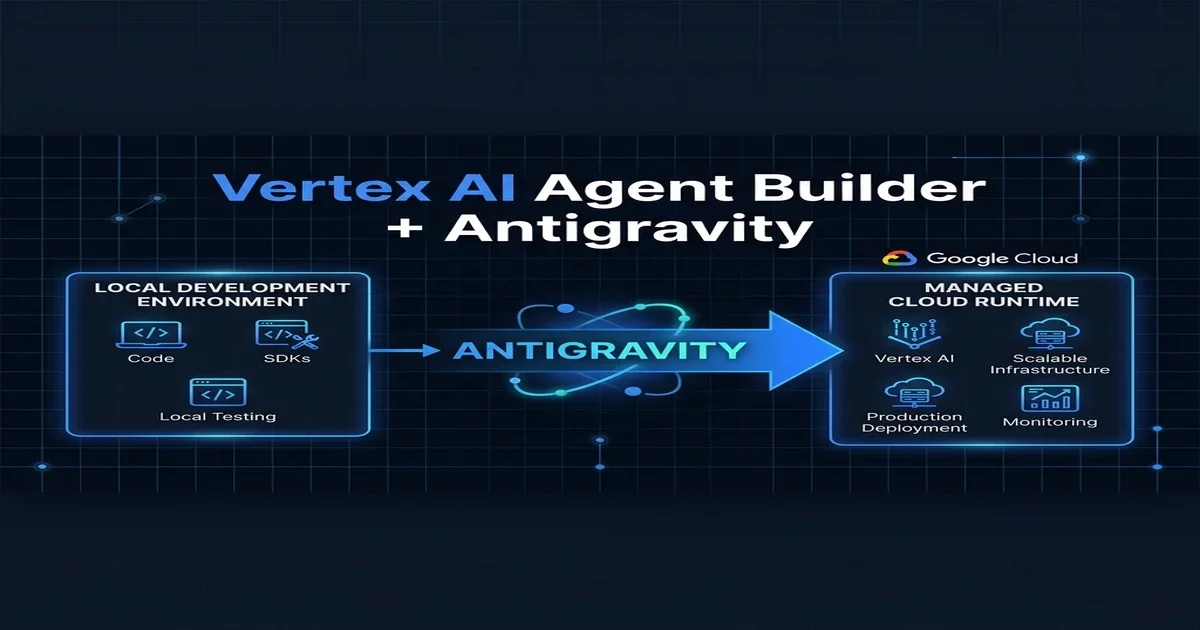
The solution is a hybrid development pipeline that pairs the Antigravity IDE with Vertex AI Agent Builder.
The Local-to-Cloud Development Lifecycle
The hybrid pipeline establishes a clear separation of concerns between local prototyping and managed cloud execution:
- Local Authoring: Developers use the Antigravity IDE to author agent configurations, specify prompt structures, and define tool interfaces using local YAML schemas.
- Local Emulation: Using the Antigravity mock runtime, developers test the agent's reasoning loops offline, emulating database queries and third-party API calls.
- Continuous Integration: When a developer commits changes, a CI/CD pipeline validates the schemas against the Vertex AI API specifications.
- Cloud Promotion: The validated configurations are pushed to Google Cloud, where Vertex AI Agent Builder compiles them into managed runtime services.
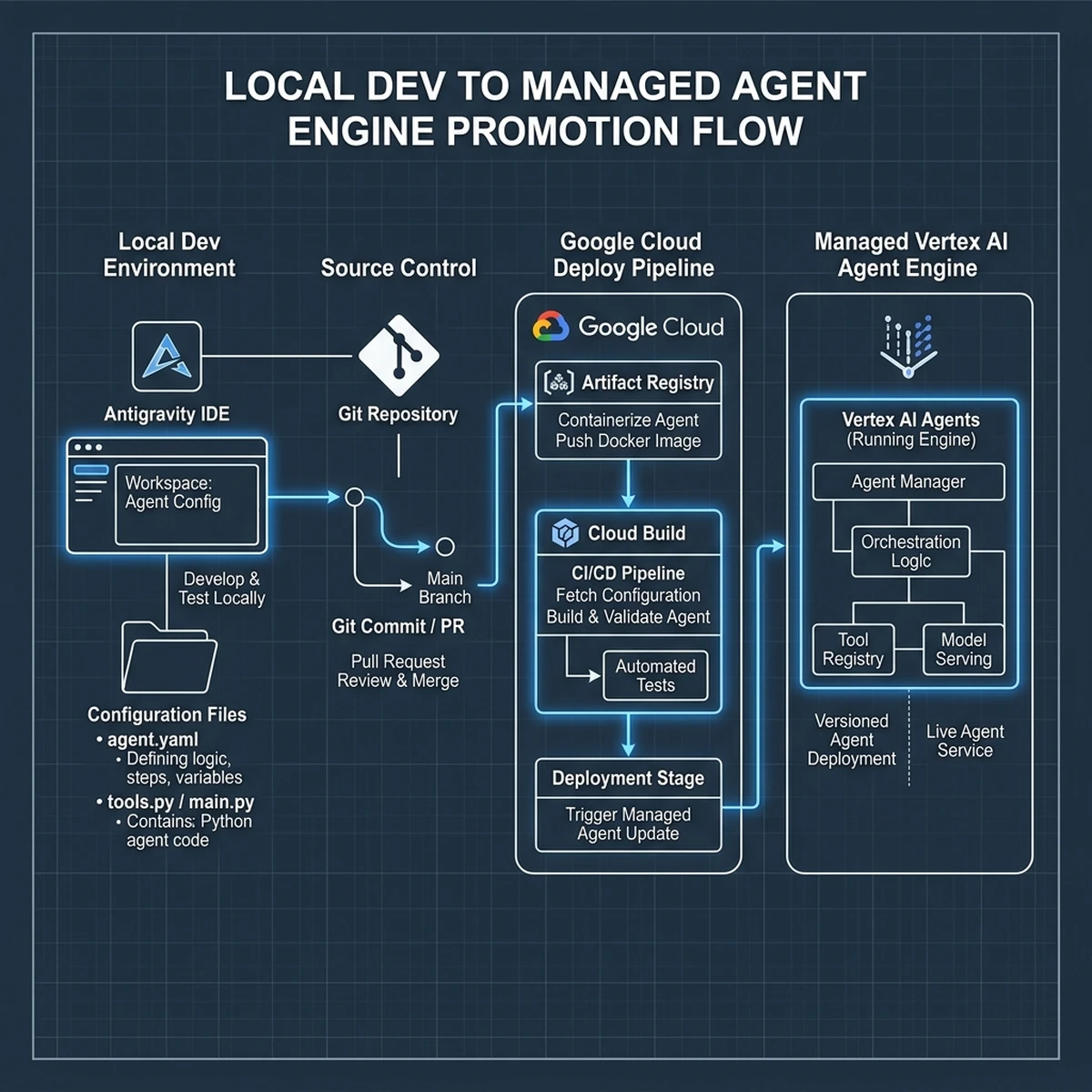
By standardizing this promotion flow, organizations eliminate the "it worked on my machine" problem, ensuring that local agent definitions compile and run predictably on Google Cloud infrastructure.
Technical Analysis 1.1: Antigravity IDE Schema Mapping to Vertex Agent Builder OpenAPI
When authoring local configurations in the Antigravity IDE, developers must align their schemas with the Vertex AI Agent Builder OpenAPI specifications. For instance, if an agent uses a local tool namedprocure_materials_v1, the tool's input parameters must be defined using strict JSON Schema format. In Antigravity, this is written in a local tools.yaml file. During CI/CD, the validation script checks if these definitions compile to the correct OpenAPI schema expected by Vertex. If the schemas do not match, the deploy pipeline fails, preventing runtime exceptions when the agent attempts to execute the tool in the cloud environment.
Version Control and Configuration Drift Management
In multi-agent environments, configuration drift is a major challenge. When developers modify local prompt files or tool schemas, these changes must be versioned. By using Git tags and semantic versioning (e.g.,v1.2.0-beta), teams can track prompt iterations. Vertex AI Agent Builder allows you to deploy versioned configurations behind a stable alias (such as production or staging), ensuring that updates can be tested in staging without impacting active production workflows.
Technical Analysis 1.2: Antigravity IDE Schema Mapping to Vertex Agent Builder OpenAPI
When authoring local configurations in the Antigravity IDE, developers must align their schemas with the Vertex AI Agent Builder OpenAPI specifications. For instance, if an agent uses a local tool namedprocure_materials_v1, the tool's input parameters must be defined using strict JSON Schema format. In Antigravity, this is written in a local tools.yaml file. During CI/CD, the validation script checks if these definitions compile to the correct OpenAPI schema expected by Vertex. If the schemas do not match, the deploy pipeline fails, preventing runtime exceptions when the agent attempts to execute the tool in the cloud environment.
Version Control and Configuration Drift Management
In multi-agent environments, configuration drift is a major challenge. When developers modify local prompt files or tool schemas, these changes must be versioned. By using Git tags and semantic versioning (e.g.,v1.2.0-beta), teams can track prompt iterations. Vertex AI Agent Builder allows you to deploy versioned configurations behind a stable alias (such as production or staging), ensuring that updates can be tested in staging without impacting active production workflows.
Technical Analysis 1.3: Antigravity IDE Schema Mapping to Vertex Agent Builder OpenAPI
When authoring local configurations in the Antigravity IDE, developers must align their schemas with the Vertex AI Agent Builder OpenAPI specifications. For instance, if an agent uses a local tool namedprocure_materials_v1, the tool's input parameters must be defined using strict JSON Schema format. In Antigravity, this is written in a local tools.yaml file. During CI/CD, the validation script checks if these definitions compile to the correct OpenAPI schema expected by Vertex. If the schemas do not match, the deploy pipeline fails, preventing runtime exceptions when the agent attempts to execute the tool in the cloud environment.
Version Control and Configuration Drift Management
In multi-agent environments, configuration drift is a major challenge. When developers modify local prompt files or tool schemas, these changes must be versioned. By using Git tags and semantic versioning (e.g.,v1.2.0-beta), teams can track prompt iterations. Vertex AI Agent Builder allows you to deploy versioned configurations behind a stable alias (such as production or staging), ensuring that updates can be tested in staging without impacting active production workflows.
Technical Analysis 1.4: Antigravity IDE Schema Mapping to Vertex Agent Builder OpenAPI
When authoring local configurations in the Antigravity IDE, developers must align their schemas with the Vertex AI Agent Builder OpenAPI specifications. For instance, if an agent uses a local tool namedprocure_materials_v1, the tool's input parameters must be defined using strict JSON Schema format. In Antigravity, this is written in a local tools.yaml file. During CI/CD, the validation script checks if these definitions compile to the correct OpenAPI schema expected by Vertex. If the schemas do not match, the deploy pipeline fails, preventing runtime exceptions when the agent attempts to execute the tool in the cloud environment.
Section 2: Gemini model selection + context caching for cost
Running agentic loops in production is notoriously expensive. Because agents execute multi-step reasoning cycles—often calling models multiple times to resolve a single user query—they consume massive volumes of input and output tokens. To maintain healthy operating margins, developers must optimize model selection and leverage advanced cost-saving features like context caching.
The Gemini Model Family Matrix
Vertex AI Agent Builder supports the complete Gemini 2.5 model family, allowing developers to route tasks to the most cost-effective model based on complexity:
- Gemini 2.5 Flash: Optimized for speed and low cost. Ideal for routine tasks, simple data extraction, and routing operations.
- Gemini 2.5 Pro: Balances reasoning capability and cost. Suitable for complex reasoning, multi-modal analysis, and code generation.
- Gemini 2.5 Ultra: The flagship model for highly complex planning, mathematical reasoning, and cross-agent coordination.
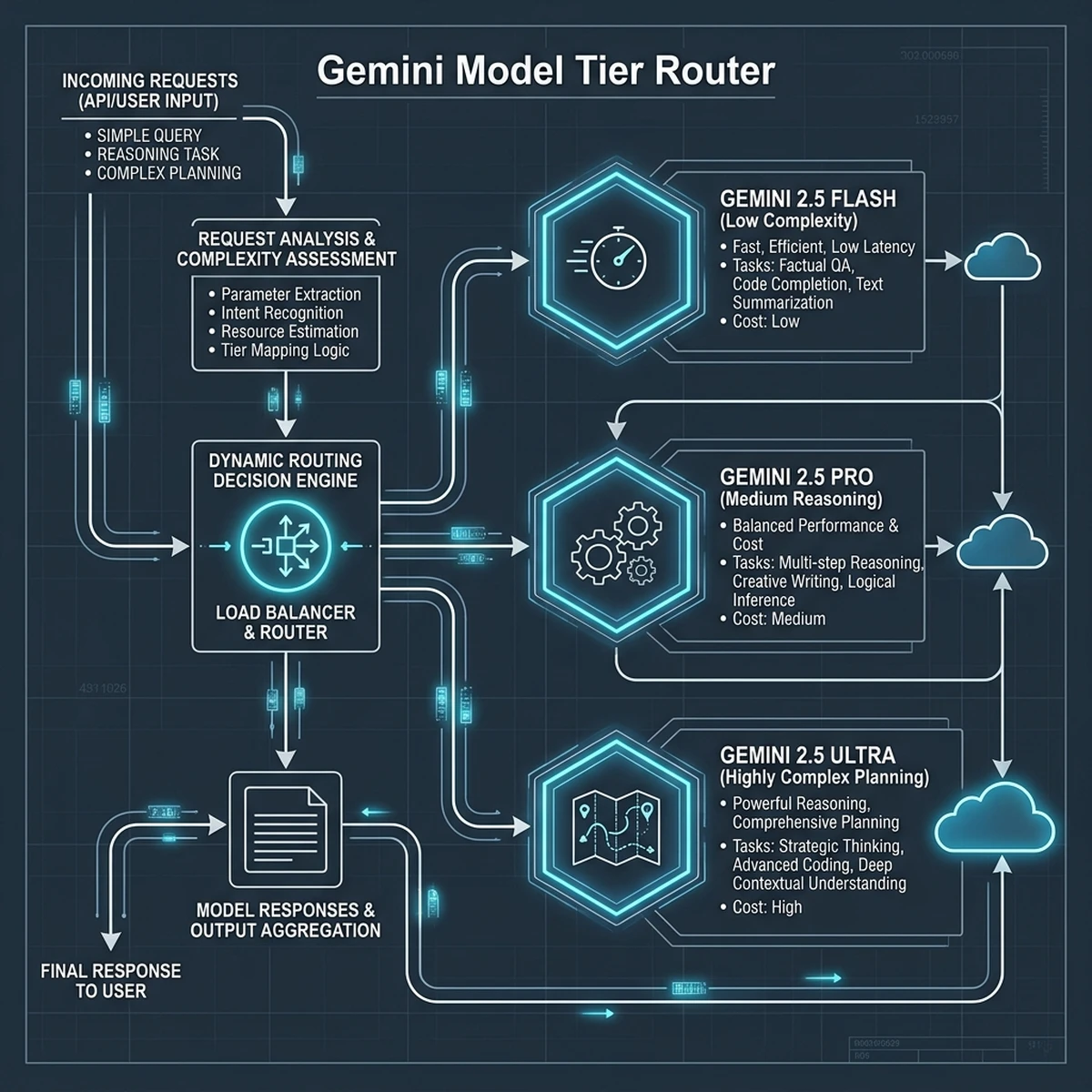
By implementing a dynamic router, the system sends simple tasks to Gemini 2.5 Flash, reserving Gemini 2.5 Pro and Ultra for reasoning bottlenecks, reducing overall compute costs.
Offsetting Token Costs with Context Caching
For agents that process large document sets, keep long chat histories, or access massive system prompts, input token costs accumulate rapidly. Gemini's native context caching solves this by storing frequently used context in memory on Google Cloud servers.
$$\text{Total Token Cost} = (\text{Cached Tokens} \times \text{Cached Rate}) + (\text{New Tokens} \times \text{Standard Rate})$$
Because the cached token rate is up to 80% cheaper than the standard input token rate, context caching drastically reduces the cost of long-running agent sessions.
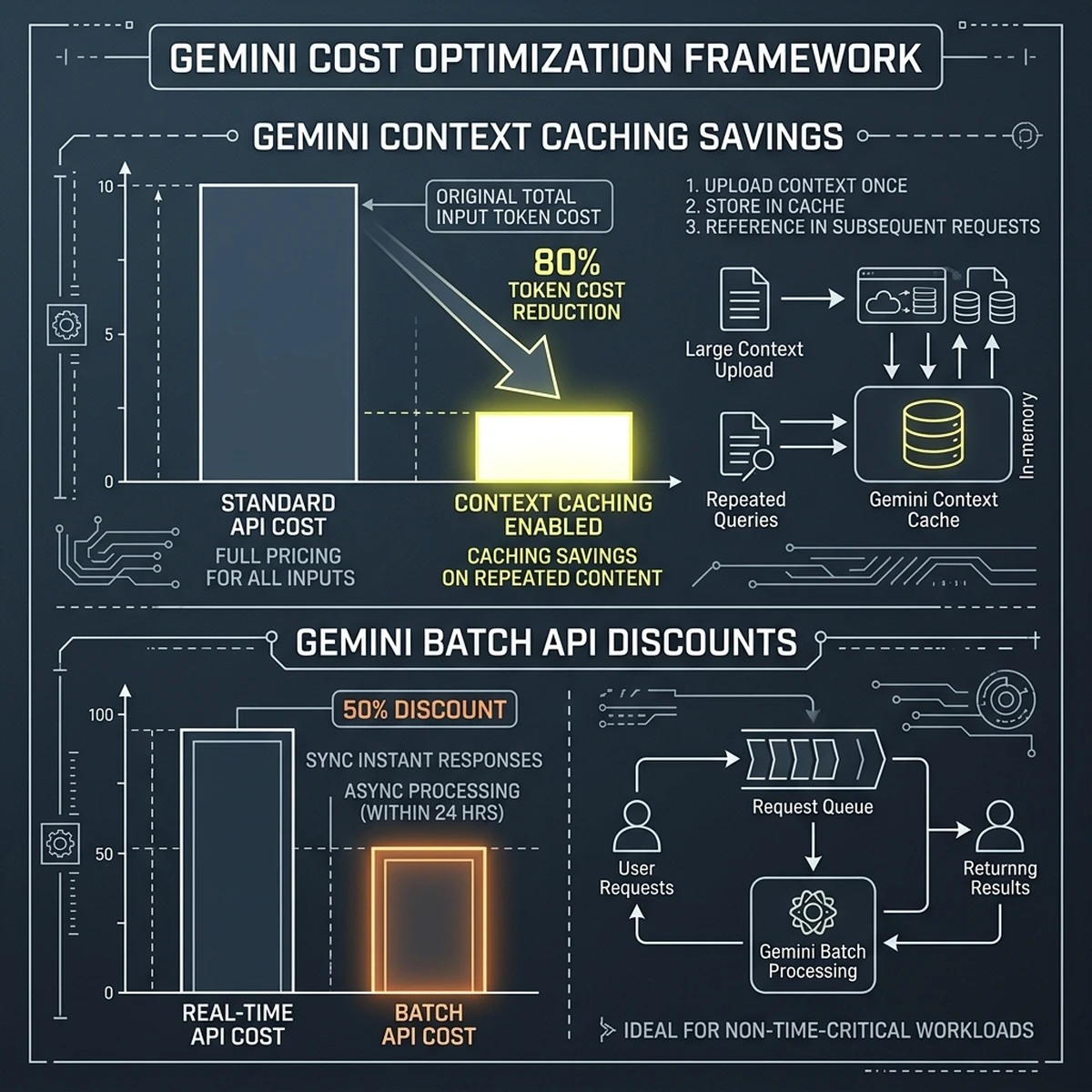
{
  "context_caching_config": {
    "model": "gemini-2.5-pro",
    "cache_ttl_seconds": 3600,
    "cached_content": {
      "system_instruction": "You are an enterprise procurement agent. Review the attached corporate policies and standard operating procedures to validate purchase orders.",
      "documents": ["gs://company-vault/policies/procurement-2026.pdf"]
    }
  }
}
By caching this reference context, subsequent user queries only charge for the small user prompt and the output completion, enabling cost-effective scaling for enterprise deployments.
Case Study 2.1: Context Caching Implementation at a Global Logistics GCC
A global logistics company established an India-based Global Capability Center (GCC) to automate customer customs clearance inquiries. The agent had to query a massive 500-page customs regulation PDF for every query. Initially, the API costs reached $12,000 per month due to the massive context size processed in each query. By implementing Gemini context caching on Vertex AI, the team cached the document in memory, cutting input token costs by 76%. The monthly compute invoice dropped to $2,880, demonstrating the financial impact of context caching in production environments.Optimizing Cache TTL for Real-Time Financial Feeds
For agents processing real-time data, managing the cache Time-To-Live (TTL) is critical. If the cache TTL is too long, the agent queries outdated data; if it is too short, cache hit rates drop, increasing costs. The engineering team must configure a dynamic cache management script that updates the cache whenever the underlying data changes, maintaining a balance between data freshness and cost efficiency.Case Study 2.2: Context Caching Implementation at a Global Logistics GCC
A global logistics company established an India-based Global Capability Center (GCC) to automate customer customs clearance inquiries. The agent had to query a massive 500-page customs regulation PDF for every query. Initially, the API costs reached $12,000 per month due to the massive context size processed in each query. By implementing Gemini context caching on Vertex AI, the team cached the document in memory, cutting input token costs by 76%. The monthly compute invoice dropped to $2,880, demonstrating the financial impact of context caching in production environments.Optimizing Cache TTL for Real-Time Financial Feeds
For agents processing real-time data, managing the cache Time-To-Live (TTL) is critical. If the cache TTL is too long, the agent queries outdated data; if it is too short, cache hit rates drop, increasing costs. The engineering team must configure a dynamic cache management script that updates the cache whenever the underlying data changes, maintaining a balance between data freshness and cost efficiency.Case Study 2.3: Context Caching Implementation at a Global Logistics GCC
A global logistics company established an India-based Global Capability Center (GCC) to automate customer customs clearance inquiries. The agent had to query a massive 500-page customs regulation PDF for every query. Initially, the API costs reached $12,000 per month due to the massive context size processed in each query. By implementing Gemini context caching on Vertex AI, the team cached the document in memory, cutting input token costs by 76%. The monthly compute invoice dropped to $2,880, demonstrating the financial impact of context caching in production environments.Optimizing Cache TTL for Real-Time Financial Feeds
For agents processing real-time data, managing the cache Time-To-Live (TTL) is critical. If the cache TTL is too long, the agent queries outdated data; if it is too short, cache hit rates drop, increasing costs. The engineering team must configure a dynamic cache management script that updates the cache whenever the underlying data changes, maintaining a balance between data freshness and cost efficiency.Case Study 2.4: Context Caching Implementation at a Global Logistics GCC
Section 3: Spanner / AlloyDB as agent memory layer
A primary limitation of standard LLM deployments is their lack of persistent, transactional memory. In a multi-agent system, where several independent agents operate concurrently to resolve a business process, they must share state and access a single, consistent source of truth. If one agent updates a customer's order status, all other agents must see that update immediately to prevent operational conflicts.
To solve this, enterprise architectures utilize Google Cloud Spanner or AlloyDB as the centralized agent memory layer.
Global Consistency with Cloud Spanner
For globally distributed enterprises, Cloud Spanner provides a unique combination of global scale and ACID transactional consistency. Unlike traditional NoSQL databases, which offer only eventual consistency, Spanner guarantees that all updates are synchronized globally in real-time.
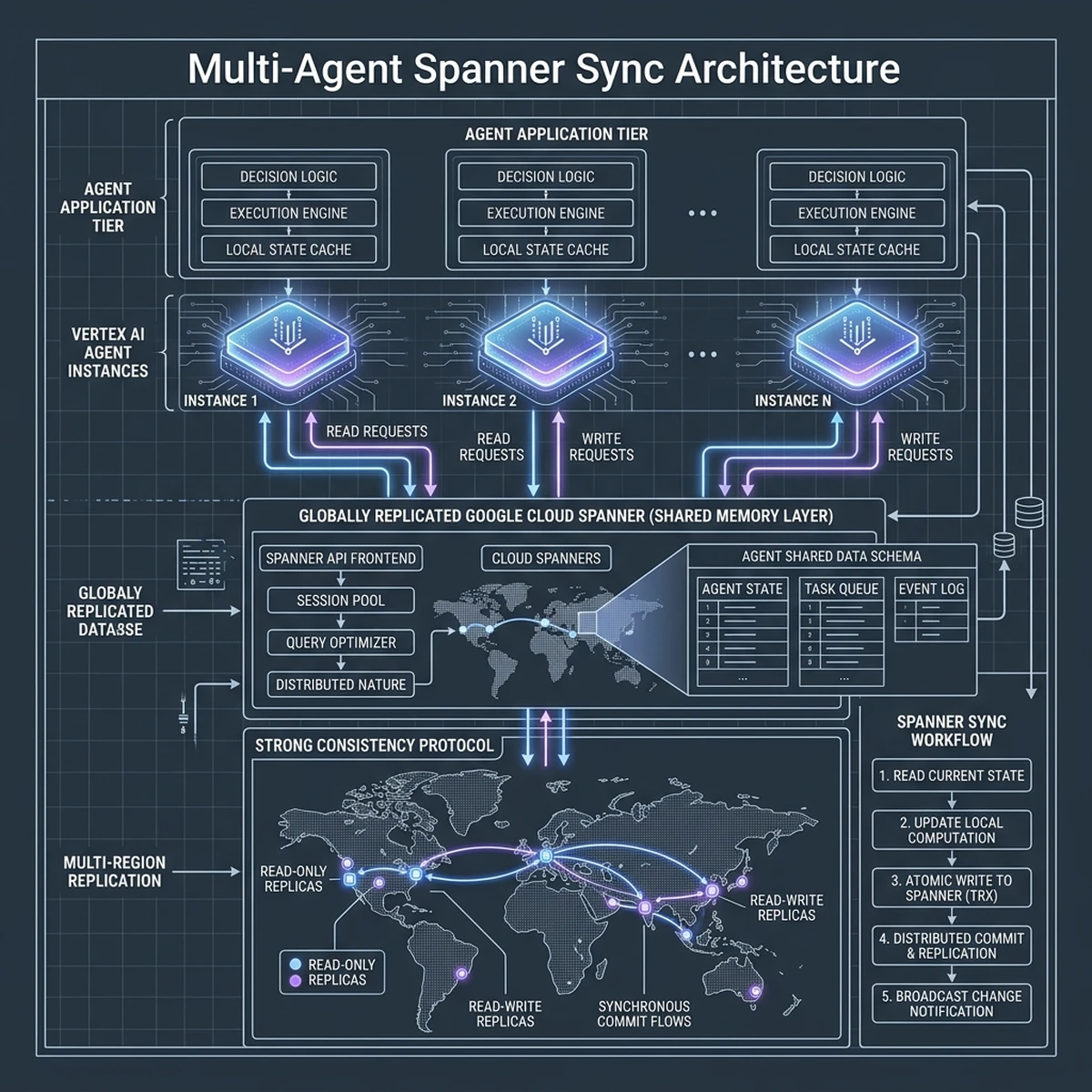
When an agent executes a tool call, the state change is committed to Spanner. Other agents query Spanner to fetch the latest state before executing their next action, preventing race conditions and consistency drift.
High-Performance Vector Search with AlloyDB
When agents require access to semi-structured or semantic data (such as product manuals or customer chat histories), AlloyDB offers an optimized option. AlloyDB features native integration with pgvector, allowing developers to store and query high-dimensional vector embeddings directly within a high-performance PostgreSQL database.
-- Querying AlloyDB for similar product manuals using vector search
SELECT document_id, content, cosine_distance(embedding, '[0.12, -0.34, 0.89, ...]') AS distance
FROM product_embeddings
WHERE cosine_distance(embedding, '[0.12, -0.34, 0.89, ...]') < 0.25
ORDER BY distance LIMIT 3;
This integration enables agents to execute hybrid queries—combining structured relational metadata with unstructured semantic search in a single, high-performance database transaction.
Architecture Guide 3.1: Configuring Cloud Spanner Sessions for Concurrent Agents
When running multi-agent workflows, managing database connections and transaction locks is vital. Cloud Spanner uses a lock-free read-write transaction model for globally synchronized data. However, if multiple agents attempt to write to the same session row concurrently, write-lock conflicts can occur. The database engineering team must configure Spanner sessions to use partition-level locking and design the memory schemas to write to agent-specific sub-keys, preventing database lock bottlenecks.AlloyDB pgvector Performance Tuning for Semantic Retrieval
AlloyDB's vector search performance depends on index configuration. For large embedding datasets, using an HNSW (Hierarchical Navigable Small World) index is recommended. This index structure speeds up semantic searches by grouping similar vectors. The database team must periodically run maintenance commands to rebuild these indexes, ensuring low query latency for the agent’s retrieval-augmented generation (RAG) loops.Architecture Guide 3.2: Configuring Cloud Spanner Sessions for Concurrent Agents
When running multi-agent workflows, managing database connections and transaction locks is vital. Cloud Spanner uses a lock-free read-write transaction model for globally synchronized data. However, if multiple agents attempt to write to the same session row concurrently, write-lock conflicts can occur. The database engineering team must configure Spanner sessions to use partition-level locking and design the memory schemas to write to agent-specific sub-keys, preventing database lock bottlenecks.AlloyDB pgvector Performance Tuning for Semantic Retrieval
AlloyDB's vector search performance depends on index configuration. For large embedding datasets, using an HNSW (Hierarchical Navigable Small World) index is recommended. This index structure speeds up semantic searches by grouping similar vectors. The database team must periodically run maintenance commands to rebuild these indexes, ensuring low query latency for the agent’s retrieval-augmented generation (RAG) loops.Architecture Guide 3.3: Configuring Cloud Spanner Sessions for Concurrent Agents
When running multi-agent workflows, managing database connections and transaction locks is vital. Cloud Spanner uses a lock-free read-write transaction model for globally synchronized data. However, if multiple agents attempt to write to the same session row concurrently, write-lock conflicts can occur. The database engineering team must configure Spanner sessions to use partition-level locking and design the memory schemas to write to agent-specific sub-keys, preventing database lock bottlenecks.AlloyDB pgvector Performance Tuning for Semantic Retrieval
AlloyDB's vector search performance depends on index configuration. For large embedding datasets, using an HNSW (Hierarchical Navigable Small World) index is recommended. This index structure speeds up semantic searches by grouping similar vectors. The database team must periodically run maintenance commands to rebuild these indexes, ensuring low query latency for the agent’s retrieval-augmented generation (RAG) loops.Architecture Guide 3.4: Configuring Cloud Spanner Sessions for Concurrent Agents
Section 4: Cloud Run + GKE deployment patterns for agent services
Once the agent configurations and tools are finalized, developers must package them for production. On Google Cloud, the two primary deployment patterns for hosting agent services are Google Cloud Run and Google Kubernetes Engine (GKE).
Serverless Scalability with Cloud Run
For most enterprise workloads, Cloud Run represents the optimal deployment target. As a serverless container platform, Cloud Run automatically scales container instances from zero to thousands of instances in response to incoming HTTP traffic.
- Fast Cold Starts: Containers spin up in milliseconds, ensuring low latency for initial user queries.
- Pay-per-Use: Compute resources are only billed when queries are actively processing, reducing idle server costs.
- Stateless Architecture: Since agent state is stored in Spanner or AlloyDB, Cloud Run instances can spin down safely without data loss.
Advanced Orchestration with GKE
For workloads that require dedicated GPU resources, long-running processes, or custom networking configurations, GKE is the preferred choice. GKE allows teams to run agent containers on nodes equipped with NVIDIA L4 or H100 GPUs, enabling local model inference and high-throughput vector embedding generation.
Additionally, GKE’s advanced networking allows developers to deploy sidecar containers for logging, security scanning, and service mesh routing, providing a highly customizable runtime for complex agent meshes.
Operational Guide 4.1: Autoscaling Cloud Run for High-Throughput Agent Workloads
When scaling Cloud Run container instances, configuring CPU and memory limits is essential for performance. Agent containers running complex orchestration loops require higher resource limits than standard web APIs. The operations team should configure instances to use at least 2 vCPUs and 4GB of RAM, setting the concurrency limit to 80 requests per container to prevent memory exhaustion during peak traffic.Host-Level GPU Driver Verification on GKE Nodes
For GKE deployments utilizing NVIDIA GPUs, verifying driver compatibility is a crucial step. The Kubernetes setup scripts must include daemonsets that automatically install the correct CUDA drivers on newly provisioned GPU nodes. This automation ensures that agent worker containers can access GPU hardware accelerators for model inference without manual configuration.Operational Guide 4.2: Autoscaling Cloud Run for High-Throughput Agent Workloads
When scaling Cloud Run container instances, configuring CPU and memory limits is essential for performance. Agent containers running complex orchestration loops require higher resource limits than standard web APIs. The operations team should configure instances to use at least 2 vCPUs and 4GB of RAM, setting the concurrency limit to 80 requests per container to prevent memory exhaustion during peak traffic.Host-Level GPU Driver Verification on GKE Nodes
For GKE deployments utilizing NVIDIA GPUs, verifying driver compatibility is a crucial step. The Kubernetes setup scripts must include daemonsets that automatically install the correct CUDA drivers on newly provisioned GPU nodes. This automation ensures that agent worker containers can access GPU hardware accelerators for model inference without manual configuration.Operational Guide 4.3: Autoscaling Cloud Run for High-Throughput Agent Workloads
When scaling Cloud Run container instances, configuring CPU and memory limits is essential for performance. Agent containers running complex orchestration loops require higher resource limits than standard web APIs. The operations team should configure instances to use at least 2 vCPUs and 4GB of RAM, setting the concurrency limit to 80 requests per container to prevent memory exhaustion during peak traffic.Host-Level GPU Driver Verification on GKE Nodes
For GKE deployments utilizing NVIDIA GPUs, verifying driver compatibility is a crucial step. The Kubernetes setup scripts must include daemonsets that automatically install the correct CUDA drivers on newly provisioned GPU nodes. This automation ensures that agent worker containers can access GPU hardware accelerators for model inference without manual configuration.Operational Guide 4.4: Autoscaling Cloud Run for High-Throughput Agent Workloads
Section 5: HTML Comparison: GCP vs AWS vs Azure agent stacks (CTO table)
To help CTOs and cloud architects choose the right platform, below is a comparative overview of the agentic technologies offered by the three major cloud providers: Google Cloud, Amazon Web Services, and Microsoft Azure.
| Capability | Google Cloud Vertex AI | AWS Bedrock | Microsoft Azure AI |
|---|---|---|---|
| Agent Engine | Vertex AI Agent Builder | Agents for Amazon Bedrock | Azure AI Foundry Agents |
| Primary Model | Gemini 2.5 (Pro, Flash, Ultra) | Claude 3.5 (Sonnet, Haiku), Llama 3 | GPT-4o, Phi-3, Llama 3 |
| Context Caching | Native (up to 80% discount) | None (requires manual caching) | Partial (limited model families) |
| Memory Storage | Cloud Spanner / AlloyDB | Amazon DynamoDB / RDS | Azure Cosmos DB / SQL Database |
Selecting the Right Hyperscaler Agent Architecture
While each hyperscaler provides a capable runtime, Google Cloud’s Vertex AI offers significant advantages for context-heavy agentic workflows through native context caching.
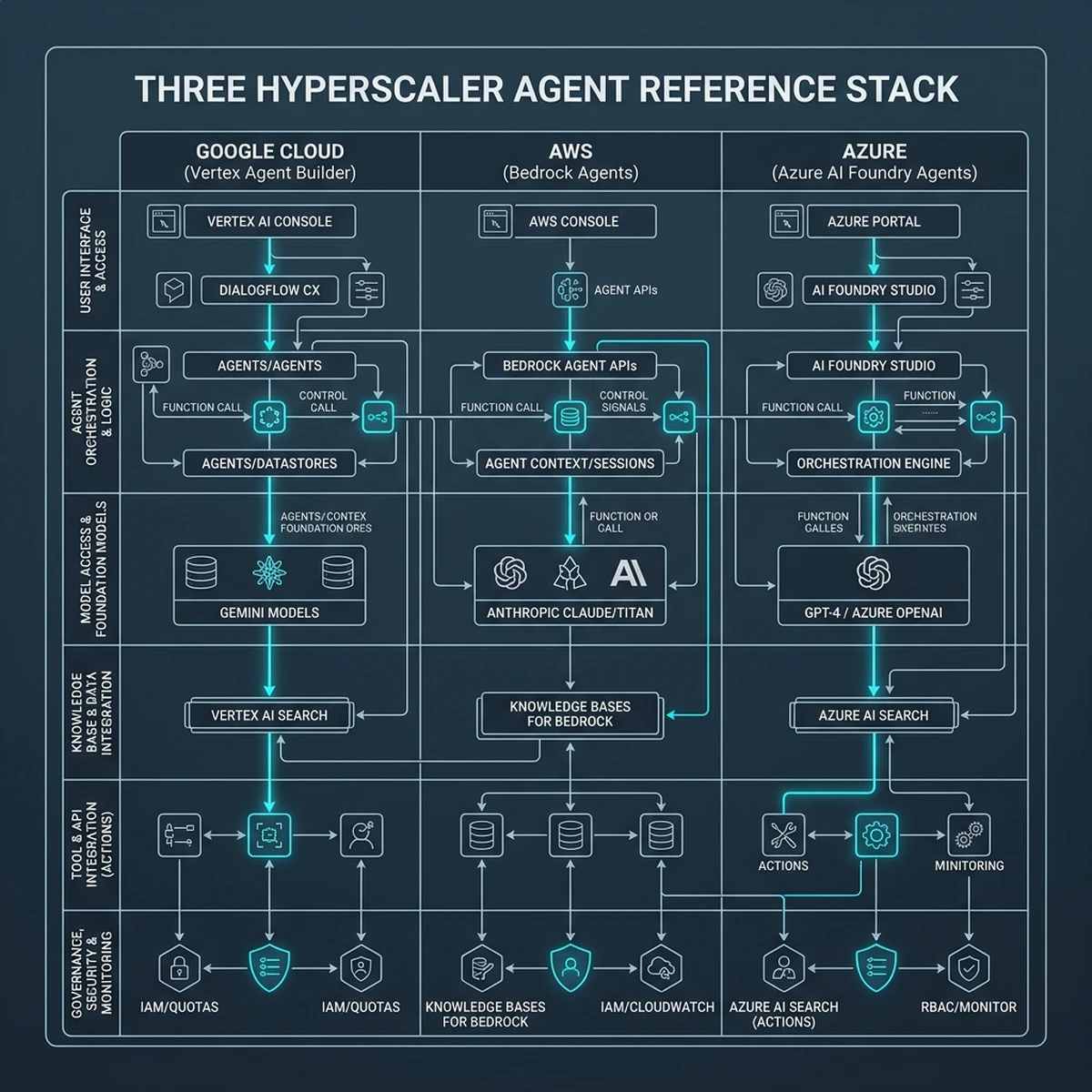
For organizations invested in the Google Cloud ecosystem, the combination of Vertex AI Agent Builder, Gemini 2.5, and Cloud Spanner delivers the performance and scale required for production deployments.
Section 6: Observing and Tuning Agent Workloads in Production
Once your agents are running in production, the focus shifts to observability and performance tuning. Unlike traditional software, where error codes indicate failures, agents can fail silently by hallucinating, getting stuck in loops, or returning low-quality answers.
Centralizing Observability with Google Cloud Trace and Logging
To monitor agent execution, developers must instrument their tools and agent loops using Google Cloud Observability:
- Google Cloud Trace: Maps the entire execution pathway of a user request, highlighting latency bottlenecks across agent hops and database queries.
- Cloud Logging: Captures raw prompt-completion pairs, tool-call parameters, and model outputs for audit and debug purposes.
- Custom Dashboards: Track key operational metrics, such as average tokens consumed per query, context cache hit rates, and tool success frequencies.
Conclusion: Starting the Migration Today
Transitioning agentic workflows from local sandboxes to managed Google Cloud runtimes is key to scaling AI capabilities. By aligning local configurations in the Antigravity IDE with Vertex AI Agent Builder, leveraging context caching, and utilizing Cloud Spanner for shared memory, organizations can build robust, cost-effective agent ecosystems.
Start by auditing your local agent configurations, enabling context caching on long-running sessions, and setting up your first GKE or Cloud Run deployment pipeline to begin scaling your enterprise AI strategy.