STRATEGIC OVERVIEW The Open-Source Sovereign Stack: Self-Hosting Llama 4 and MCP By Vatsal Shah · June 12, 2026 · AI / Infrastructure Table of Contents 1. Intro…
Introduction: The Case for the Sovereign Stack
As enterprise AI adoption transitions from basic chat assistants to autonomous agent fleets, the underlying infrastructure is facing a critical bottleneck. Relying on third-party cloud APIs (such as OpenAI, Anthropic, or proprietary model hosts) introduces three structural liabilities: data leakage, unpredictable runtime costs, and WAN-dependent latency.
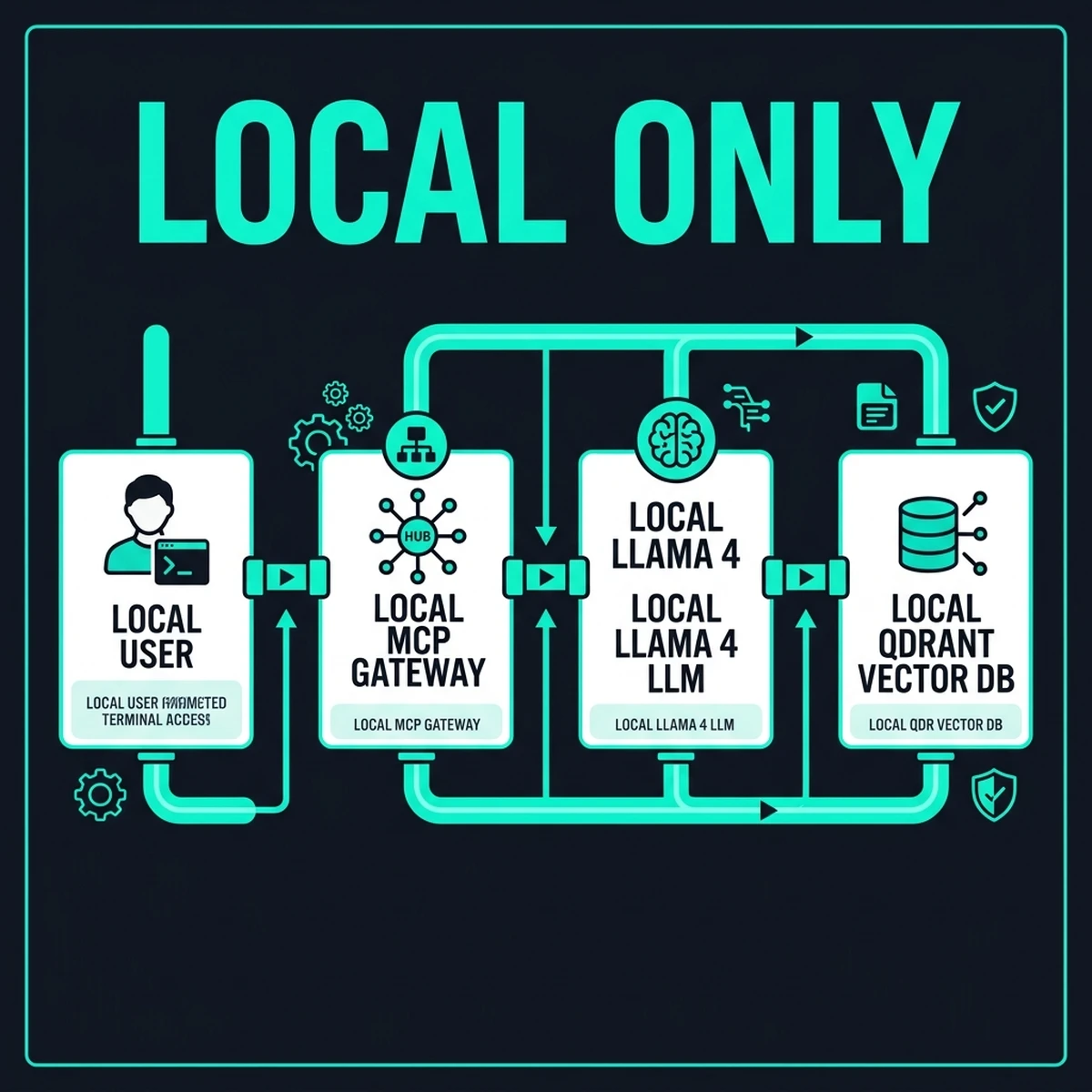
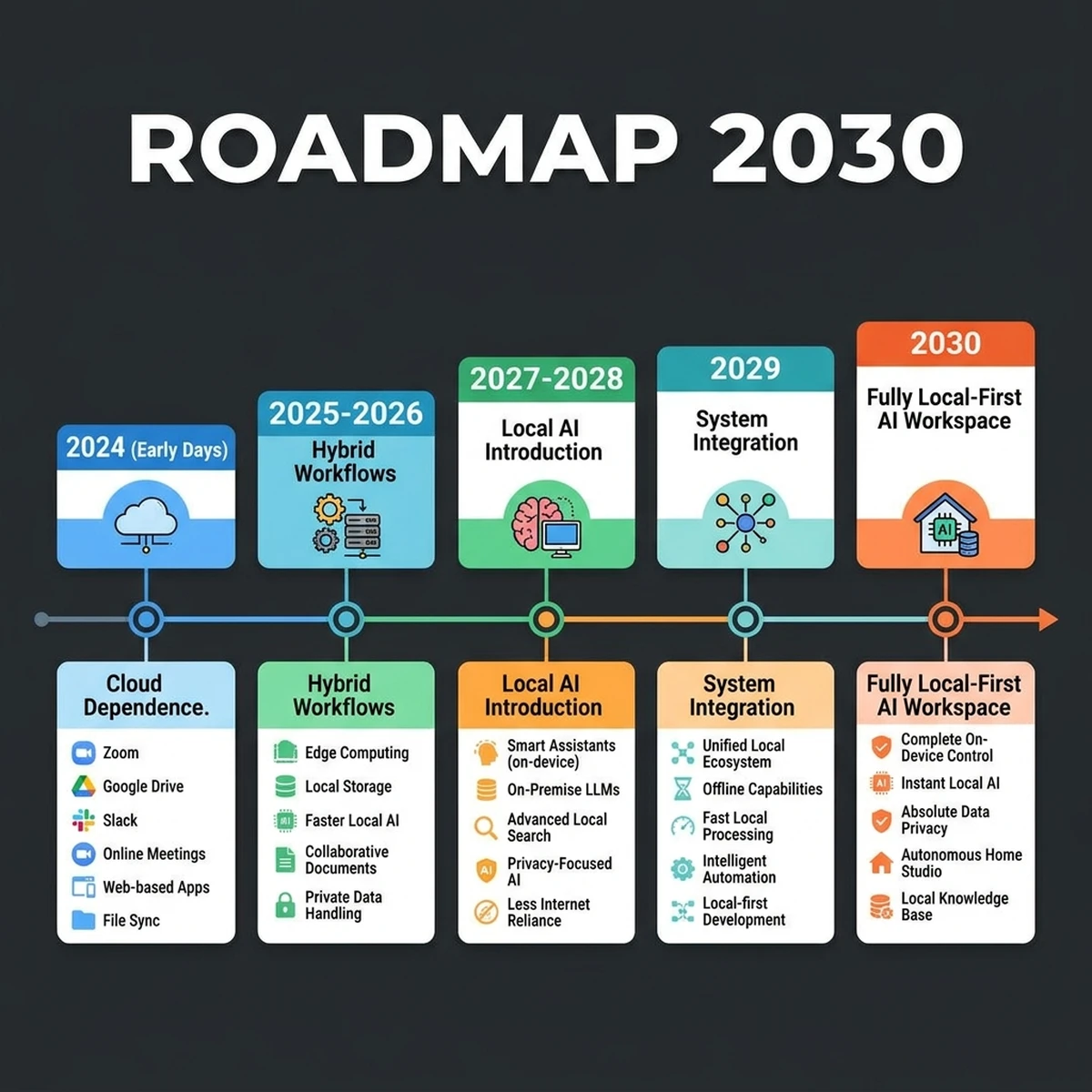
In 2026, the strategy for elite organizations is shifting toward the Sovereign AI Stack. This refers to a completely self-hosted, local-first artificial intelligence environment consisting of open-weight models (Llama 4), localized vector indices (Qdrant), and standard context exchange layers (Model Context Protocol).
1. Data Privacy and Compliance
When sending corporate data—such as source code repositories, customer support databases, or proprietary financial worksheets—to a cloud endpoint, you relinquish physical control. Even with enterprise Business Associate Agreements (BAAs) and SOC 2 Type II compliance guarantees, data resides on systems owned by third parties. For industries bound by strict data guidelines (HIPAA in healthcare, GDPR in the EU, or PCI DSS in payment systems), local execution is the most robust safeguard.By executing model inference locally, data does not exit the corporate network boundary. This eliminates security reviews for cloud vendors, solves cross-border data transfer limitations, and protects proprietary source code from being utilized for external model training.
2. Predictable Amortized Cost
API token pricing model is a variable operational expense. High-throughput agents looping continuously on complex codebases or executing background tasks can consume thousands of dollars in tokens daily. By self-hosting on physical hardware, variable API costs are replaced with a predictable, flat-rate hardware amortization model.Enterprise budgets often struggle with the variable cost spikes associated with agentic LLM pipelines. A developer using Claude 3.5 Sonnet to perform automated refactoring and repository scanning can easily consume 50 million tokens per week. Across a team of 50 developers, these variable fees quickly outpace the cost of purchasing high-performance local workstations.
3. Sub-millisecond Latency
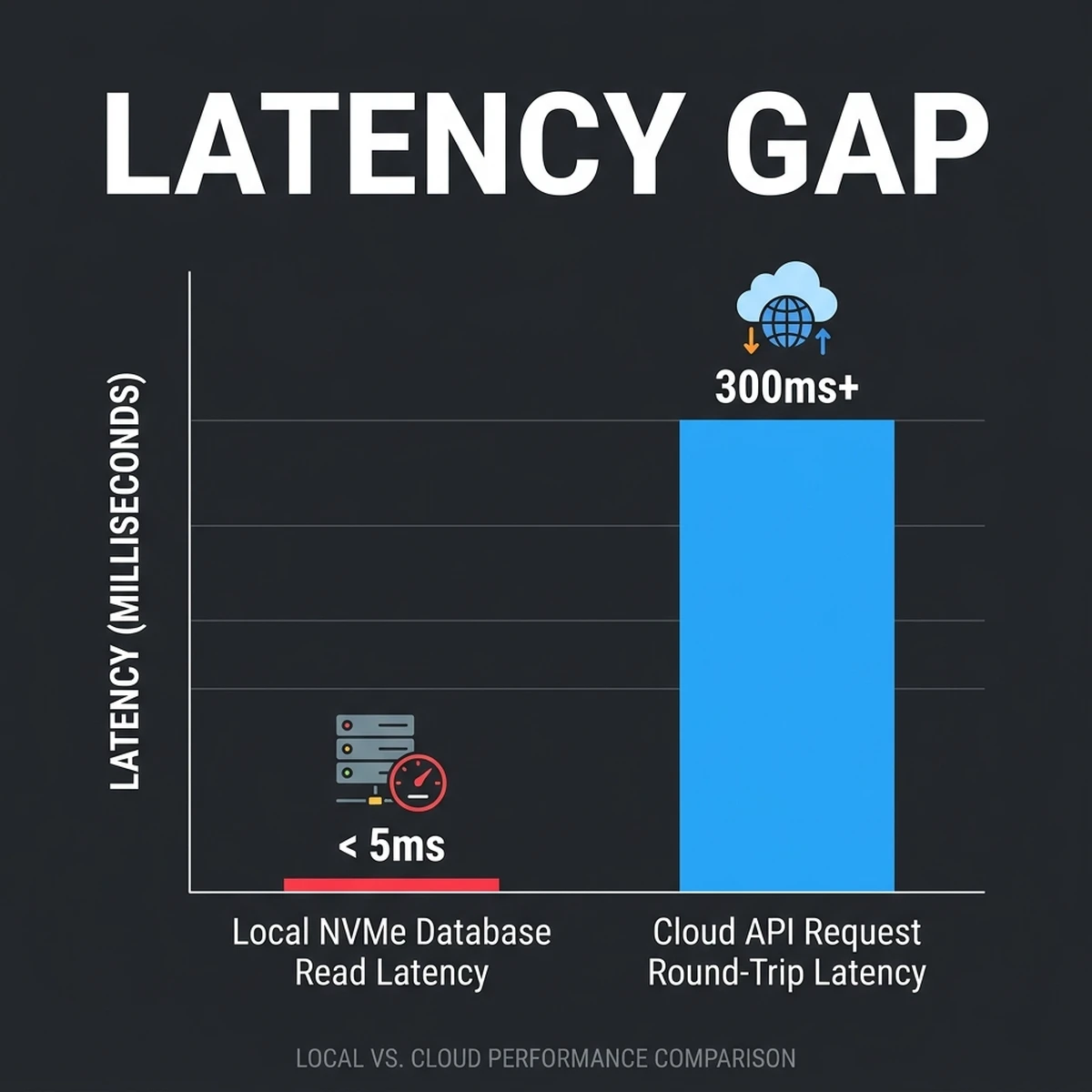
Network latency remains a blocker for interactive agent workflows. A cloud API request averages 300ms to 1200ms in round-trip time (RTT). By running a local Llama 4 instance on PCIe Gen 5 NVMe drives and high-bandwidth VRAM, internal database lookups and tool executions achieve single-digit millisecond response times.Hardware Sizing for 2026: Mac Studio vs. Custom GPU Clusters
Deploying Llama 4 locally requires a deep understanding of memory architecture. Large Language Models are heavily memory-bandwidth bound during inference. The speed of generating tokens is determined by how fast the hardware can transfer model weights from memory to the processor.
Sizing VRAM and Memory Bandwidth
To run a model comfortably, the entire model weights plus the Key-Value (KV) cache must fit within the hardware's fast memory (VRAM for GPUs, or Unified Memory for Apple Silicon).The formula to estimate the VRAM requirement is:
$$VRAM = \frac{Parameters \times Quantization\ Bits}{8} \times 1.25$$
The 1.25 multiplier accounts for the KV cache overhead during active context window sessions, along with system runtime overhead.
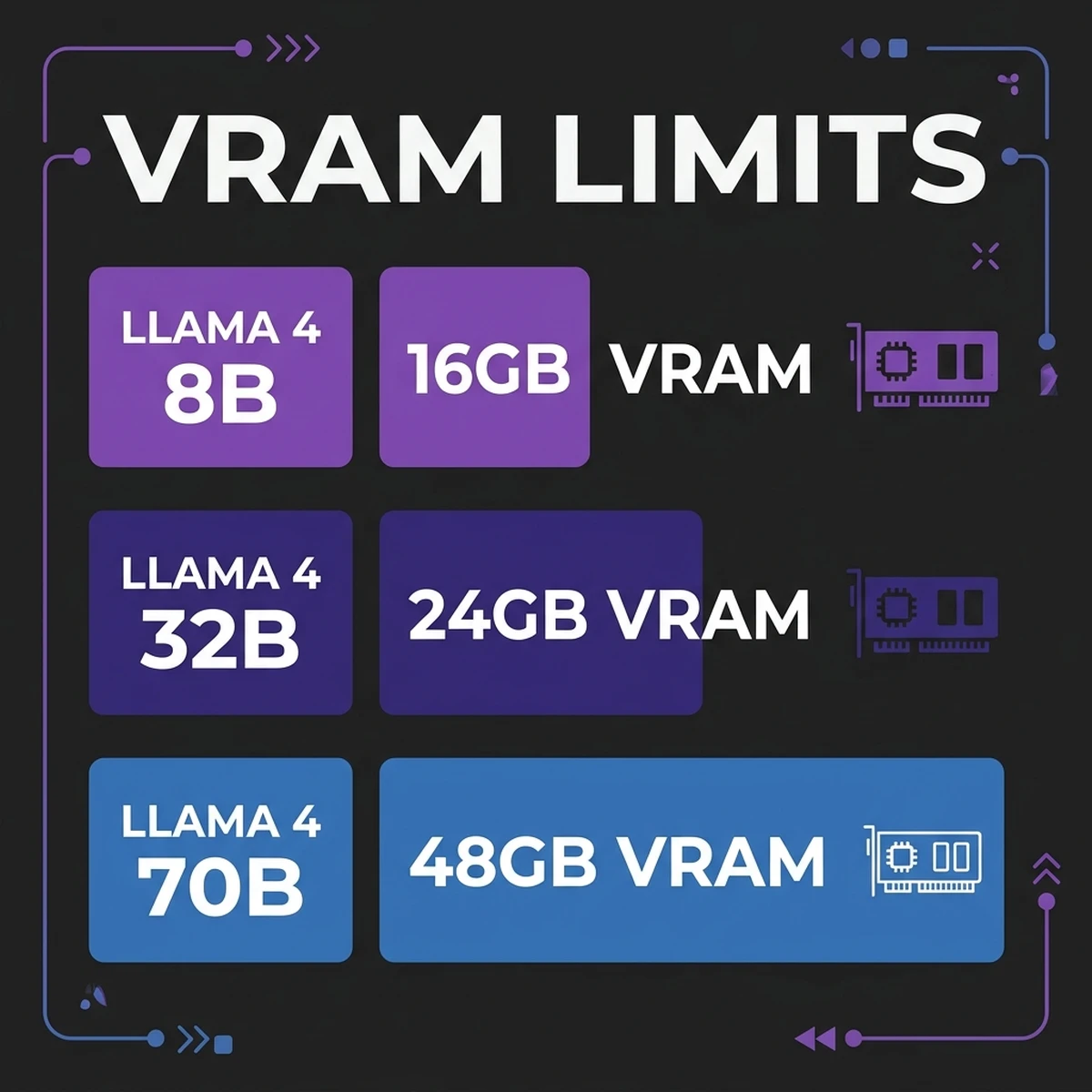
Here is the hardware compatibility mapping for the Llama 4 models:
- Llama 4 8B (Q8 Quantization): Fits comfortably inside a single card with 12GB to 16GB VRAM (e.g., RTX 4080/5080).
- Llama 4 32B (Q4_K_M Quantization): Requires 20GB to 24GB VRAM. Runs optimally on a single RTX 5090/6090 or Apple Mac Studio (M2/M3 Max).
- Llama 4 70B (Q4_K_M Quantization): Requires approximately 40GB to 48GB VRAM. This necessitates a dual-GPU cluster (e.g., 2x RTX 5090 with NVLink/PCIe Gen 5) or an Apple Mac Studio (M2/M3 Ultra) configured with 64GB or more Unified Memory.
Memory Bandwidth: The Key to Inference Speeds
Memory bandwidth determines the maximum tokens per second (t/s) a system can produce. The theoretical limit is calculated by dividing the system's memory bandwidth by the size of the active model in memory. For instance, a Llama 4 32B quantized to Q4 requires approximately 18GB of space.On a system with 800 GB/s memory bandwidth (such as a Mac Studio M2 Ultra), the theoretical maximum inference speed is:
$$Speed = \frac{800\ GB/s}{18\ GB} \approx 44.4\ \text{tokens/second}$$
On a custom server with 2x RTX 5090 cards running in parallel over PCIe Gen 5 lanes (providing an aggregate bandwidth of over 2000 GB/s), the same model can achieve speeds exceeding 100 t/s. This makes dedicated GPU clusters the preferred choice for real-time agent systems, while unified memory systems like Apple Silicon are ideal for running ultra-large models (like 70B or 120B) cost-effectively.
Hardware Comparison: Apple Silicon vs. Dedicated NVIDIA GPUs
Apple Mac Studio (M2/M3 Ultra)
- Memory Bandwidth: Up to 800 GB/s unified memory bandwidth.
- VRAM Capacity: Up to 192GB Unified Memory.
- Pros: Can run massive 70B or even 120B models on a single compact desktop unit without multi-GPU configurations. High power efficiency.
- Cons: Lower raw processing throughput (FLOPs) compared to dedicated NVIDIA tensor cores. Slower token generation rates (Tokens/Second) for smaller models.
Custom NVIDIA Multi-GPU Clusters (2x RTX 5090/6090)
- Memory Bandwidth: Up to 1000+ GB/s per GPU.
- VRAM Capacity: 24GB per card (48GB total).
- Pros: Exceptional tensor core performance. Faster prompt ingestion and token generation speeds.
- Cons: High power consumption (often requiring dedicated circuits). Large physical footprint and heat output. Costly infrastructure setup.
The Software Layer: Llama 4, Qdrant, and MCP Gateway
To build a functional sovereign stack, we configure three containerized services running locally. We isolate them using a secure Docker bridge network that blocks outbound WAN traffic.
Local Services Layout
- Ollama / vLLM: Manages Llama 4 model inference and exposes an OpenAI-compatible API endpoint.
- Qdrant: High-performance local vector database running on NVMe-backed storage for vector search.
- MCP Gateway: The Model Context Protocol runtime that serves local files, shell terminals, and databases to the LLM.
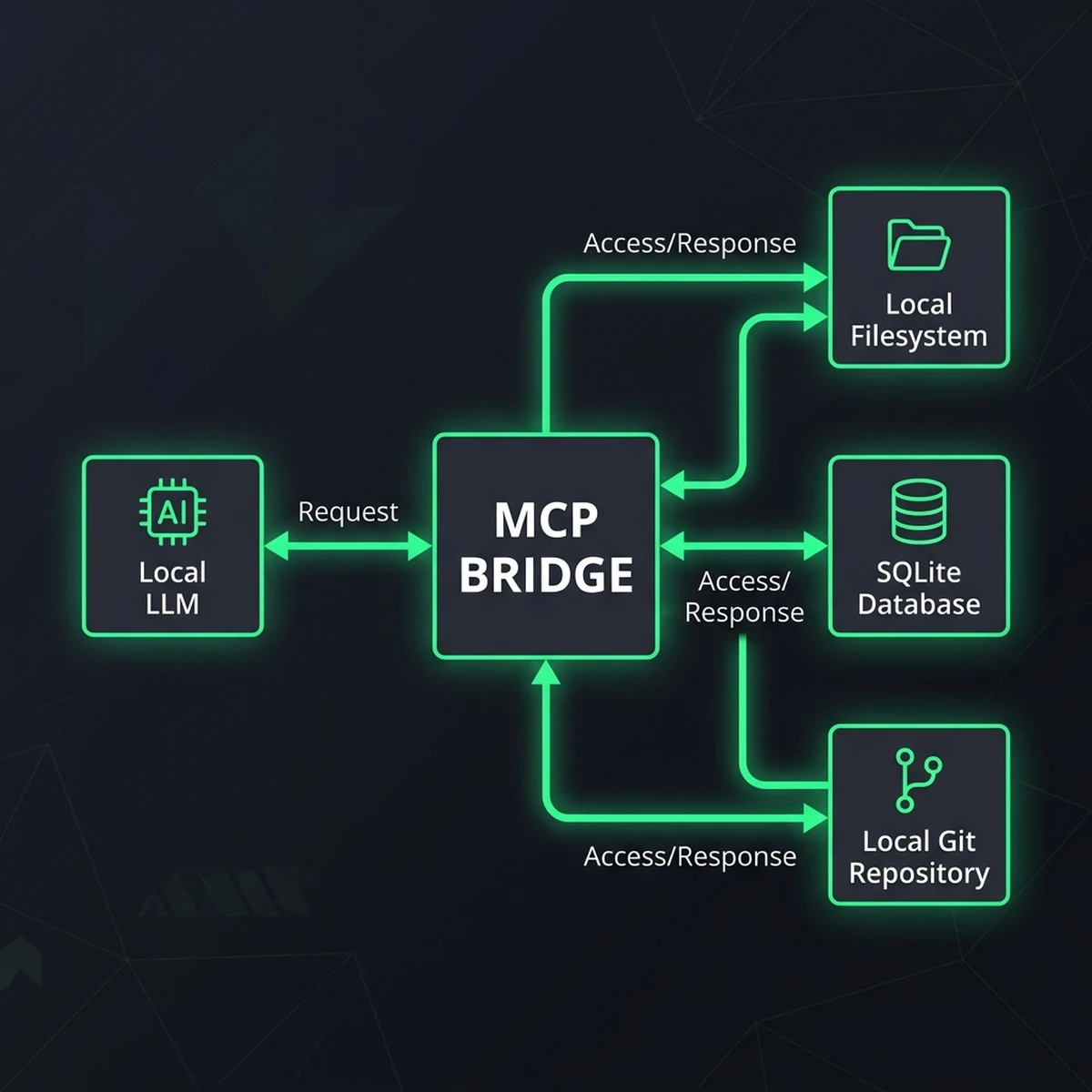
Here is a production-ready docker-compose.yml file configuring this local workspace:
version: '3.8'

services:
  ollama:
    image: ollama/ollama:latest
    container_name: sovereign-ollama
    volumes:
      - ./ollama_data:/root/.ollama
    ports:
      - "11434:11434"
    deploy:
      resources:
        reservations:
          devices:
            - driver: nvidia
              count: all
              capabilities: [gpu]
    networks:
      - sovereign-net
    restart: unless-stopped

  qdrant:
    image: qdrant/qdrant:latest
    container_name: sovereign-qdrant
    ports:
      - "6333:6333"
      - "6334:6334"
    volumes:
      - ./qdrant_data:/qdrant/storage
    networks:
      - sovereign-net
    restart: unless-stopped

  mcp-gateway:
    image: node:20-alpine
    container_name: sovereign-mcp-gateway
    volumes:
      - ./mcp_config:/workspace/config
      - /var/run/docker.sock:/var/run/docker.sock
    working_dir: /workspace
    command: sh -c "npm install -g @modelcontextprotocol/server-filesystem && node mcp-server.js"
    ports:
      - "8080:8080"
    networks:
      - sovereign-net
    restart: unless-stopped

networks:
  sovereign-net:
    driver: bridge
internal: true # STRICT WAN ISOLATIONConfiguring vLLM for Optimized Throughput
If you require high concurrency (e.g. serving a team of 10-20 agents simultaneously), vLLM is preferred over Ollama. Below are the key optimization flags to launch vLLM for a local Llama 4 32B model on dual RTX 5090 cards:python3 -m vllm.entrypoints.openai.api_server \
--model /models/Llama-4-32B-Instruct-Q4 \
--tensor-parallel-size 2 \
--max-model-len 32768 \
--gpu-memory-utilization 0.90 \
--max-num-seqs 256 \
--port 11434--tensor-parallel-size 2splits the model computation across both GPUs.--max-model-len 32768allocates the KV cache for a 32k context window.--gpu-memory-utilization 0.90reserves 90% of VRAM for inference speed, leaving 10% for dynamic allocation.
Local RAG Pipeline: Python & TypeScript Implementation
With the containers configured, we establish a local Retrieval-Augmented Generation (RAG) pipeline. The pipeline intercepts a user's prompt, queries the local Qdrant instance for vector context, and sends a consolidated payload to Ollama running Llama 4.
The Ingestion and Chunking Strategy
To feed the local database, documents must be processed into vector representations. Rather than using basic character splitting, we implement a Parent-Child Retrieval Strategy.A parent document is split into larger parent chunks (e.g., 2000 tokens) and nested child chunks (e.g., 400 tokens). During querying, the system searches the database using the high-granularity child chunks. However, when returning context to Llama 4, it retrieves the parent document wrapper. This ensures the model receives complete context rather than fragmented text blocks.
Below is a complete, production-grade Python script executing a local RAG request:
import json
import urllib.request
import urllib.error

OLLAMA_HOST = "http://localhost:11434"
QDRANT_HOST = "http://localhost:6333"

def get_local_embedding(text: str, model: str = "nomic-embed-text") -> list:
    url = f"{OLLAMA_HOST}/api/embeddings"
    payload = {
        "model": model,
        "prompt": text
    }
    req = urllib.request.Request(
        url,
        data=json.dumps(payload).encode("utf-8"),
        headers={"Content-Type": "application/json"}
    )
    try:
        with urllib.request.urlopen(req) as res:
            response_data = json.loads(res.read().decode())
            return response_data["embedding"]
    except Exception as e:
        print("Embedding generation failed:", e)
        raise

def query_local_vector_db(collection_name: str, query_vector: list, limit: int = 3) -> list:
    url = f"{QDRANT_HOST}/collections/{collection_name}/points/search"
    payload = {
        "vector": query_vector,
        "limit": limit,
        "with_payload": True
    }
    req = urllib.request.Request(
        url,
        data=json.dumps(payload).encode("utf-8"),
        headers={"Content-Type": "application/json"}
    )
    try:
        with urllib.request.urlopen(req) as res:
            response_data = json.loads(res.read().decode())
            return [hit["payload"] for hit in response_data.get("result", [])]
    except Exception as e:
        print("Vector database query failed:", e)
        return []

def generate_local_response(prompt: str, context: str, model: str = "llama4:32b") -> str:
    url = f"{OLLAMA_HOST}/api/generate"
    system_prompt = (
        "You are an offline sovereign AI assistant. "
        "Use exclusively the provided local context to answer the user query. "
        "Do not hallucinate or access external services."
    )
    full_prompt = f"Context:\n{context}\n\nQuery:\n{prompt}"

    payload = {
        "model": model,
        "prompt": full_prompt,
        "system": system_prompt,
        "stream": False
    }
    req = urllib.request.Request(
        url,
        data=json.dumps(payload).encode("utf-8"),
        headers={"Content-Type": "application/json"}
    )
    try:
        with urllib.request.urlopen(req) as res:
            response_data = json.loads(res.read().decode())
            return response_data["response"]
    except Exception as e:
        print("Model inference failed:", e)
        raise

if __name__ == "__main__":
    query = "What is the local data compliance standard for audit logging?"
    print(f"User Query: {query}")

    # Step 1: Generate embeddings locally
    q_vector = get_local_embedding(query)

    # Step 2: Query local Qdrant collection
    results = query_local_vector_db("compliance_docs", q_vector)

    # Step 3: Consolidate context payload
    local_context = "\n".join([r.get("text", "") for r in results])

    # Step 4: Run local inference
    final_output = generate_local_response(query, local_context)
    print("\n--- Sovereign Llama 4 Response ---")
    print(final_output)
Security Hardening: Isolating the Stack from the WAN
Running models locally eliminates third-party data tracking, but it introduces local runtime risks. An autonomous agent with filesystem access via MCP can execute malicious terminal scripts or leak data if compromised.
To mitigate this, we implement three security layers: DNS egress filtering, private networking via Tailscale, and Open Policy Agent (OPA) middleware to control tool executions.
1. WAN Egress Filtering with nftables
We configure the host firewall to drop all TCP/UDP connections originating from the model's Docker network to the WAN. Here is a production-readynftables.conf rule block:
table ip sovereign_filter {
    chain outbound_block {
        type filter hook forward priority 0; policy accept;
        # Isolate the sovereign subnet (172.20.0.0/16)
        ip saddr 172.20.0.0/16 oifname "eth0" counter drop
    }
}
2. Private Networking via Tailscale
To connect remote developer environments to the local GPU host safely, avoid exposing local ports to the public internet. Instead, configure a Tailscale private tailnet. The host listens exclusively on the Tailscale virtual interface (tailscale0).
Additionally, we use local SSL certificates generated with mkcert so that all local API communications are encrypted in transit over the tailnet:
# Generate local certificates
mkcert -install
mkcert -cert-file local-api.crt -key-file local-api.key "sovereign-gpu.tailnet-address.ts.net"
Configure Nginx as a reverse proxy on the host to route traffic securely to Ollama and Qdrant:
server {
    listen 443 ssl;
    server_name sovereign-gpu.tailnet-address.ts.net;

    ssl_certificate /etc/nginx/certs/local-api.crt;
    ssl_certificate_key /etc/nginx/certs/local-api.key;

    location /ollama/ {
        proxy_pass http://127.0.0.1:11434/;
        proxy_set_header Host $host;
    }

    location /qdrant/ {
        proxy_pass http://127.0.0.1:6333/;
        proxy_set_header Host $host;
    }
}
3. OPA Rego Policy Control for MCP Actions
Before the MCP Gateway executes a tool request from Llama 4, it forwards the command payload to a local OPA service to evaluate compliance.This Rego policy blocks all file deletion commands and restricts directory modifications outside of the /workspace pathing boundary:
package sovereign.mcp

default allow = false

# Allow tool execution only if it is in our approved list
allow {
    input.tool_name == "read_file"
    is_safe_path(input.arguments.path)
}

allow {
    input.tool_name == "write_file"
    is_safe_path(input.arguments.path)
    not contains(input.arguments.content, "rm -rf")
}

# Helper rule to verify directory boundaries
is_safe_path(path) {
    startswith(path, "/workspace/")
}
Financial Modeling: Self-Hosted Amortization vs. Cloud APIs
To justify a hardware transition, we evaluate a financial model comparing a self-hosted server vs. commercial API endpoint consumption.
Assumption Metrics (36-Month Lifecycle)
- Self-Hosted Server cost: $8,500 upfront (GPU server: 2x RTX 5090, 64GB host RAM, AMD Threadripper, 2TB Gen 5 NVMe storage).
- Operating Power cost: $50/month (Estimated flat electricity fee for local inference runtime).
- Enterprise API Usage: 4 million tokens processed per business day (2 million input, 2 million output).
- Cloud API Token Pricing: $3.00 per million input tokens, $15.00 per million output tokens (standard Claude 3.5 Sonnet pricing).
| Cost Category | Self-Hosted Stack (Local) | Cloud API Stack (SaaS) |
|---|---|---|
| Initial Hardware/Setup Capital | $8,500 (one-time) | $0 |
| Monthly Operation / Energy Fees | $50 / month | $0 |
| Monthly Token Consumption Fees | $0 | $1,440 / month |
| Year 1 Cumulative Cost | $9,100 | $17,280 |
| Year 3 Cumulative Cost | $10,300 | $51,840 |
The financial data demonstrates that the self-hosted stack pays for itself within approximately 7 months of continuous deployment. By the end of a 3-year hardware lifecycle, the enterprise saves over $41,500 per server node. These calculations make a clear business case for hardware ownership. By switching to a flat-rate capital expenditure structure, finance teams can budget their infrastructure costs with absolute precision, avoiding the volatility of token usage billing models when scaling out developer agent pipelines.
Additionally, this model is highly scalable. Once the physical server is purchased and deployed, processing extra runs, background iterations, or larger batches of tasks does not increment your billing statement. This enables developers to run long-running diagnostic tasks overnight without any fear of incurring thousands of dollars in surprise API charges.
Conclusion & Next Steps
Transitioning to a sovereign AI stack gives you complete ownership of your data, models, and workflows. By deploying local Llama 4 instances and securing the Model Context Protocol layer, you build a high-performance system designed for privacy and speed.
Next Steps for Implementation:
- Hardware Procurement: Select an Apple Mac Studio with unified memory for large models, or configure a multi-GPU RTX cluster for high token throughput.
- Container Deployment: Clone the
docker-compose.ymlfile and start the local services on your host machine. - Security Isolation: Set up strict firewall rules to block outbound WAN access and write OPA rules to monitor local tool calls.
- Local Indexing: Configure local Qdrant vectors to ingest and search internal document repositories.
Frequently Asked Questions
1. Does self-hosting Llama 4 mean slower token generation speeds?
It depends on the hardware. A single high-end GPU (like an RTX 5090) achieves excellent token-per-second generation rates for smaller models (e.g., Llama 4 8B/32B). For 70B models, running on unified memory architectures (like Apple Mac Studios) may yield slightly lower speeds but provides massive capacity.2. Can Qdrant handle high-concurrency requests locally?
Yes. Qdrant is built in Rust and is optimized for low-latency searches. Running on high-speed NVMe SSD drives allows it to process hundreds of concurrent search operations in single-digit milliseconds.3. How does Model Context Protocol improve local AI workflows?
MCP provides a standardized JSON-RPC protocol over standard input/output (stdio) or HTTP. This allows any supporting LLM interface to interact with local services—such as filesystems, IDEs, and local databases—without custom code or middleware.4. What is the biggest security vulnerability of a local AI stack?
The primary risk is model escape or local code execution. If an autonomous agent executes arbitrary bash commands without monitoring, a prompt injection vulnerability could result in file corruption or system breaches. Implementing strict sandboxing and OPA validation is critical.5. Can I run multiple quantization variants of Llama 4 simultaneously?
Yes. Container runtimes (such as Ollama or vLLM) allow you to load and manage multiple models in memory. Ensure your system has sufficient VRAM to allocate space for each model's weights and KV cache.6. How do I maintain and update local vector index databases?
Local vector databases can be updated through automated ingestion cron jobs. A local python script can monitor specified file directories, split changed files into semantic chunks, generate embeddings via Ollama, and upsert them to Qdrant without internet dependencies.About the Author
Vatsal Shah is a software architect, AI developer, and technology consultant specializing in decentralized infrastructure, sovereign cloud architectures, and machine learning deployments. He builds and designs local-first tech systems for enterprise customers globally.